
.avif)
[.ebook-q-card][.ebook-body-text]TL;DR: An AI event lead capture app captures, qualifies, and syncs leads from any sponsored event in real time - without waiting for the organizer's file export. Most leads go cold because the data handoff takes days. The fix is capturing context, enriching, and syncing to CRM before you leave the venue.[.ebook-body-text][.ebook-q-card]
You just got back from the Chicago tradeshow and that one prospect is still on your mind. They’re a dream account - ICP match, clear buying intent and they even have an upcoming evaluation cycle they mentioned.
Their badge was scanned (on a rented device) and your rep wrote the good parts in the Notes app on their phone for context. By Thursday the organizer still hadn't sent the file. The email field was empty when you finally got the details.
That prospect had already taken calls from three other vendors.
Where (and when) event lead capture tools become unreliable
A warm event lead depends on the four factors:
- Latency: how quickly the record becomes something a rep can act on
- Fidelity: whether you get mobile, direct email, and job level, or just what the organizer chose to collect
- Context: what was actually said: qualification, intent, which demo or session drove the conversation
- Continuity: routing, dedupe, consent and campaign attribution
You would need to own the complete record of the conversations you have. That often doesn’t happen due to third-party infrastructure or information gaps between the different tools in your stack.
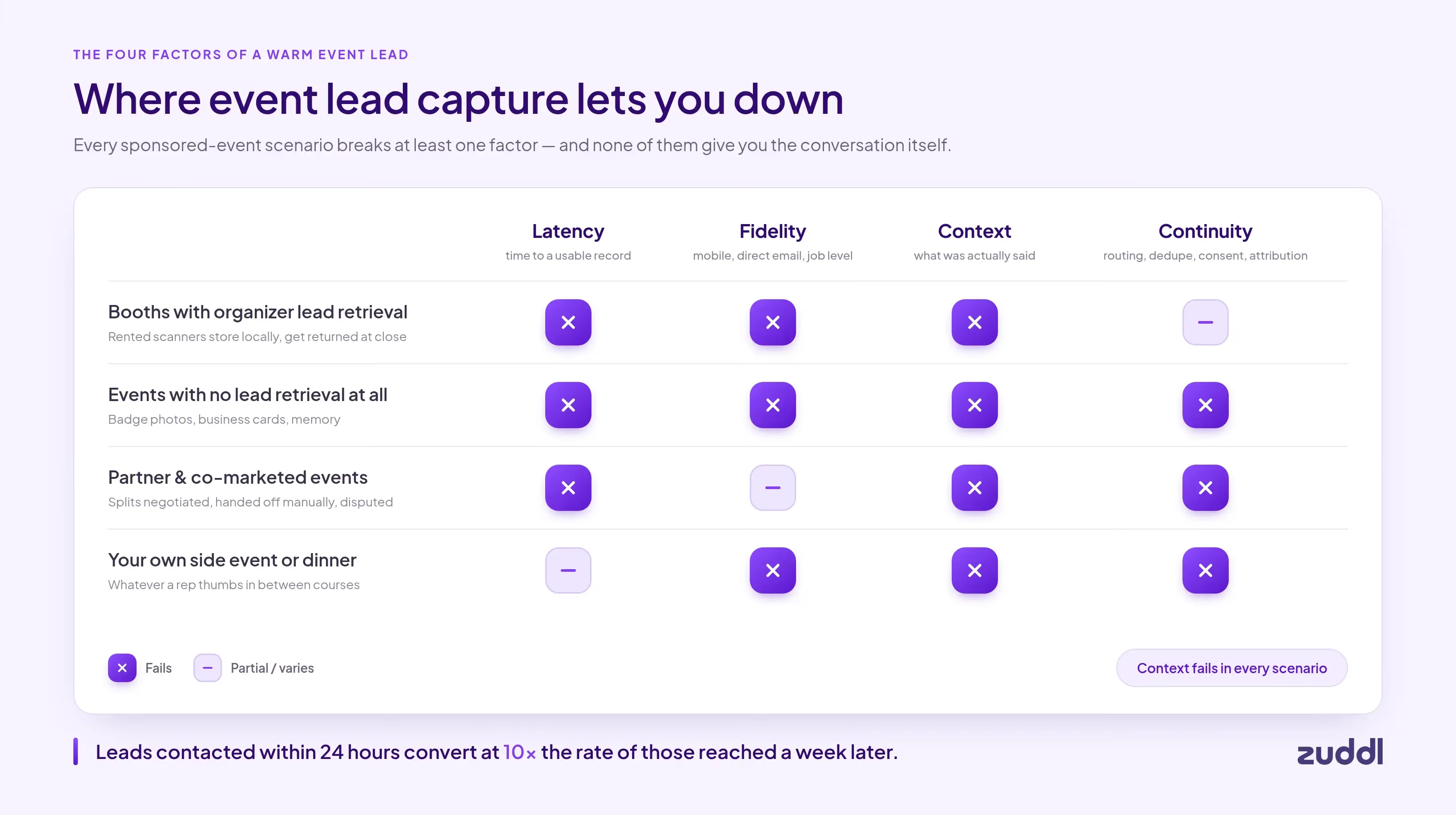
The organizer owns the badge scanner and the registration data. They decide when your reps' conversations become records your sales team can act on.
- Booths with organizer lead retrieval: Fail on latency and fidelity. Rented scanners store data locally, get returned at event close, and produce a file with whatever details the organizer chose to collect.
- Events with no lead retrieval at all: Regional shows, community events, and smaller conferences often don't offer lead retrieval, or price it at $500+ for a 200-person show, which isn't worth it.. Reps fall back to badge photos, business cards, and memory.
- Partner and co-marketed events: Fail on latency and continuity. Lead splits are negotiated, handed off manually, and frequently disputed.
[.ebook-q-card][.ebook-body-text]Leads contacted within 24 hours convert at 10x the rate of those reached a week later. [.ebook-body-text][.ebook-q-card]
Every delay with the data, and every additional manual enrichment you have to run turns event follow-up into cold outreach. Your leads are less likely to remember and respond to your messages.
Now imagine the dinner you host that night on the sidelines of the event. You’ve handpicked every invitee, but there’s no organized system for lead capture here. Whatever a rep thumbs into their phone between courses becomes the record.
Common lead capture errors at sponsored events
- Rep variance: five people work a booth with five different capture habits. The same account gets scanned three times, none with notes. Record quality becomes a function of who happened to be standing there.
- Connectivity: venue Wi-Fi means scans buffer on-device and sync whenever they sync.
- Consent provenance: opt-in capture varies by organizer and scan method, leaving you with contacts you don’t have permission to mail
- Dedupe and attribution: junk scans, competitors, and contacts already sitting on open opportunities are part of the same list as new leads. This also makes it harder (and more manual) to attribute leads to a campaign
[.ebook-q-card][.ebook-body-text]Your pipeline depends on infrastructure you do not own, or systems that don’t exist.[.ebook-body-text][.ebook-q-card]
End of day scanner exports or renting the organizer’s lead retrieval system are temporary fixes for a structural gap. Your pipeline depends on infrastructure you do not own, or systems that don’t exist.
How do you build a real-time event lead capture process?
The moment your rep finishes a conversation at a booth is the moment the lead should be in your CRM. Here is the four-step process to designing a real-time lead capture process.
Step 1: Capture the lead the moment the conversation ends
The clock on a lead starts ticking the moment a conversation ends. By end of day, notes blur together, faces blend, and the specific detail that made that account worth pursuing is gone.
The fix is rep-owned capture on their own device, using the same app at every event regardless of what the organizer provides. The flow is simple: scan the badge or business card, or enter details manually when there's no badge.
The app needs to work offline; expo halls have unreliable Wi-Fi, and leads shouldn't sit in a sync queue while a rep is mid-conversation.
With Zuddl Universal Lead Capture, reps use the app on their own phone at every sponsored event, whatever the organizer provides:
- If a scanner is provided: Use Zuddl as the primary system and keep one organizer scanner as backup. Badge images are always saved, so if enrichment can't resolve a lead, you scan the saved badge to fill the gap.
- If you already have an attendee list: upload it pre-event and Zuddl enriches every record, so reps walk in already knowing who to prioritize.
- If nothing provided: Just scan the badge, enrich it, sync it. No more notes apps and business cards needed to remember context
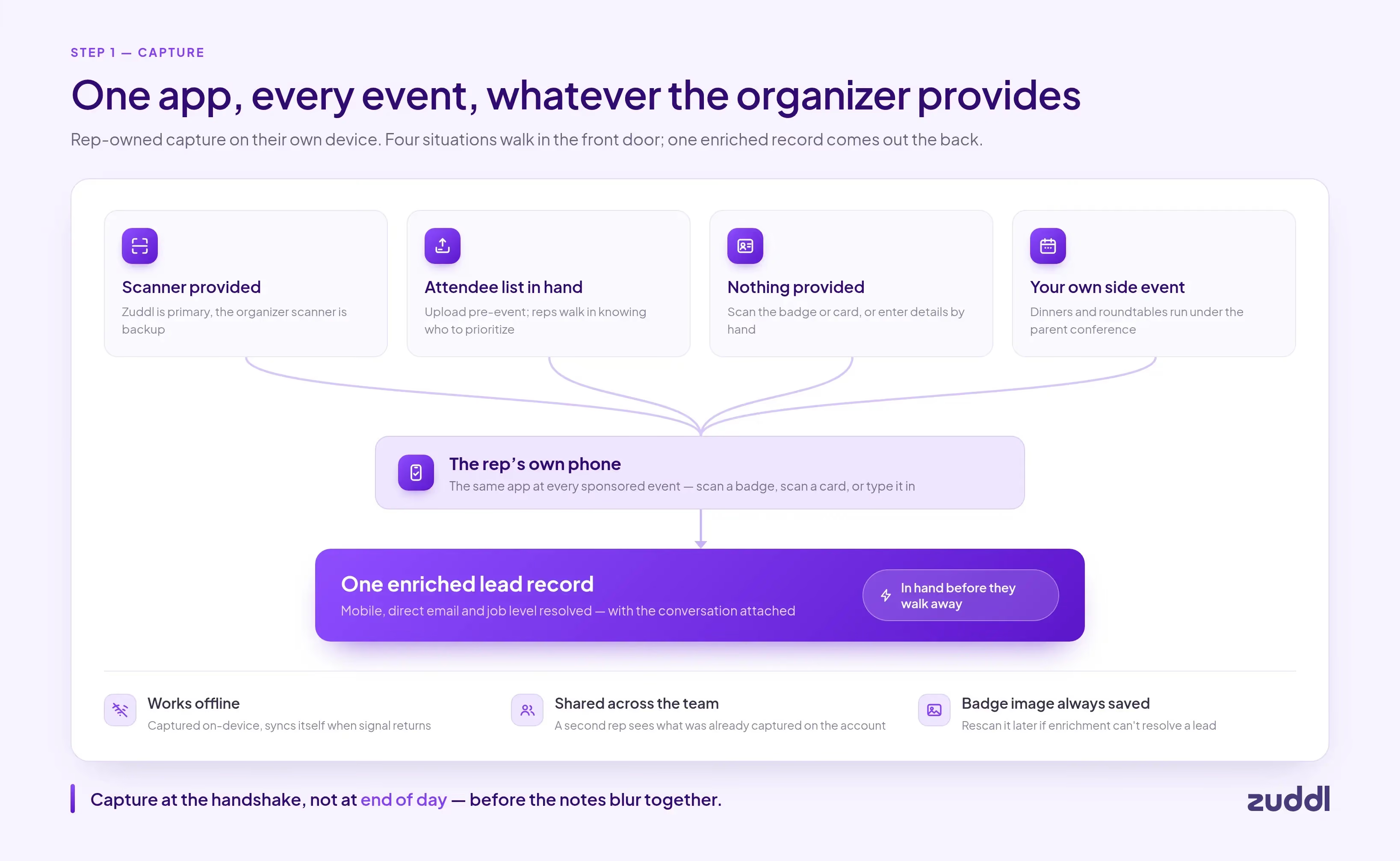
It covers the events you host around the conference. Set up your dinner or executive roundtable as a side event under the parent conference, your RSVP list can become an engagement record.
It works with no signal. Expo halls have bad Wi-Fi. Leads are captured offline and sync themselves when connectivity returns.
It works across your whole team. The lead record is shared and visible, so if a second rep talks to someone from the same account, they can see the details that have already been captured.
Step 2: Qualify and add context at the point of capture
A captured lead without context is a name and a company. Sales cannot prioritize it, and any follow-up reads like cold outreach.
Qualification needs to happen immediately after the scan while the conversation is still in the rep's head.
- First, assign a temperature: hot (confirmed need, active buying process, decision authority), warm (genuine interest, earlier-stage evaluation), or cold (browser, no near-term opportunity).
- Tier definitions should be agreed before the event so that every rep on the floor is applying the same criteria.
- Second, record a voice note of 20–40 seconds. Voice is faster and captures exact phrases the prospect used. The note should cover their role, their stated need, why you tiered them the way you did, and any competitor or feature they mentioned.
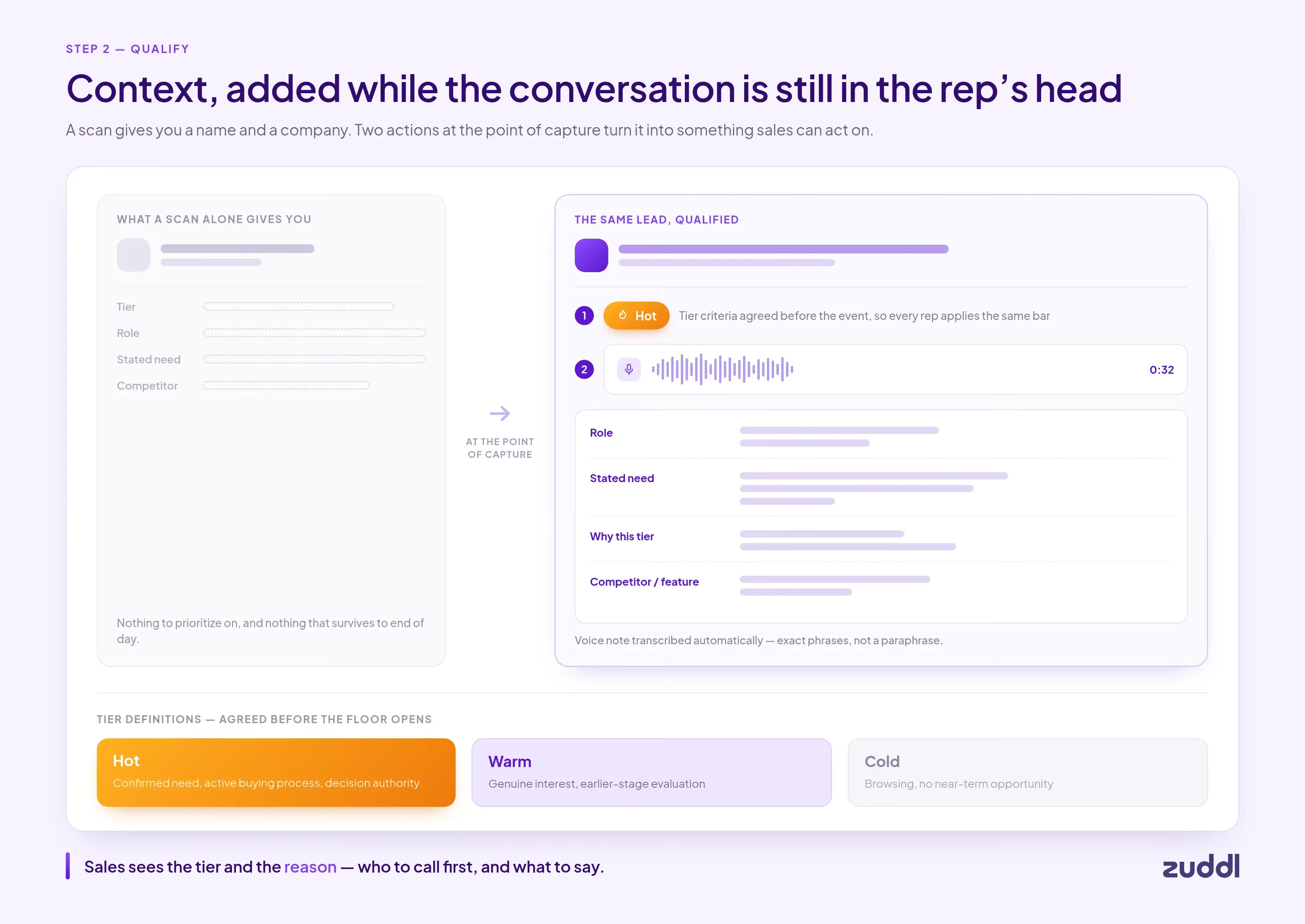
In Zuddl’s system, hot/warm/cold tags and voice notes are built into the capture flow. When the rep hands off a lead, the sales team sees not just a name but the qualification tier and a transcribed note explaining what the prospect said and why the conversation mattered.
All lead records are pushed to the CRM in near real-time. Sales knows who to call first and why.
Step 3: AI enrichment to fill incomplete fields
The organizer collects what they asked registrants to fill in - typically name, company, and job title. That's not enough to route a lead, qualify it against ICP criteria, or write a personalized follow-up.
Manual enrichment after the fact works only if you’re not sponsoring more than a handful of events a year.
Enrichment works by querying third-party data providers to fill missing fields: verified direct email, mobile number, LinkedIn profile, company revenue, headcount, and more
It’s important to run enrichment as soon as possible. Post-event batch enrichment delays your sales follow-ups. Point-of-capture enrichment means the record is complete before the rep walks to the next conversation.
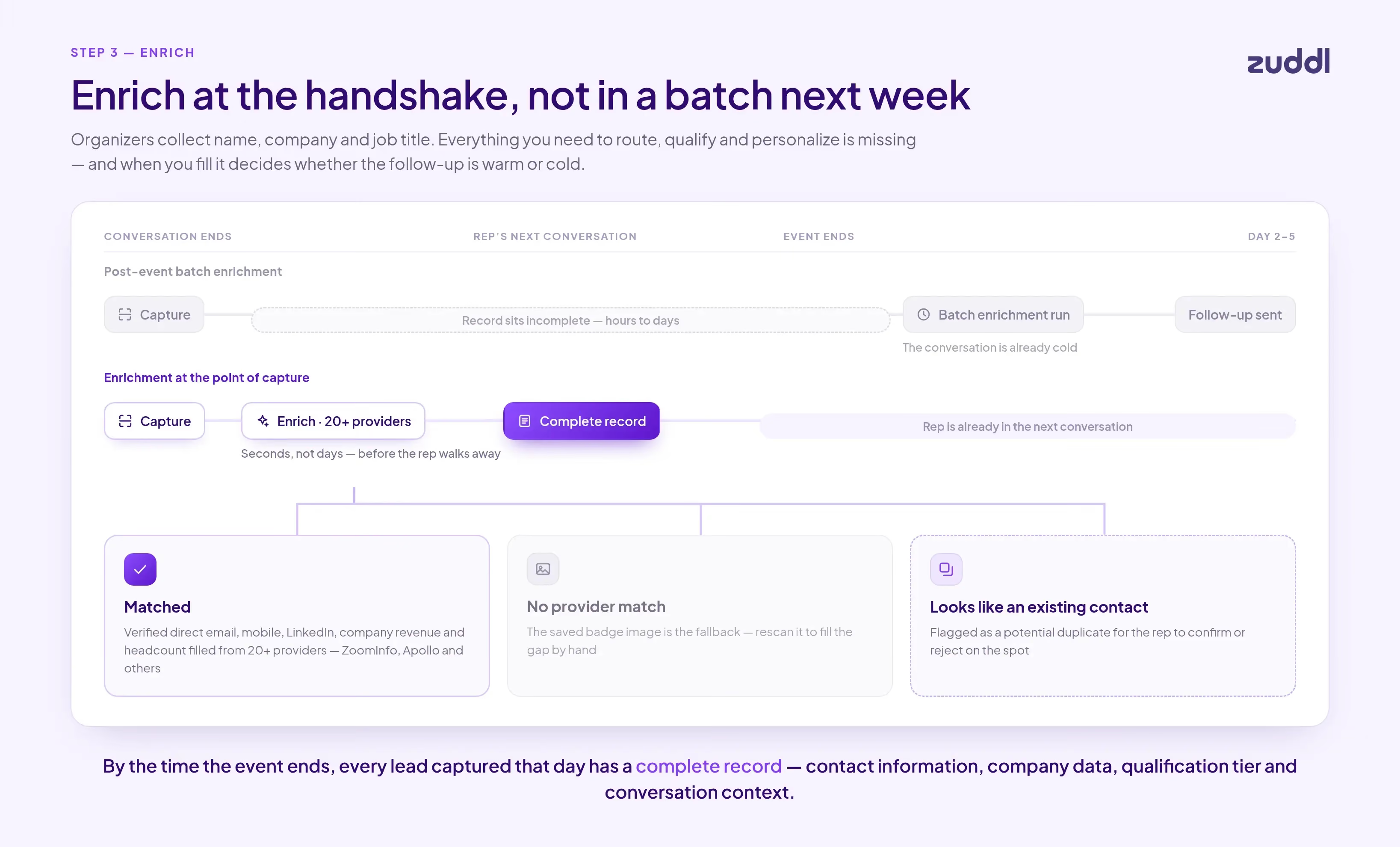
Zuddl ULC enriches through 20+ data providers, including ZoomInfo and Apollo. If no provider can enrich the record, the saved badge image is the fallback.
Enrichment is also where duplicates get caught. New captures are matched against records you already have, and anything that looks like an existing contact is flagged as a potential match for the rep to confirm or reject on the spot.
By the time the event ends, every lead captured that day has a complete record: contact information, company data, qualification tier, and conversation context.
Step 4: Sync to CRM and act before you leave the venue
The CRM sync step in most processes is either one-way or is completely manual. Lead lists have to be cleaned up, deduped and verified.
The fix is a direct integration that writes records as they are created. Fields map to your existing CRM schema automatically, so there is no manual column-matching step before upload.
In Salesforce, leads should attach to Campaign Member records tied to the specific event so attribution is automatic. In HubSpot, lifecycle stage should advance based on qualification tier.
Deduplication should also run at the CRM layer as a second pass on anything that slipped through at capture.
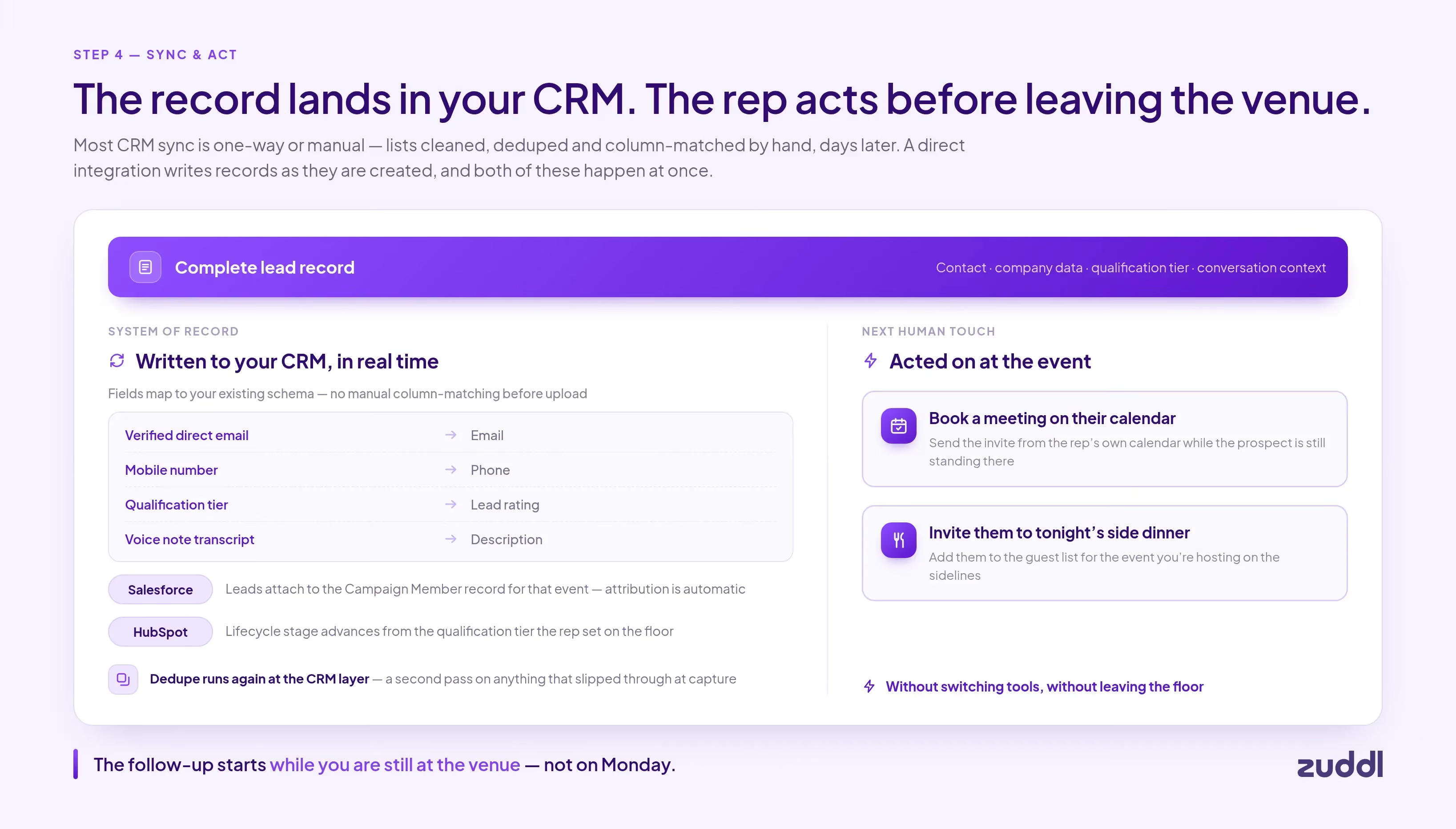
Zuddl syncs leads to your CRM of choice in real time. Leads are assigned to the right campaigns, and reps can also act from the app while still at the event: send a meeting link on their calendar or invite the prospect to a side dinner, without switching tools.
What real-time AI event lead capture can do for you
Same Chicago tradeshow. Same dream account, same conversation.
This time the rep scans the badge, tags the lead hot, and records a 30-second voice note walking to the next booth. Enrichment fills in the direct email the organizer's form never asked for.
Before the rep reaches the next aisle, the record is in Salesforce — enriched, tagged, context attached. They send a meeting link from the same screen, and an invite to the dinner the team is hosting that night.
The prospect comes to dinner. Wednesday morning the rep follows up with specific detail from the conversation. The organizer's CSV arrives Friday with the email field still blank.
It does not matter because you were the first call.
Motive runs 75+ events a year on Zuddl. Before switching, the gap between event and lead handoff was two weeks.
[.ebook-q-card][.ebook-body-text]"Speed-to-lead went from two weeks to real-time sales follow-up." - Bri Molina, Events Marketing Manager, Motive[.ebook-body-text][.ebook-q-card]
The right AI event lead capture allows you to close the gap between the conversation and follow-up because the lead is a shared record in a unified system. You get one app for any sponsored event, with a process your team controls.
See how Zuddl Universal Lead Capture works at sponsored events: Universal Lead Capture: Turn Every Event Into a Lead-Gen Powerhouse
Frequently Asked Questions
What is AI event lead capture?
AI event lead capture is the process of collecting, enriching, and syncing lead data from events in real time using AI-powered automation. Instead of waiting for an organizer's CSV export three to five days after the event, reps capture leads on their own devices, AI enrichment fills in missing contact and firmographic fields automatically, and records sync to a CRM immediately, producing a complete, actionable lead before the event ends.
How do you capture leads at a trade show?
To capture leads at a trade show without waiting for the organizer's CSV export, use a phone-based capture app that lets reps scan badges or business cards immediately. The lead record is created at the moment of the conversation, enriched automatically, and synced to your CRM in real time, not three to five days after the event.
What is lead retrieval at events?
Lead retrieval is the system used to collect contact data at events, typically through badge scanning. Traditional organizer-provided lead retrieval sends data as a batch export days after the event. Modern lead retrieval tools let exhibitors capture leads in real time on their own devices, with immediate CRM sync.
Why do event leads go cold before sales follows up?
Event leads go cold because organizer-controlled badge scanners send data three to five days after the event as a CSV export. By the time the data is cleaned and uploaded to a CRM, the follow-up window has closed. Leads contacted within 24 hours convert at significantly higher rates than those reached after a week.
What is the difference between event lead capture and lead retrieval?
Lead retrieval typically refers to organizer-provided badge scanning hardware rented at a specific event. Event lead capture describes a broader process where exhibitors use their own tools, across any event they attend, to capture, qualify, enrich, and sync lead data in real time, independent of the organizer's infrastructure.

Subscribe to our blog now!

.png)
.avif)


