Watch On Demand
Back To All Articles

The difference between unified and all in one event platforms

Why “all-in-one” event tech costs your team more than the point solutions it replaced.

Consolidation can be great. Those of you that remember Game of Thrones might recall the seven kingdoms of Westeros being conquered under the Targaryen banner. Consolidation made it easier to govern the realm because everyone was working under the same set of rules.

That was the idea, at least. In practice, each territory did whatever they liked. There were rebellions, infighting and general chaos. Nobody was really a ‘Westerosi’ - they belonged to the North, the Vale, the Riverlands and so on. The consolidation was just a wrapper over those identities. 

It’s this all-in-one version of consolidation that hurts event teams who’re looking to move away from point solutions. While they look like a single product from the outside, the only actual consolidation you get is with the logo and the invoice. 
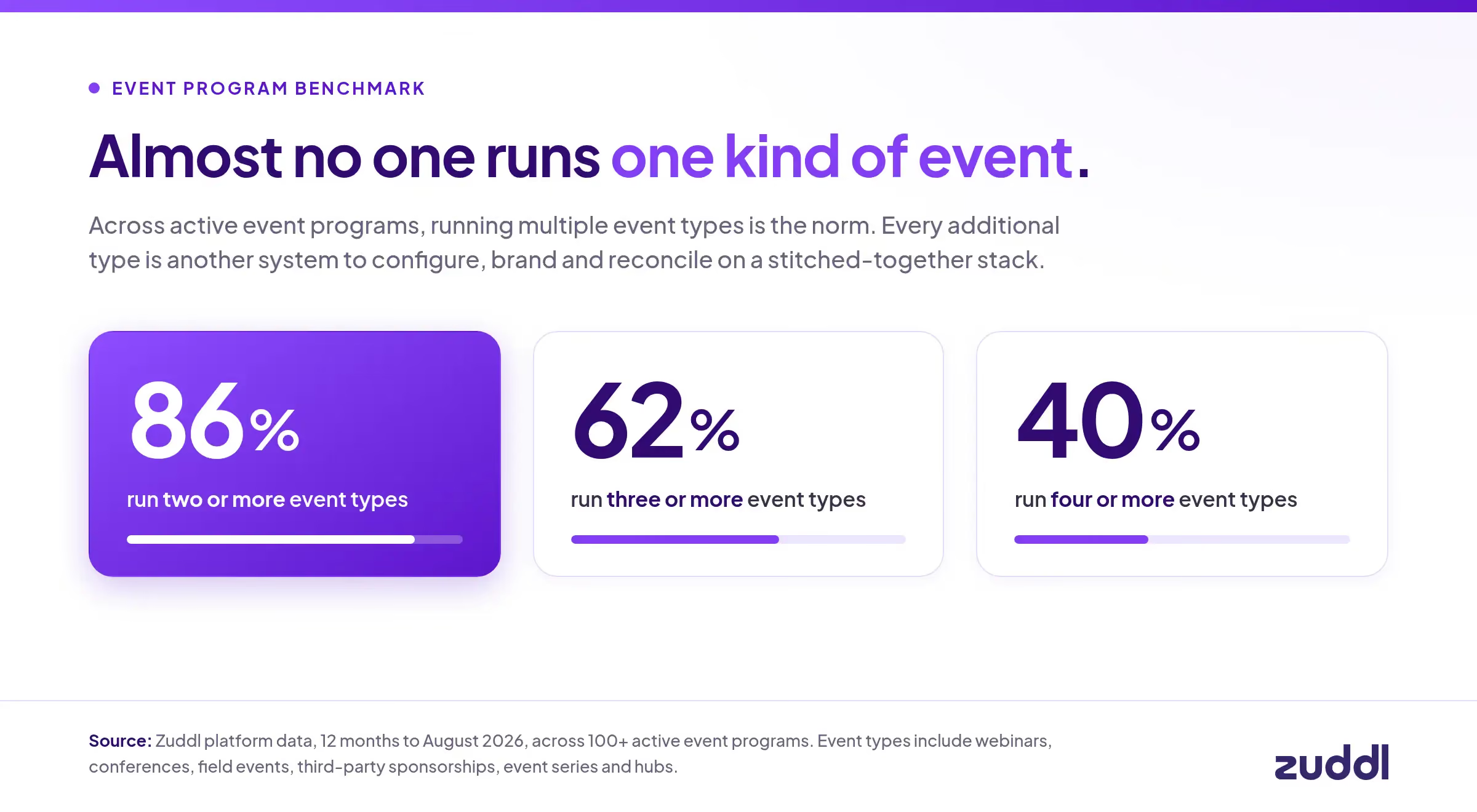
Pop open the hood and you’ll see a collection of separately built products. They’ve been built by separate teams over separate eras and acquired over the years. Each product has a different database, different landing page builders, different permission models, different email engines, different roadmaps and different support queues. 

That’s one step away from buying separate platforms outright. The version of consolidation that works is unified. Just like the idea of having a common rule set for Westeros, a unified platform is one product built on one codebase and one data model.

The all in one version looks simpler for procurement. But ask any event team that has to use these platforms day in and day out. They’d prefer a platform where they can configure and scale every event type through one underlying system.

The 5 taxes you’re paying on an all-in-one platform

Tax #1: The consistency tax

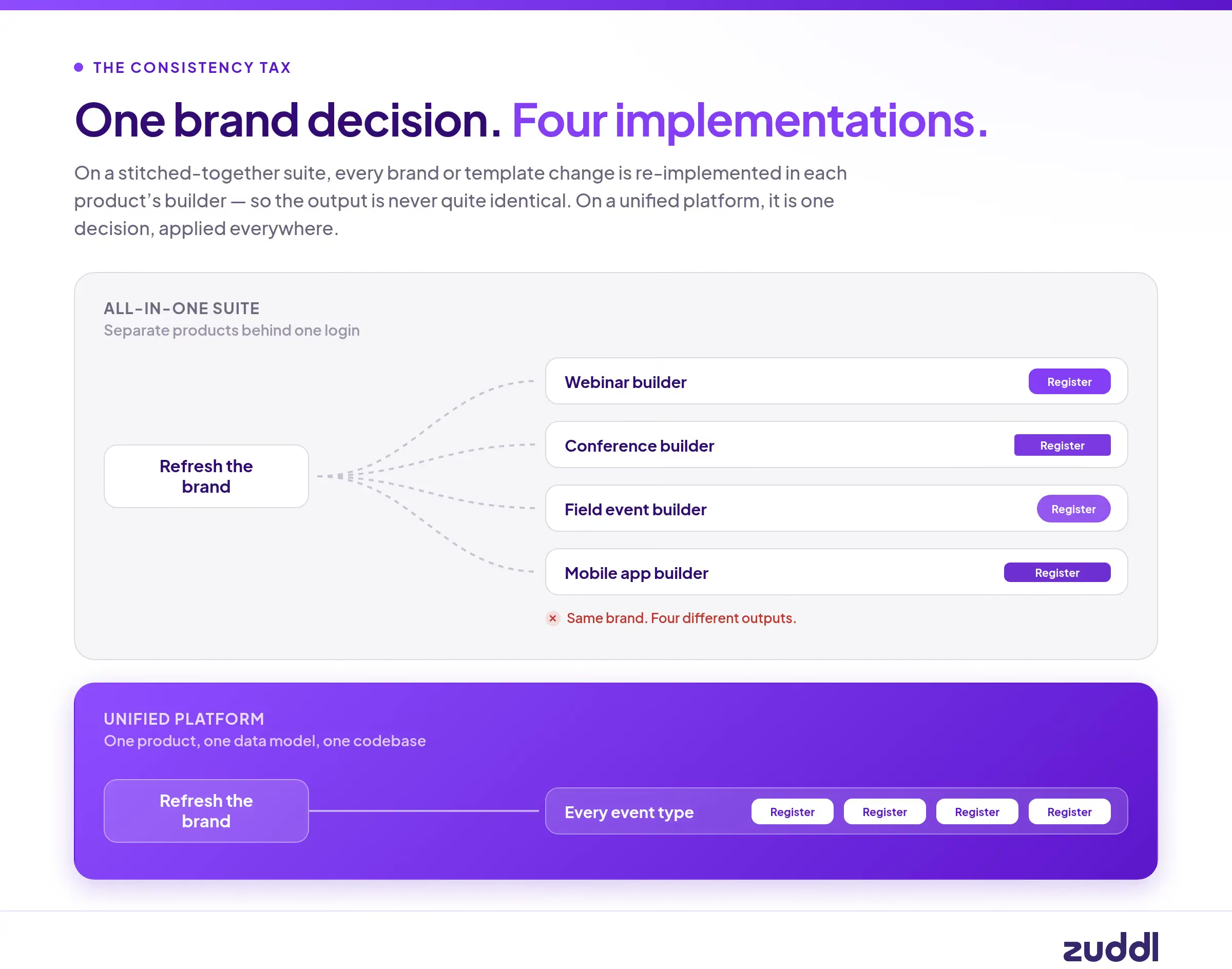
Let’s say you want to refresh the brand for this year’s flagship conference. On a unified platform that’s one decision. On a stitched suite it’s four or five separate implementations, in four or five different builders, each with their own quirks.

The output will never be identical because it isn’t the same software underneath. Your loading states differ. Your form layouts differ. Your email rendering differs. Your head of brand will notice the difference. 
Now try guardrails. You want the EU disclaimer locked to every European registration form. You want the approved template to be the only template. You want a specific field required on every event of a given type.

On some of the products in an all-in-one suite, you can do a version of that. On others you can’t at all. The guardrail isn’t consistently enforced, which means your marketing ops person is back to manually checking everything. This was the exact scenario you wanted to avoid.

[.ebook-q-card][.ebook-body-text]Every new feature widens this gap[.ebook-body-text][.ebook-q-card]

A unified platform ships a capability once and it exists everywhere immediately and identically. A stitched suite ships it in one product, eventually in a second, differently in a third, and never in the fourth. 

Unified compounds capability. All-in-one compounds inconsistency.

Tax #2: The implementation tax

All-in-one is like a streaming subscription where you have to keep paying a recurring cost. A one-time set-up is never enough.

Initial implementation is genuinely 4-5x: separate integrations to your CRM and MAP, separate SSO and permissions, separate field mappings, separate templates, separate training for every team.
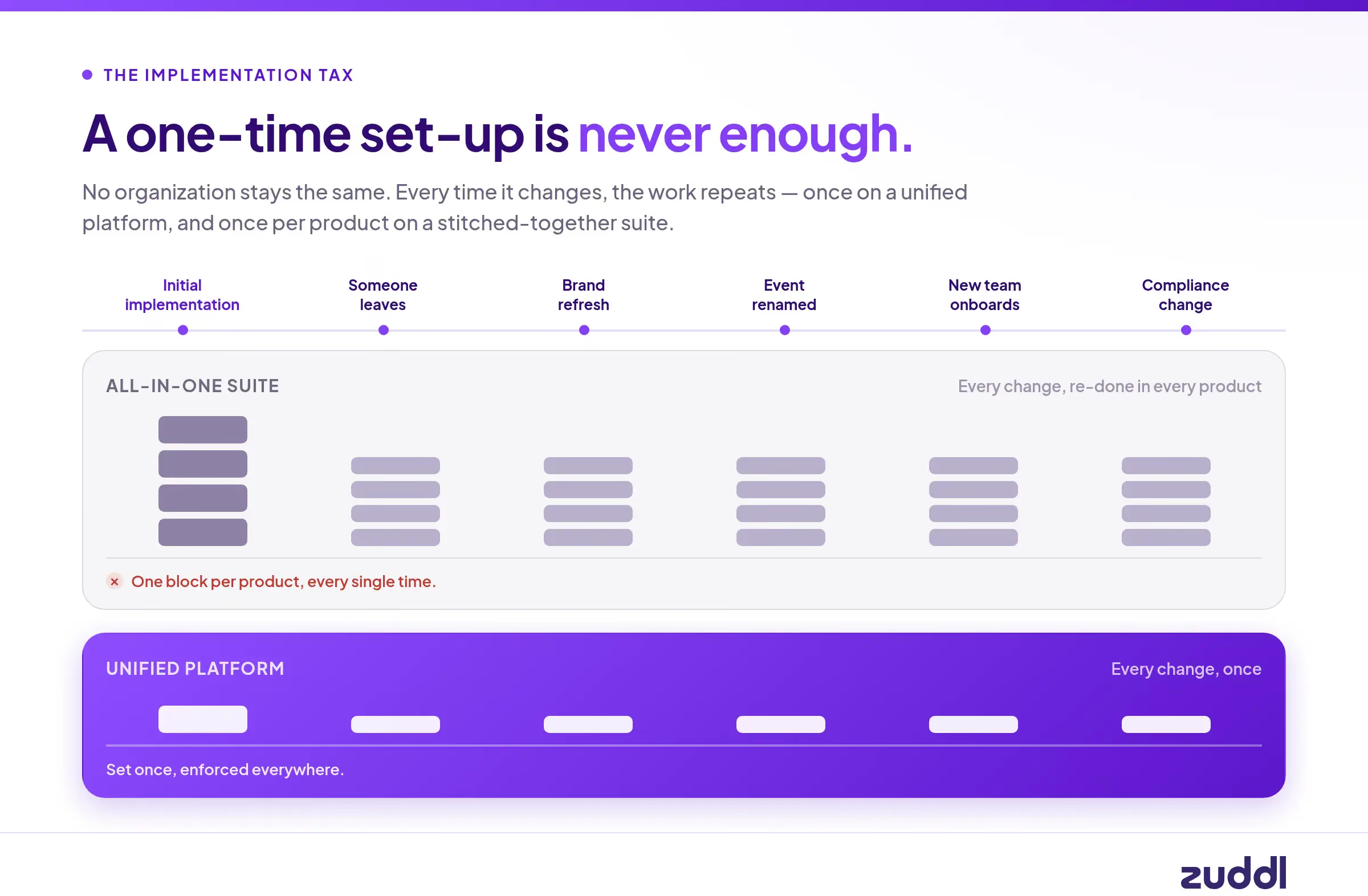
The recurring cost starts to show because no organization stays the same forever:

  • People change roles and leave. Every departure means re-establishing context in every system.
  • Brands get refreshed. Programs get their own sub-brands. Your summit probably needs a new look.
  • Event names change. Your roadshow gets rebranded. Now you have to update it in every connected tool.
  • New functions appear. Partner marketing spins up. Customer marketing takes on advisory boards. Each one needs onboarding across the whole stack.
  • Compliance requirements shift per region or per year.

Each of those is a small change multiplied by the number of systems. It’s impossible to make the change everywhere, so you prioritize. Two systems get done properly, one gets maybe not so well. Six months later nobody remembers which is which.

Every event team we talk to has a bandwidth constraint. All-in-one platforms force you to spread yourself thin and leave some things undone. No amount of discipline can solve this - it’s just the predictable output of the architecture you bought.

Tax #3: The orchestration tax

This is where fragmentation that all-in-one causes really starts limiting you.

A hybrid event should be one event. In a stitched suite it’s two separate halves. The event is created twice, configured twice, with attendee data reconciled by hand or by CSV. This isn’t a rare case either - field teams are constantly adding a virtual component. 

Adding a capability should be a decision, not a project. On a unified platform, adding a mobile app to a field event is a toggle. The app builds itself from the event that already exists, and you tweak what you want to tweak. 

In a fragmented stack, the mobile app is on a different product, so you rebuild the event there, export a CSV from the first system, import it into the second, and keep them in sync manually. What should be one click becomes weeks.

[.ebook-q-card][.ebook-body-text]An all-in-one stack makes cross-event orchestration impossible and defeats the point of having a sophisticated events program.[.ebook-body-text][.ebook-q-card]

Take the most obvious play in B2B events. Someone registers for your webinar next month. You have a session at your conference on a closely adjacent topic, and this person is exactly the right title at exactly the right account. The thank-you email should already be inviting them to that session, with their details pre-filled and a one-click path to register.
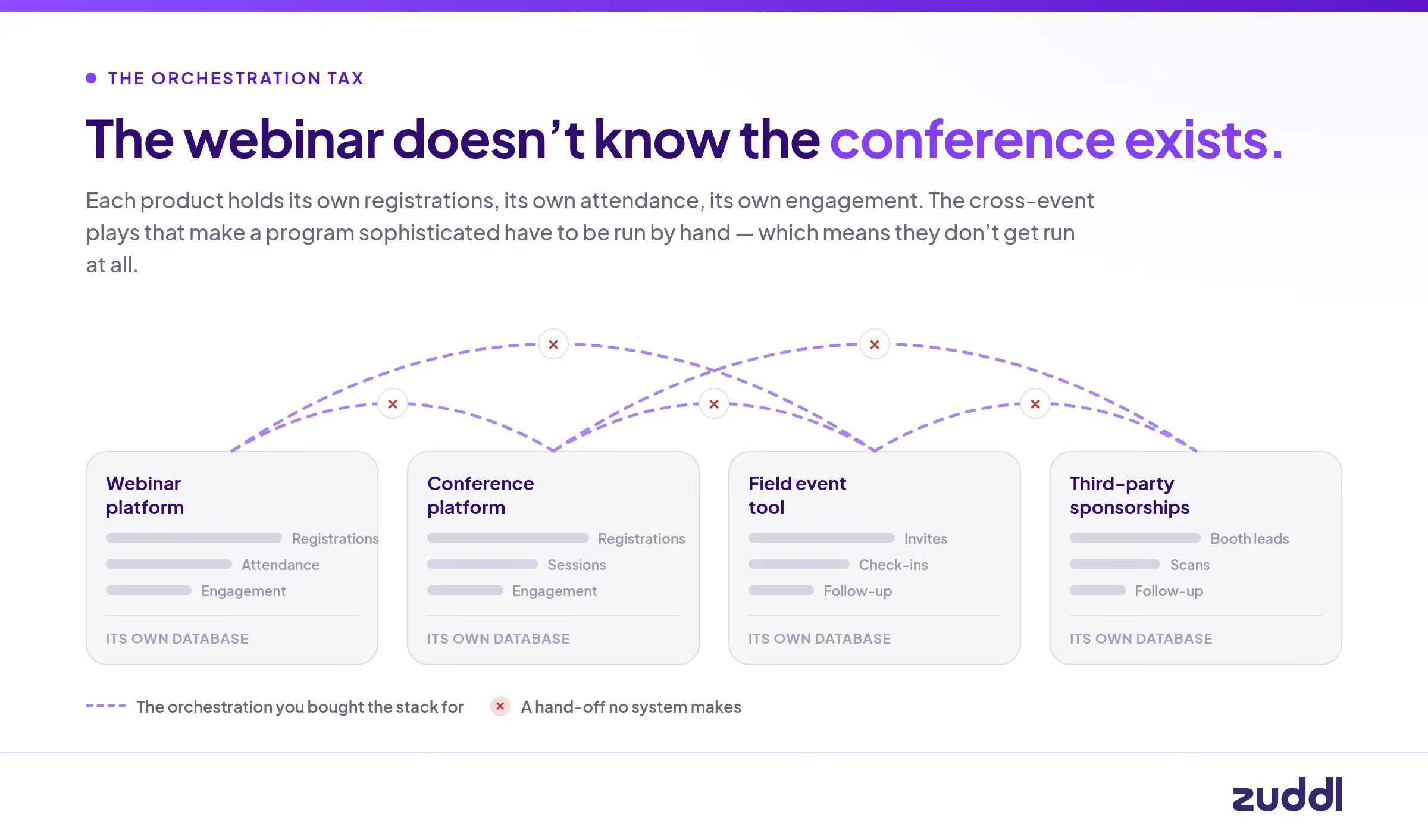
Across separate platforms, a human has to do that manually for every audience segment because the webinar doesn’t know that the conference exists. Which means it doesn’t get done. So instead your team does what everyone does when registrations lag: sends more email to more people. Worse targeting, worse experience, worse results, just more effort.

The trade you made is giving up the ability to run your event program as a funnel.

Tax #4: The adoption tax

Another problem with a fragmented stack is that people just use something else.

Your webinar platform has forty seats and they belong to demand gen. The partner marketer running four webinars a year isn’t one of them, and isn’t going to file a request. They run it on Zoom.

Customer marketing runs advisory boards, customer summits, and the user conference — three different formats, and the tools they have seats in cover maybe one. So the other two happen wherever is convenient.
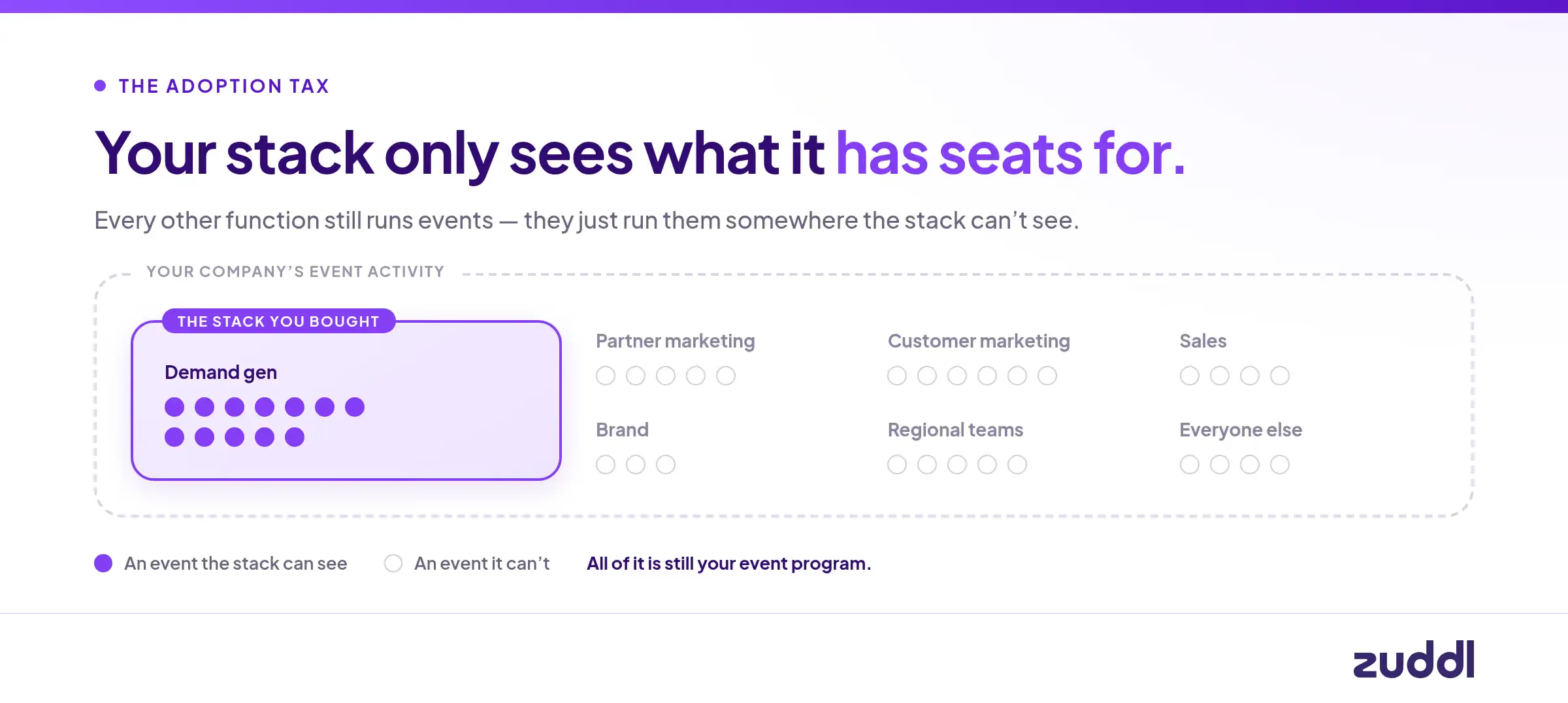
Multiply that across every function that touches events — partner, customer, sales, brand, regional teams — and a meaningful share of your company’s event activity is invisible to the stack you bought to manage event activity.

Fragmentation doesn’t just split your data. It pushes activity out of the system entirely, because access boundaries follow product boundaries.

Tax #5: The compounding tax (this matters the most)

Events should get smarter over time. Your stack should be able to tell you which cities pull in the most attendance, or which webinar attendees eventually became conference registrants and then became revenue. It should be easy to spot patterns for the activations that drive show rate, or what topics matter to certain titles.

That kind of learning requires one system that sees the whole funnel. The insights lie in the cross-event signals, whether it’s the webinar-to-field path, the third-party-booth-to-conference path, or the relationship between what someone watched in March and what they bought in November.

The standard rebuttal to having a unified platform is, “We’ll unify the data in the warehouse.” This addresses the wrong half of the problem. 

[.ebook-q-card][.ebook-body-text]Only 44% of teams measure event impact despite 67% having some CRM integration ( Forrester 2026 State Of B2B Events Survey)[.ebook-body-text][.ebook-q-card]

Piping five products into Snowflake gets you the ability to report. It does not get you orchestration. A warehouse cannot create a hybrid event once. It cannot enforce a brand rule at the moment someone builds a page. 

It cannot put a personalized conference invite in a webinar thank-you email while the intent is still warm. The report knows what happened, but knowing is not doing, and the value is in the doing.

Even when teams do build a unified profile with a ton of engineering effort, it still exists as data in a warehouse and they can’t act on it because they don’t have the operational capacity.
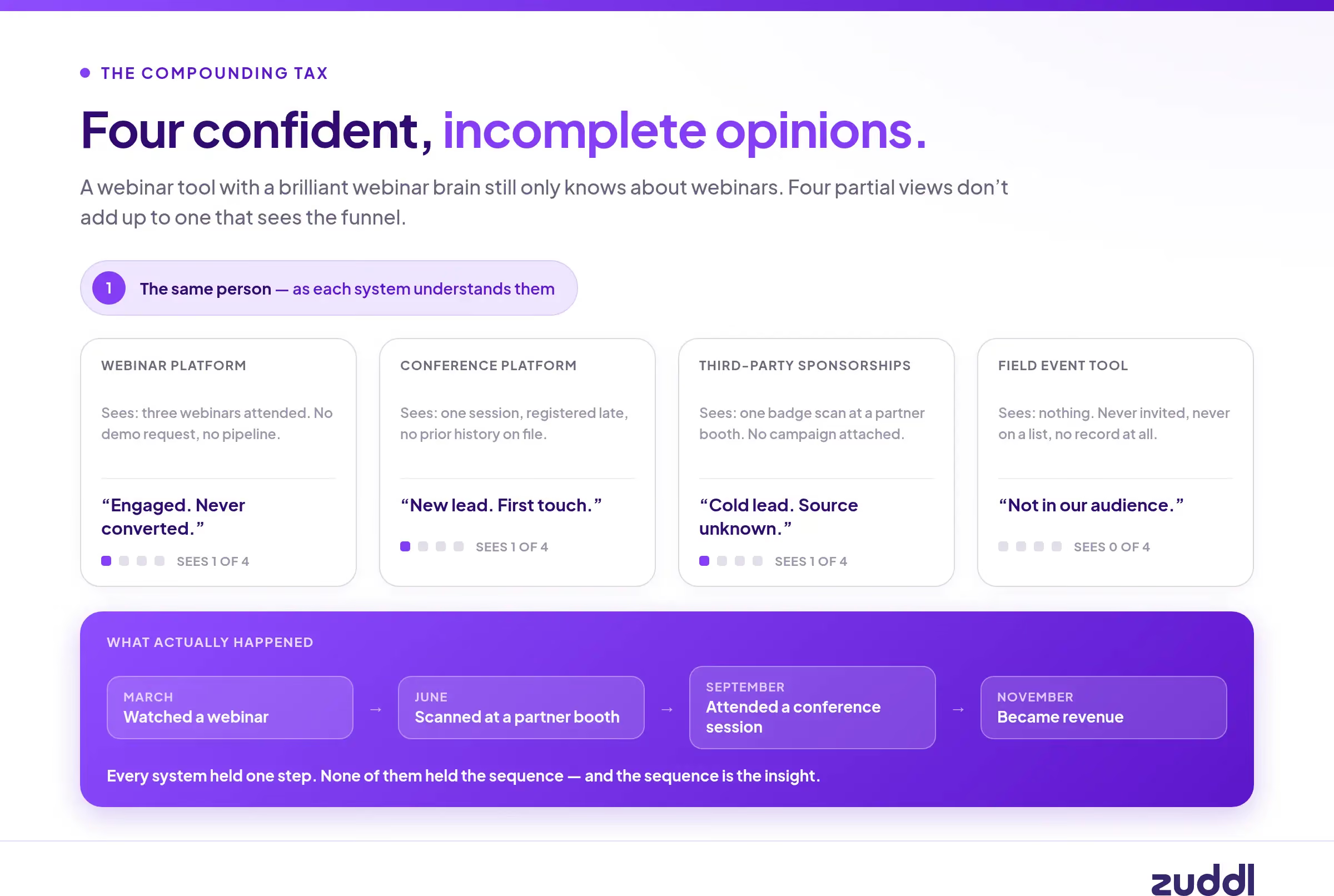
Per-product intelligence doesn’t solve it either. A webinar tool with a brilliant webinar brain still only knows about webinars. It’s a fraction of your program, run by a fraction of your teams. Four separate brains with partial vision don’t add up to one that sees the funnel. They add up to four confident, incomplete opinions.

What do I get with a unified events platform?

Here’s what one platform, one data model and one codebase get you:

  • A hybrid event is one event: Create once, with one registration flow and one attendee record
  • Add a mobile app in a click: It builds from the event that already exists.
  • Set a brand or compliance rule once, and it is enforced on every event type, every region, every team, without anyone checking.
  • Webinar behaviour is instantly available to conference invite logic, field targeting, and seller follow-up.
  • One implementation. One learning curve. One permission model. One support relationship.
  • New capabilities land everywhere at once, the same way, the day they ship.
  • And the program can actually learn because there’s one system that sees all of it.

None of these features are bolted on. They’re consequences of the architecture. Without the right foundation, you can’t buy them at any price.

What questions can event teams ask a vendor to check if they have a unified platform? 

If you look at the pricing page of an event platform, it might list virtual, hybrid, field events and conferences with all the capabilities you could want. It’s hard to tell the difference between a true unified platform and a platform that has multiple tools under one logo from the outside. 

Don’t ask “do you cover all my event types” because everyone will say yes. Ask these six questions instead:

  1. Is this one product, or several products behind one login? Were any of them acquired?
  2. Can I create a hybrid event as a single event?
  3. If I set a brand or compliance rule, is it enforced for every event type? 
  4. Can I target an audience based on their behaviour in a different event type automatically?
  5. When you ship a new feature, does it appear across every event type on the same day?
  6. Can I add a capability — a mobile app, an integration, a new format — without recreating the event somewhere else?

Consolidate your procurement or consolidate your work

A fragmented stack means that you’re the glue between all the tools and people. Events become exhausting exertions because the context and standards of enforcement live in your head. The only way to grow an event program this way is by adding more people. 

With a unified stack, you can move the standards on to the platform. The ceiling changes because you don’t have to start over every time. Every event you run makes the next one better, and the program grows beyond any one person. 

All-in-one consolidates your vendor list and is great for your procurement team. Unified consolidates your work.

Zuddl is the AI-native unified events platform that learns your event playbook and operates every event from it, across conferences, field events, digital events, third-party sponsorships, and webinars, so the team runs the program instead of running every event by hand. We built it as one system, one data model and one product on purpose.

Subscribe to our blog

Book A Demo
Deliver your best event ever with Zuddl

Subscribe to our blog now!

Get fresh ideas, actionable insights and expert guidance for B2B events delivered directly to your inbox!

The difference between unified and all in one event platforms

Consolidation can be great. Those of you that remember Game of Thrones might recall the seven kingdoms of Westeros being conquered under the Targaryen banner. Consolidation made it easier to govern the realm because everyone was working under the same set of rules.

That was the idea, at least. In practice, each territory did whatever they liked. There were rebellions, infighting and general chaos. Nobody was really a ‘Westerosi’ - they belonged to the North, the Vale, the Riverlands and so on. The consolidation was just a wrapper over those identities. 

It’s this all-in-one version of consolidation that hurts event teams who’re looking to move away from point solutions. While they look like a single product from the outside, the only actual consolidation you get is with the logo and the invoice. 

Pop open the hood and you’ll see a collection of separately built products. They’ve been built by separate teams over separate eras and acquired over the years. Each product has a different database, different landing page builders, different permission models, different email engines, different roadmaps and different support queues. 

That’s one step away from buying separate platforms outright. The version of consolidation that works is unified. Just like the idea of having a common rule set for Westeros, a unified platform is one product built on one codebase and one data model.

The all in one version looks simpler for procurement. But ask any event team that has to use these platforms day in and day out. They’d prefer a platform where they can configure and scale every event type through one underlying system.

The 5 taxes you’re paying on an all-in-one platform

Tax #1: The consistency tax

Let’s say you want to refresh the brand for this year’s flagship conference. On a unified platform that’s one decision. On a stitched suite it’s four or five separate implementations, in four or five different builders, each with their own quirks.

The output will never be identical because it isn’t the same software underneath. Your loading states differ. Your form layouts differ. Your email rendering differs. Your head of brand will notice the difference. 

Now try guardrails. You want the EU disclaimer locked to every European registration form. You want the approved template to be the only template. You want a specific field required on every event of a given type.

On some of the products in an all-in-one suite, you can do a version of that. On others you can’t at all. The guardrail isn’t consistently enforced, which means your marketing ops person is back to manually checking everything. This was the exact scenario you wanted to avoid.

[.ebook-q-card][.ebook-body-text]Every new feature widens this gap[.ebook-body-text][.ebook-q-card]

A unified platform ships a capability once and it exists everywhere immediately and identically. A stitched suite ships it in one product, eventually in a second, differently in a third, and never in the fourth. 

Unified compounds capability. All-in-one compounds inconsistency.

Tax #2: The implementation tax

All-in-one is like a streaming subscription where you have to keep paying a recurring cost. A one-time set-up is never enough.

Initial implementation is genuinely 4-5x: separate integrations to your CRM and MAP, separate SSO and permissions, separate field mappings, separate templates, separate training for every team.

The recurring cost starts to show because no organization stays the same forever:

  • People change roles and leave. Every departure means re-establishing context in every system.
  • Brands get refreshed. Programs get their own sub-brands. Your summit probably needs a new look.
  • Event names change. Your roadshow gets rebranded. Now you have to update it in every connected tool.
  • New functions appear. Partner marketing spins up. Customer marketing takes on advisory boards. Each one needs onboarding across the whole stack.
  • Compliance requirements shift per region or per year.

Each of those is a small change multiplied by the number of systems. It’s impossible to make the change everywhere, so you prioritize. Two systems get done properly, one gets maybe not so well. Six months later nobody remembers which is which.

Every event team we talk to has a bandwidth constraint. All-in-one platforms force you to spread yourself thin and leave some things undone. No amount of discipline can solve this - it’s just the predictable output of the architecture you bought.

Tax #3: The orchestration tax

This is where fragmentation that all-in-one causes really starts limiting you.

A hybrid event should be one event. In a stitched suite it’s two separate halves. The event is created twice, configured twice, with attendee data reconciled by hand or by CSV. This isn’t a rare case either - field teams are constantly adding a virtual component. 

Adding a capability should be a decision, not a project. On a unified platform, adding a mobile app to a field event is a toggle. The app builds itself from the event that already exists, and you tweak what you want to tweak. 

In a fragmented stack, the mobile app is on a different product, so you rebuild the event there, export a CSV from the first system, import it into the second, and keep them in sync manually. What should be one click becomes weeks.

[.ebook-q-card][.ebook-body-text]An all-in-one stack makes cross-event orchestration impossible and defeats the point of having a sophisticated events program.[.ebook-body-text][.ebook-q-card]

Take the most obvious play in B2B events. Someone registers for your webinar next month. You have a session at your conference on a closely adjacent topic, and this person is exactly the right title at exactly the right account. The thank-you email should already be inviting them to that session, with their details pre-filled and a one-click path to register.

Across separate platforms, a human has to do that manually for every audience segment because the webinar doesn’t know that the conference exists. Which means it doesn’t get done. So instead your team does what everyone does when registrations lag: sends more email to more people. Worse targeting, worse experience, worse results, just more effort.

The trade you made is giving up the ability to run your event program as a funnel.

Tax #4: The adoption tax

Another problem with a fragmented stack is that people just use something else.

Your webinar platform has forty seats and they belong to demand gen. The partner marketer running four webinars a year isn’t one of them, and isn’t going to file a request. They run it on Zoom.

Customer marketing runs advisory boards, customer summits, and the user conference — three different formats, and the tools they have seats in cover maybe one. So the other two happen wherever is convenient.

Multiply that across every function that touches events — partner, customer, sales, brand, regional teams — and a meaningful share of your company’s event activity is invisible to the stack you bought to manage event activity.

Fragmentation doesn’t just split your data. It pushes activity out of the system entirely, because access boundaries follow product boundaries.

Tax #5: The compounding tax (this matters the most)

Events should get smarter over time. Your stack should be able to tell you which cities pull in the most attendance, or which webinar attendees eventually became conference registrants and then became revenue. It should be easy to spot patterns for the activations that drive show rate, or what topics matter to certain titles.

That kind of learning requires one system that sees the whole funnel. The insights lie in the cross-event signals, whether it’s the webinar-to-field path, the third-party-booth-to-conference path, or the relationship between what someone watched in March and what they bought in November.

The standard rebuttal to having a unified platform is, “We’ll unify the data in the warehouse.” This addresses the wrong half of the problem. 

[.ebook-q-card][.ebook-body-text]Only 44% of teams measure event impact despite 67% having some CRM integration ( Forrester 2026 State Of B2B Events Survey)[.ebook-body-text][.ebook-q-card]

Piping five products into Snowflake gets you the ability to report. It does not get you orchestration. A warehouse cannot create a hybrid event once. It cannot enforce a brand rule at the moment someone builds a page. 

It cannot put a personalized conference invite in a webinar thank-you email while the intent is still warm. The report knows what happened, but knowing is not doing, and the value is in the doing.

Even when teams do build a unified profile with a ton of engineering effort, it still exists as data in a warehouse and they can’t act on it because they don’t have the operational capacity.

Per-product intelligence doesn’t solve it either. A webinar tool with a brilliant webinar brain still only knows about webinars. It’s a fraction of your program, run by a fraction of your teams. Four separate brains with partial vision don’t add up to one that sees the funnel. They add up to four confident, incomplete opinions.

What do I get with a unified events platform?

Here’s what one platform, one data model and one codebase get you:

  • A hybrid event is one event: Create once, with one registration flow and one attendee record
  • Add a mobile app in a click: It builds from the event that already exists.
  • Set a brand or compliance rule once, and it is enforced on every event type, every region, every team, without anyone checking.
  • Webinar behaviour is instantly available to conference invite logic, field targeting, and seller follow-up.
  • One implementation. One learning curve. One permission model. One support relationship.
  • New capabilities land everywhere at once, the same way, the day they ship.
  • And the program can actually learn because there’s one system that sees all of it.

None of these features are bolted on. They’re consequences of the architecture. Without the right foundation, you can’t buy them at any price.

What questions can event teams ask a vendor to check if they have a unified platform? 

If you look at the pricing page of an event platform, it might list virtual, hybrid, field events and conferences with all the capabilities you could want. It’s hard to tell the difference between a true unified platform and a platform that has multiple tools under one logo from the outside. 

Don’t ask “do you cover all my event types” because everyone will say yes. Ask these six questions instead:

  1. Is this one product, or several products behind one login? Were any of them acquired?
  2. Can I create a hybrid event as a single event?
  3. If I set a brand or compliance rule, is it enforced for every event type? 
  4. Can I target an audience based on their behaviour in a different event type automatically?
  5. When you ship a new feature, does it appear across every event type on the same day?
  6. Can I add a capability — a mobile app, an integration, a new format — without recreating the event somewhere else?

Consolidate your procurement or consolidate your work

A fragmented stack means that you’re the glue between all the tools and people. Events become exhausting exertions because the context and standards of enforcement live in your head. The only way to grow an event program this way is by adding more people. 

With a unified stack, you can move the standards on to the platform. The ceiling changes because you don’t have to start over every time. Every event you run makes the next one better, and the program grows beyond any one person. 

All-in-one consolidates your vendor list and is great for your procurement team. Unified consolidates your work.

Zuddl is the AI-native unified events platform that learns your event playbook and operates every event from it, across conferences, field events, digital events, third-party sponsorships, and webinars, so the team runs the program instead of running every event by hand. We built it as one system, one data model and one product on purpose.

Subscribe to our blog

Book A Demo

Subscribe to our blog now!

Get fresh ideas, actionable insights and expert guidance for B2B events delivered directly to your inbox!

Our curated hub of inspiration

Take control of your virtual event production with Zuddl.
Own every step from registrations to approvals with Zuddl.
Own your event app from branding to CRM sync with Zuddl.
Book a Demo
Book A Demo
Book A Demo
Steph’s tip for event marketers: 
Bring a simple cost-savings table like this: 
Line Item
2024 Cost
2025 Cost(after negotiation)
Cost Savings
Venue package
$200k
$170k
$30k
Lead capture tech
$18k
$12k
$6k
Then say, “This $36K savings covers the increase I’m asking for.”