Free Virtual Event
Sep 29
-
30, 2026
Sep 29–30 | 9 AM PTFree Virtual Event
Grab your spot
Back To All Articles

The Event Marketer's Guide to AI That Actually Does the Work

This practical guide explores where AI can move beyond brainstorming and admin to actually create, check, manage, understand, and optimize events, plus a simple readiness checklist to help you identify where your program is ready for AI

The big promise of AI has been "do more with less." Event marketers could be forgiven for shrugging at this, because they've been doing more events with smaller teams and tighter timelines for years.
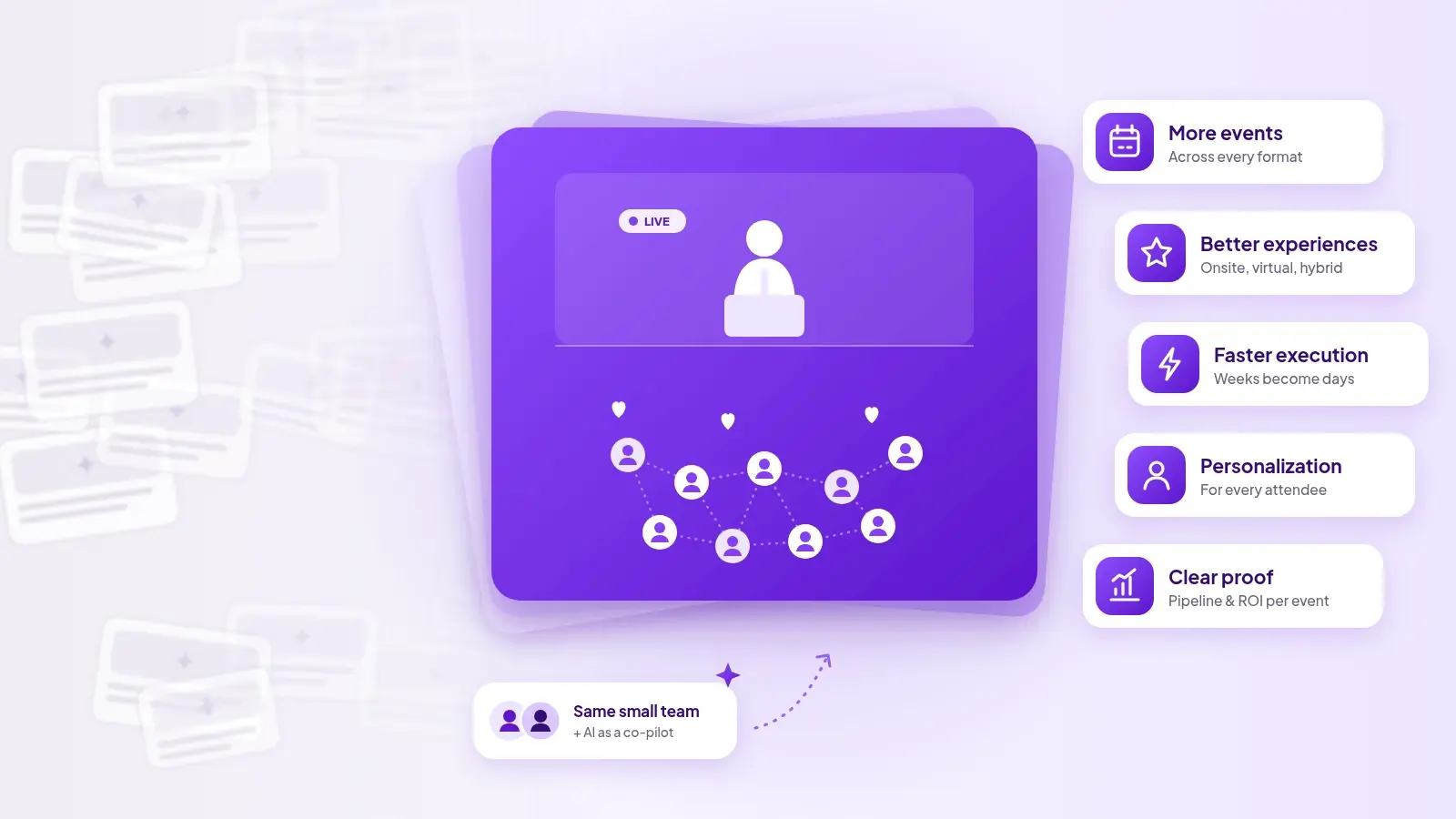
What's changed is the size of "more." As AI-generated content floods our feeds, organizations are investing more into their event programs to build real relationships. That means higher expectations: more events, better experiences, faster execution, more personalization, and clear proof of what every event delivered.

The AI gap in events

Despite this, most event teams use AI for individual tasks, like brainstorming session titles, drafting promo emails, summarizing a call, or tidying a speaker bio. Useful, but it doesn’t change the burden of the work an events team has to do. 

The landing page still needs to be manually checked for brand conformity. The invite list still needs chasing multiple stakeholders across different sheets. The post-event report still gets stitched together from four exports.
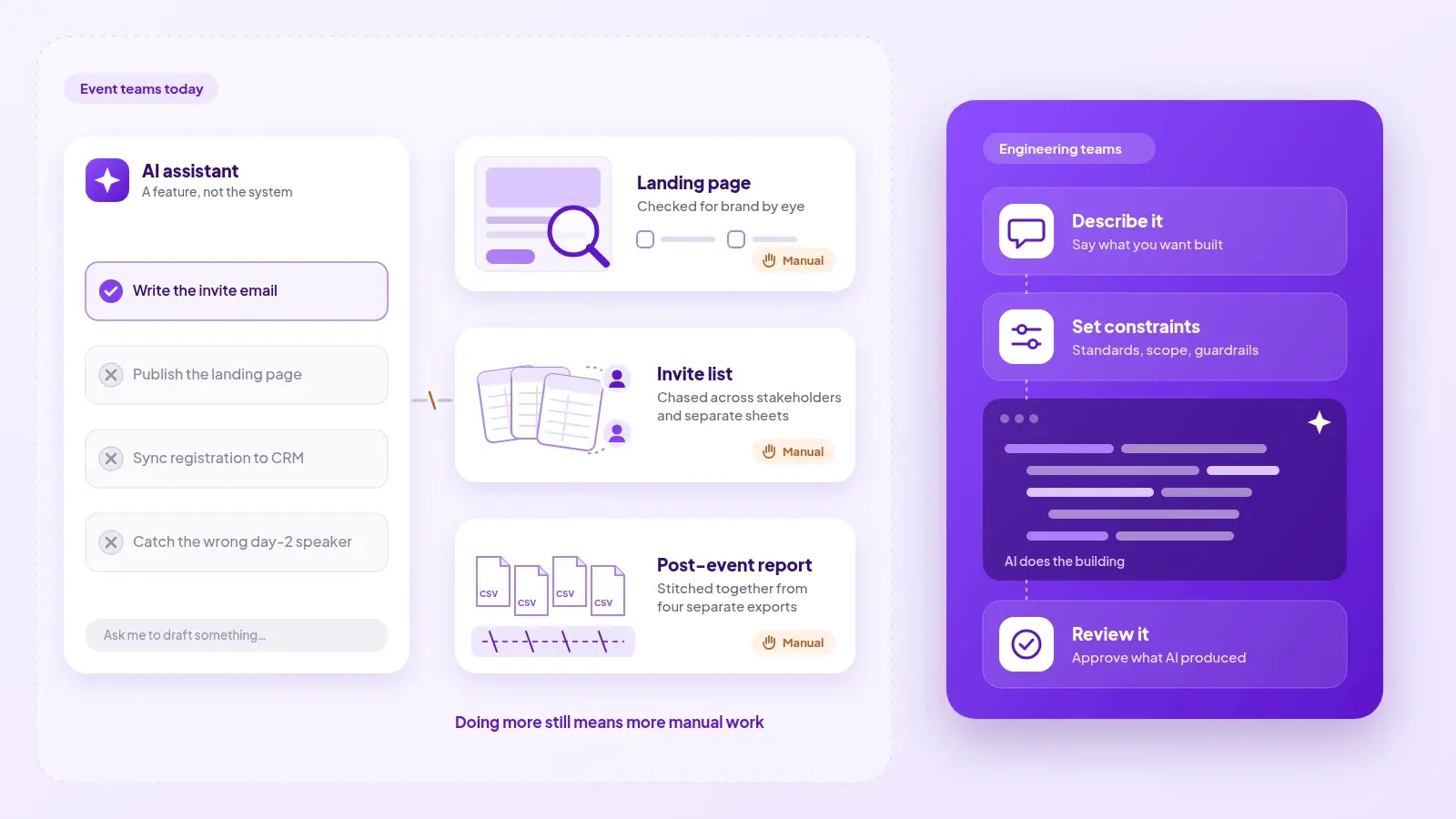
Compare that with engineering. On many software teams, engineers now rarely write code line by line. They describe what they want, set the constraints, and review what AI produces. The same can't be said for event teams. For most of them, doing more still means more manual work.

This is because of the way AI has been implemented by event platforms as a discrete set of features rather than as part of a unified system. A chat assistant can write an invitation email, but it can't publish the landing page, connect the registration form to your CRM, or notice that the day-two agenda went out with the wrong speaker. 

Where event teams are still doing too much manually 
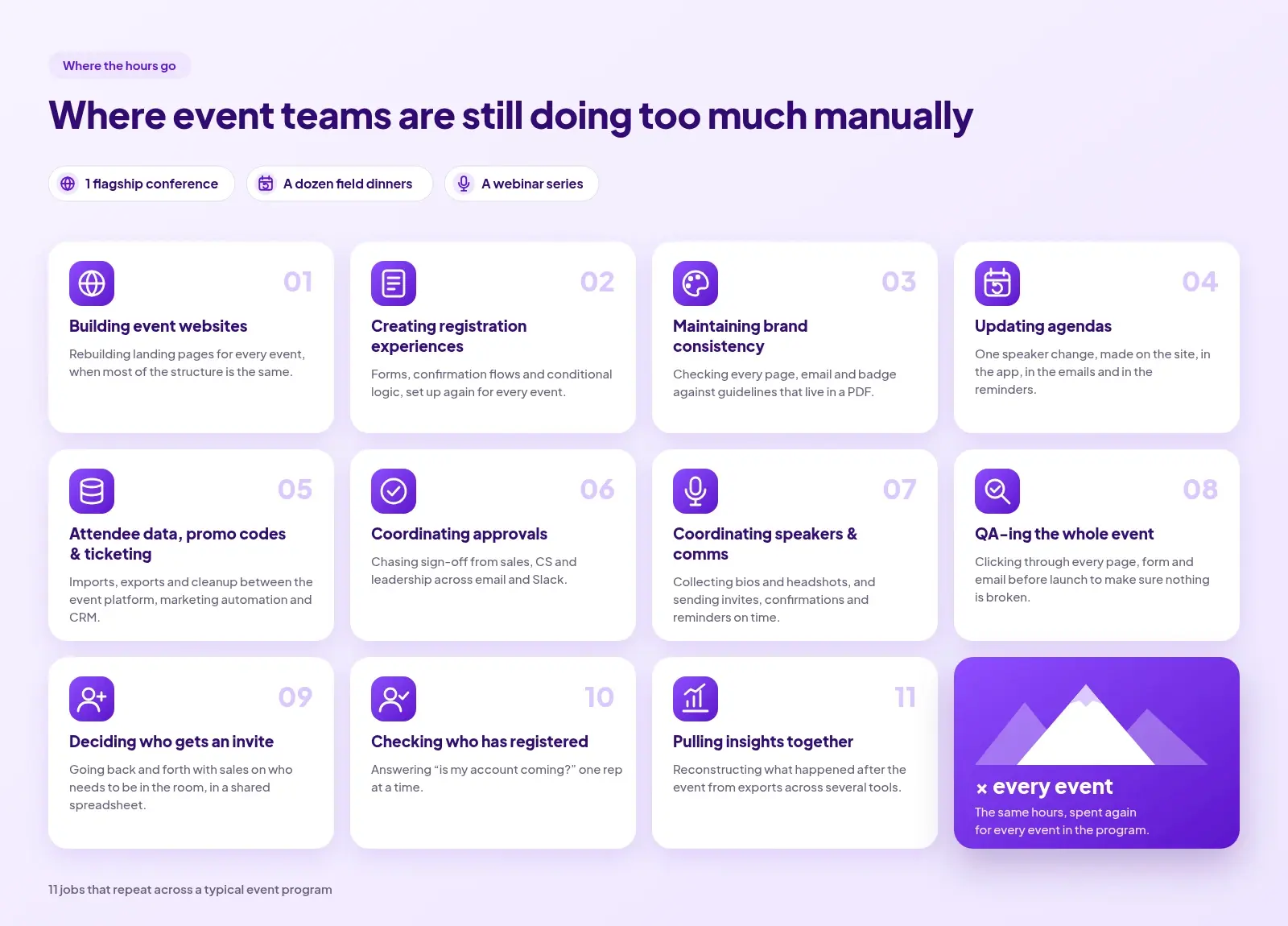
Every event shouldn't be another mountain of work. But look at a typical program — a flagship conference, a dozen field dinners, a webinar series — and most of the hours go to the same places:

  • Building event websites: rebuilding landing pages for every event when most of the structure is the same.
  • Creating registration experiences: forms, confirmation flows, and conditional logic set up again for every event.
  • Maintaining brand consistency:  checking every page, email, and badge against guidelines that live in a PDF.
  • Updating agendas: a speaker drops, a session moves, and the change has to be made on the site, in the app, in the emails, and in the reminder sequence.
  • Managing attendee data, promo codes, and ticketing: imports, exports, and cleanup between the event platform, the marketing automation tool, and the CRM.
  • Coordinating approvals: chasing sign-off from sales, CS and leadership across email and Slack.
  • Coordinating speakers and comms: collecting bios and headshots, and sending the invitation, confirmation, and reminder emails on time.
  • QA-ing the whole event: clicking through every page, form, and email before launch to make sure nothing is broken.
  • Deciding who gets an invite: going back and forth with sales on who needs to be in the room, usually in a shared spreadsheet.
  • Checking who has registered: answering "is my account coming?" one rep at a time.
  • Pulling insights together: reconstructing what happened after the event from exports across several tools.

This work is the connective tissue between systems and teams, and as the program scales, the busywork scales with it.

What happens when AI moves from helping you think to actually taking the work off your plate?

The new AI-native event workflow

The room for error with AI in events is small. Every attendee touchpoint — the invitation, the registration page, the confirmation email, the badge — reflects the brand and shows how much you care about the experience you give customers and partners. No event marketer wants AI making random changes to a live registration flow, or "AI slop" muddying a brand experience the team has spent years building.

For AI in events to work, you need to define the guardrails and the outcome you want, and let AI do the work inside them. That changes the question from "which tools and tasks do I need?" to "what work needs to get done?"
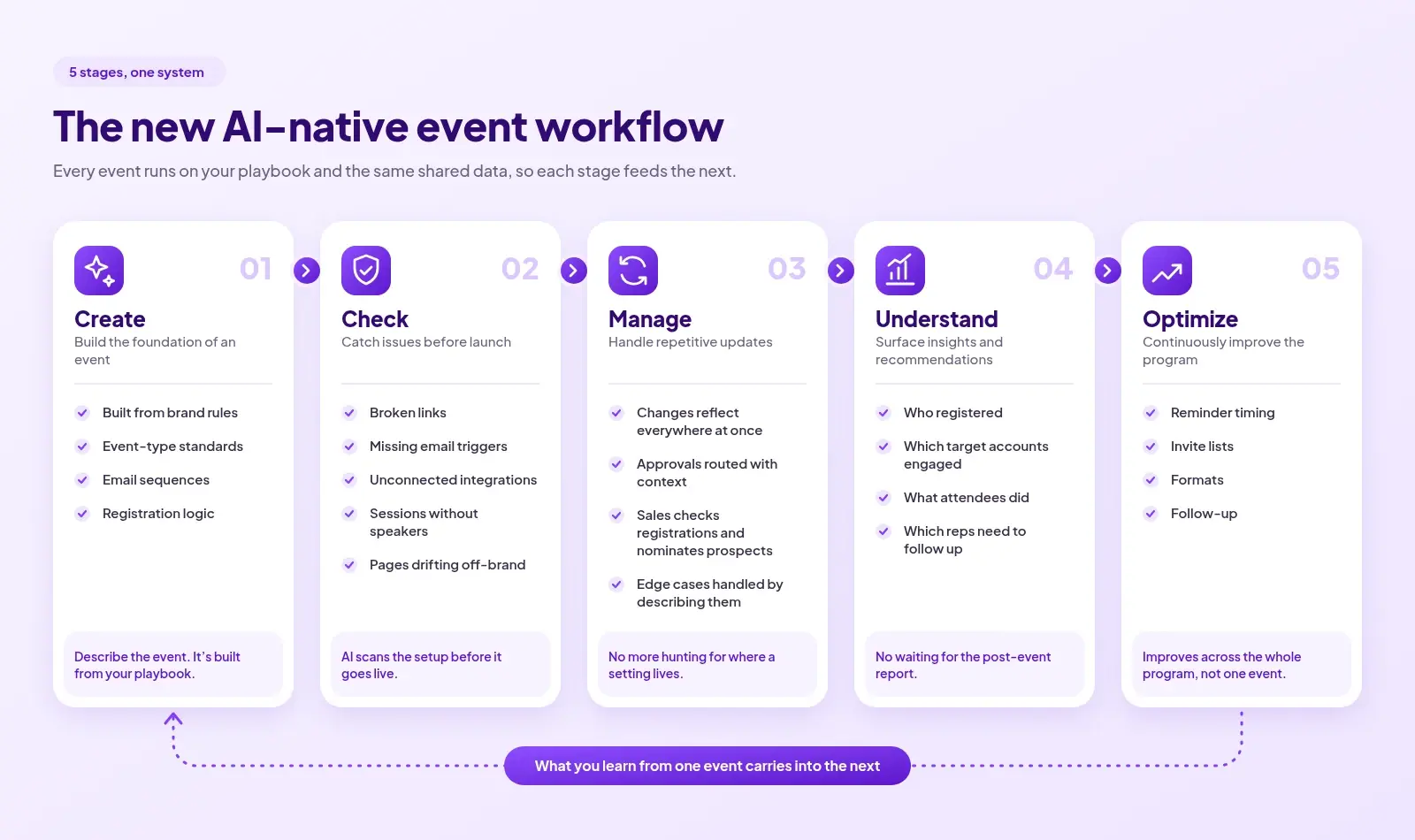
If we look at the lifecycle of an event, here’s where AI could take work off the event marketer’s plate at each stage:

1. Create: build the foundation of an event. Instead of starting from a blank template, the event is produced from what your team has already defined: brand rules, event-type standards, email sequences, registration logic. You describe the event, and each version is built from your playbook.

2. Check: catch issues before launch. AI scans the setup before it goes live: broken links, missing email triggers, unconnected integrations, sessions without speakers, pages that drift off-brand. 

3. Manage: handle repetitive updates and workflows. When a session moves or a speaker changes, the update reflects everywhere it needs to happen at once. Approvals route to the right person with context attached. Sales can check registrations or nominate a prospect without filing a ticket with the event team. And when you hit an edge case — as you always do with events — you describe what you need instead of trying to remember where the setting lives in the platform.

4. Understand: surface insights and recommendations. Instead of waiting for a post-event report, you see who registered, which target accounts engaged, what attendees did, and which reps need to follow up.

5. Optimize: continuously improve the program. When every event runs on the same data, what you learn from one event carries into the next. Reminder timing, invite lists, formats, and follow-up improve across the whole program, not just inside one event.

What should you actually hand over to AI?

Not everything should move to AI. Here's how you can decide what to keep with yourself and what to delegate to the AI.
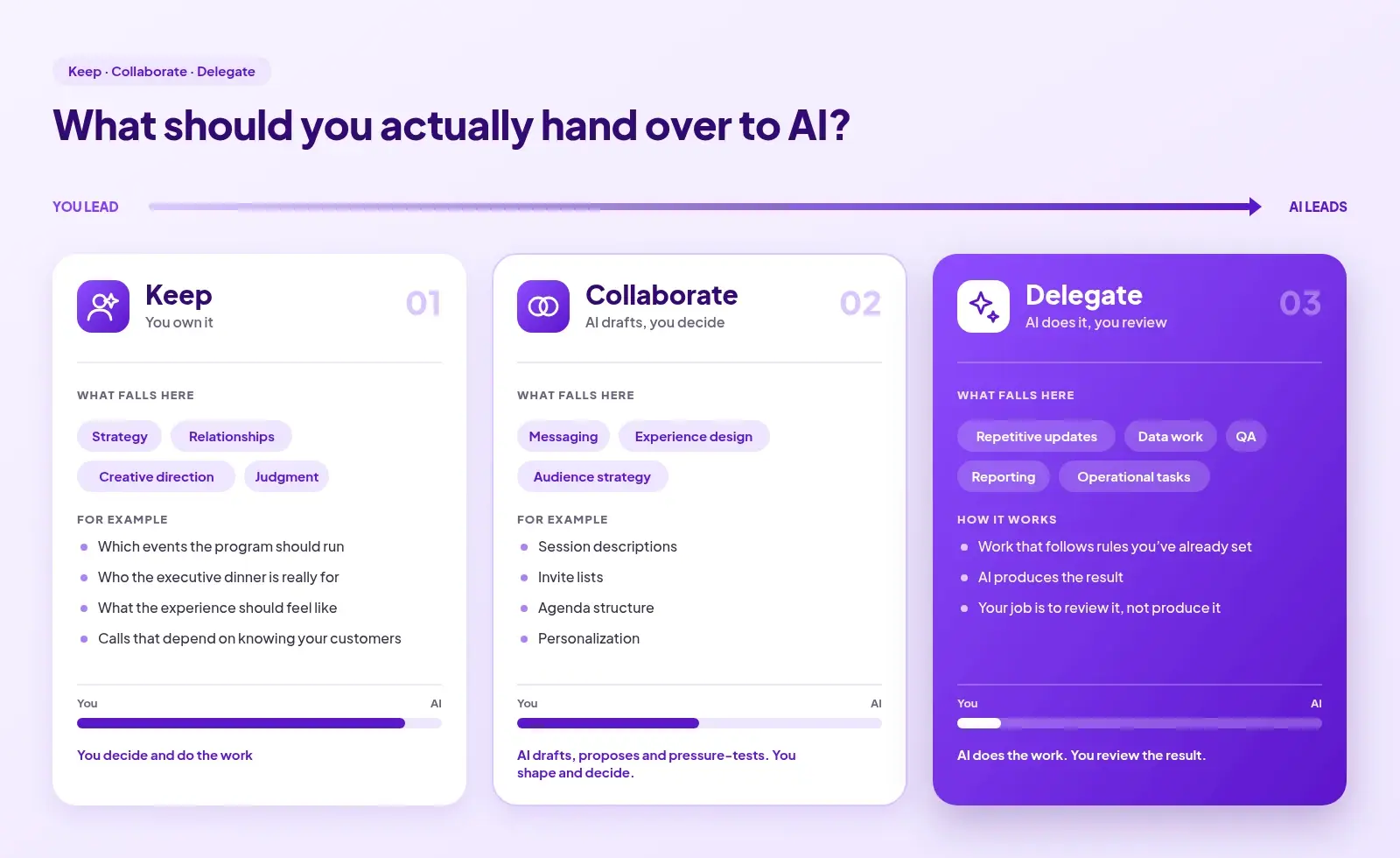
Keep: strategy, relationships, creative direction, and judgment. Which events the program should run, who the executive dinner is really for, what the experience should feel like, and the calls that depend on knowing your customers. 

Collaborate: messaging, experience design, and audience strategy. AI drafts, proposes, and pressure-tests; you shape and decide. This works well for session descriptions, invite lists, agenda structure, and personalization.

Delegate: repetitive updates, data work, QA, reporting, and operational tasks. This is work that follows rules you've already set. Here, AI should do the work itself, and your job is to review the result rather than produce it.

Before you evaluate AI for your event program, it helps to know where you're starting from. Use the checklist below to find out.

AI Event Readiness Checklist

How ready is your event program for AI?

Check the statements that are true today. The goal isn't to have everything checked. It's to identify where your team is still spending time on work that could potentially be automated.
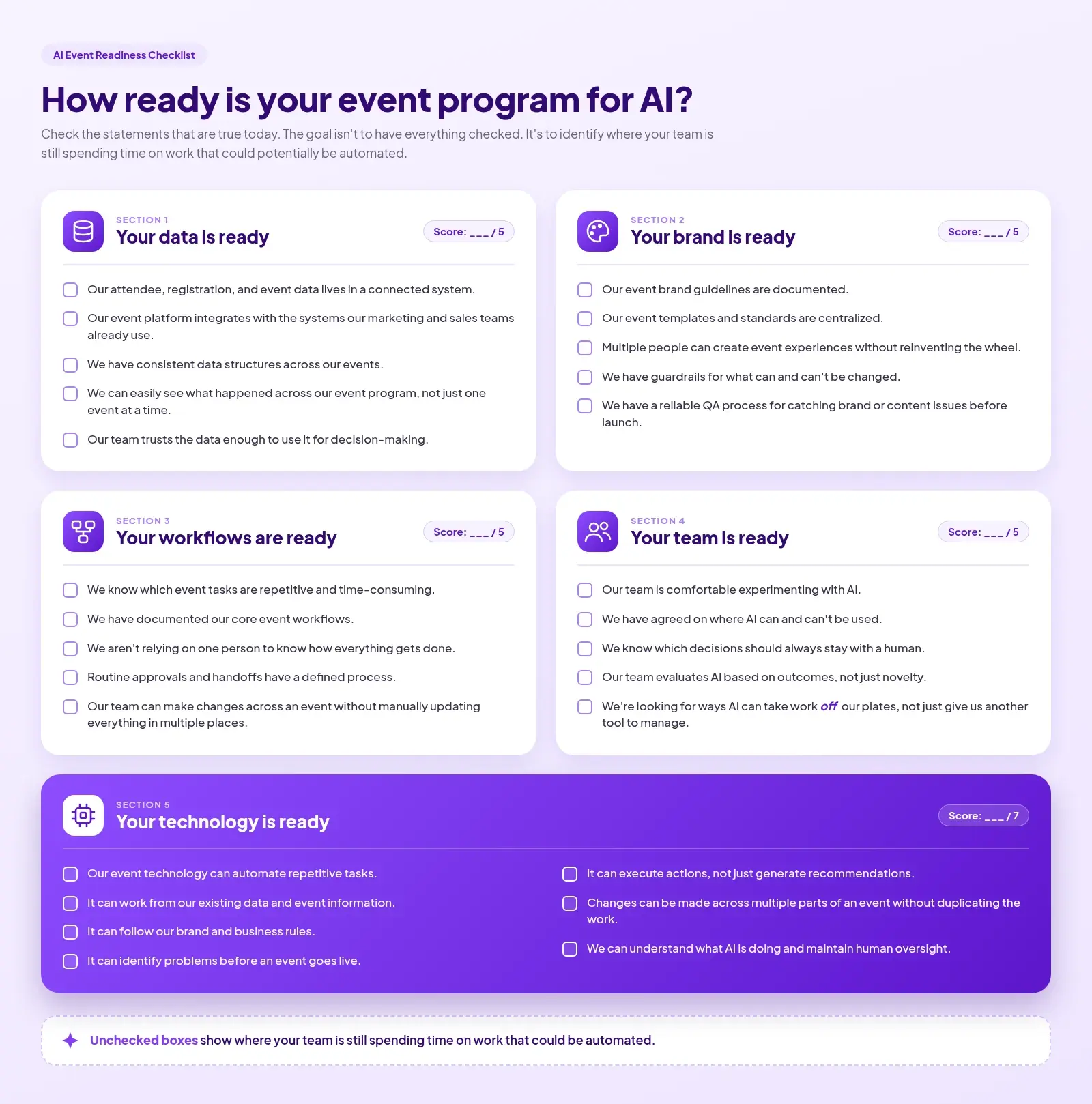
1. Your data is ready

- Our attendee, registration, and event data lives in a connected system.

- Our event platform integrates with the systems our marketing and sales teams already use.

- We have consistent data structures across our events.

- We can easily see what happened across our event program, not just one event at a time.

- Our team trusts the data enough to use it for decision-making.

2. Your brand is ready

- Our event brand guidelines are documented.

- Our event templates and standards are centralized.

- Multiple people can create event experiences without reinventing the wheel.

- We have guardrails for what can and can't be changed.

- We have a reliable QA process for catching brand or content issues before launch.

3. Your workflows are ready

- We know which event tasks are repetitive and time-consuming.

- We have documented our core event workflows.

- We aren't relying on one person to know how everything gets done.

- Routine approvals and handoffs have a defined process.

- Our team can make changes across an event without manually updating everything in multiple places.

4. Your team is ready

- Our team is comfortable experimenting with AI.

- We have agreed on where AI can and can't be used.

- We know which decisions should always stay with a human.

- Our team evaluates AI based on outcomes, not just novelty.

- We're looking for ways AI can take work off our plates, not just give us another tool to manage.

5. Your technology is ready

- Our event technology can automate repetitive tasks.

- It can work from our existing data and event information.

- It can follow our brand and business rules.

- It can identify problems before an event goes live.

- It can execute actions, not just generate recommendations.

- Changes can be made across multiple parts of an event without duplicating the work.

- We can understand what AI is doing and maintain human oversight.

What your score means

0–8: Start with the foundation
You may have opportunities to clean up data, workflows, and documentation before layering AI on top.

9–16: You're AI-ready in pockets
You have some of the infrastructure and processes in place. Look for repetitive workflows where AI can immediately reduce manual work.

17–24: You're ready to move from AI-assisted to AI-powered
Your program has the data, processes, and guardrails to start letting technology take on more of the actual work.

25+: You're thinking beyond AI tools
You're building an event program where AI can become part of how work gets done, rather than another tool your team has to manage.

The event marketer's role is changing

As more of the execution moves to technology, the event marketer spends less time building every page and chasing every approval, and more time deciding what the program should look like, which events matter, and what to change from last quarter.
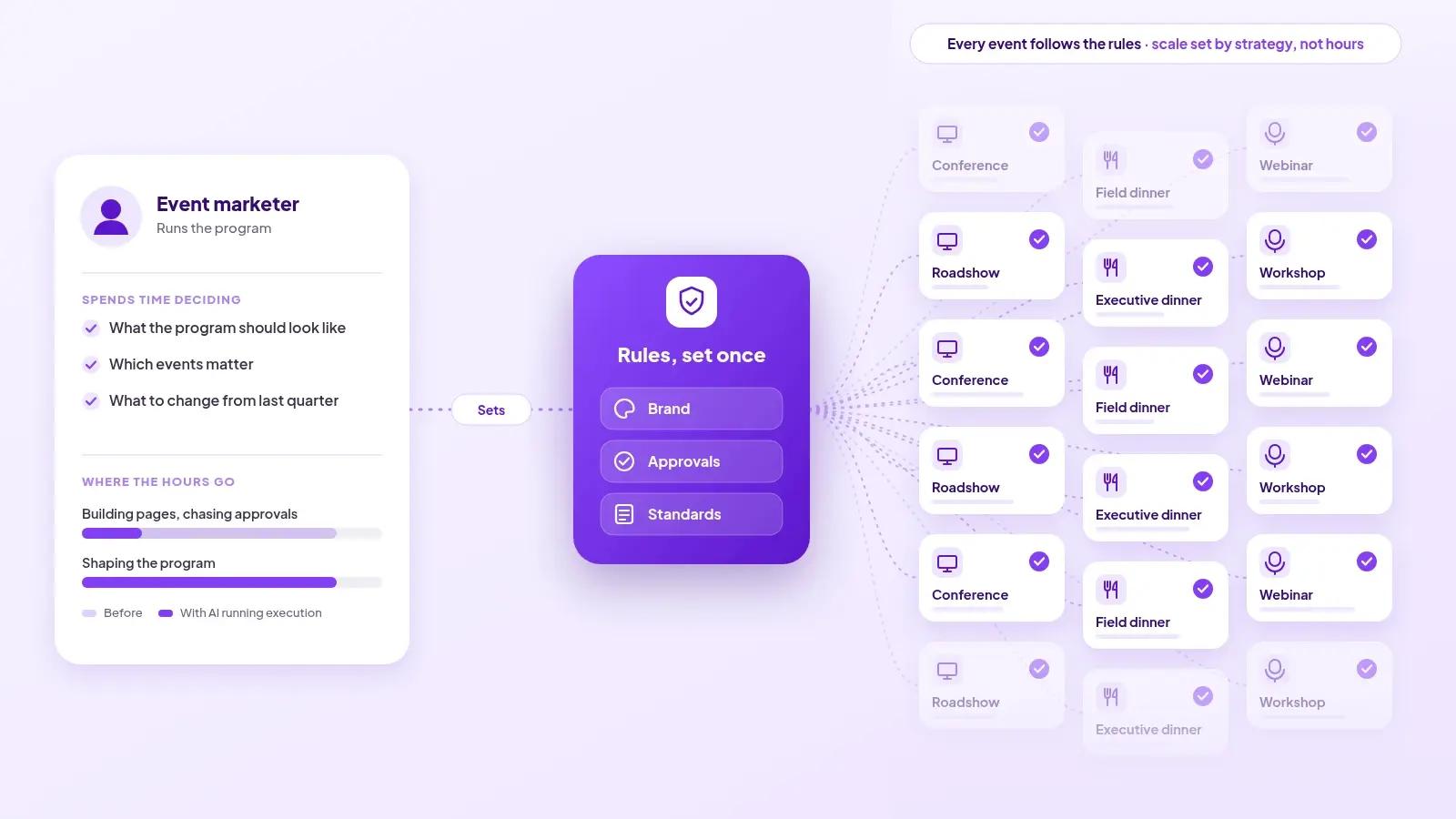
The human controls what matters most: setting the rules once — brand, approvals, standards — and the event platform makes sure every event follows them. The event program stops being limited by how many events the team can run.

Let Zuddl carry the load so you can do the work that matters

Zuddl is the AI-native unified events platform that learns your event playbook and operates every event from it, across conferences, field events, webinars, and activations. Your team defines brand rules, approval hierarchies, and event-type standards once. Events are produced from that playbook, checked before they go live, and connected to your CRM from the first registration.

Zuddl's AI understands your processes, and guardrails, and uses them to do the work. The same guardrails you'd give an intern or a new teammate are the ones the AI operates within. That makes Zuddl a safe place for AI to work inside your event program.

See what it looks like when your event platform does the work.

{{demo-widget-1}}

Deliver your best event ever with Zuddl

Subscribe to our blog now!

Get fresh ideas, actionable insights and expert guidance for B2B events delivered directly to your inbox!

The Event Marketer's Guide to AI That Actually Does the Work

The big promise of AI has been "do more with less." Event marketers could be forgiven for shrugging at this, because they've been doing more events with smaller teams and tighter timelines for years.

What's changed is the size of "more." As AI-generated content floods our feeds, organizations are investing more into their event programs to build real relationships. That means higher expectations: more events, better experiences, faster execution, more personalization, and clear proof of what every event delivered.

The AI gap in events

Despite this, most event teams use AI for individual tasks, like brainstorming session titles, drafting promo emails, summarizing a call, or tidying a speaker bio. Useful, but it doesn’t change the burden of the work an events team has to do. 

The landing page still needs to be manually checked for brand conformity. The invite list still needs chasing multiple stakeholders across different sheets. The post-event report still gets stitched together from four exports.

Compare that with engineering. On many software teams, engineers now rarely write code line by line. They describe what they want, set the constraints, and review what AI produces. The same can't be said for event teams. For most of them, doing more still means more manual work.

This is because of the way AI has been implemented by event platforms as a discrete set of features rather than as part of a unified system. A chat assistant can write an invitation email, but it can't publish the landing page, connect the registration form to your CRM, or notice that the day-two agenda went out with the wrong speaker. 

Where event teams are still doing too much manually 

Every event shouldn't be another mountain of work. But look at a typical program — a flagship conference, a dozen field dinners, a webinar series — and most of the hours go to the same places:

  • Building event websites: rebuilding landing pages for every event when most of the structure is the same.
  • Creating registration experiences: forms, confirmation flows, and conditional logic set up again for every event.
  • Maintaining brand consistency:  checking every page, email, and badge against guidelines that live in a PDF.
  • Updating agendas: a speaker drops, a session moves, and the change has to be made on the site, in the app, in the emails, and in the reminder sequence.
  • Managing attendee data, promo codes, and ticketing: imports, exports, and cleanup between the event platform, the marketing automation tool, and the CRM.
  • Coordinating approvals: chasing sign-off from sales, CS and leadership across email and Slack.
  • Coordinating speakers and comms: collecting bios and headshots, and sending the invitation, confirmation, and reminder emails on time.
  • QA-ing the whole event: clicking through every page, form, and email before launch to make sure nothing is broken.
  • Deciding who gets an invite: going back and forth with sales on who needs to be in the room, usually in a shared spreadsheet.
  • Checking who has registered: answering "is my account coming?" one rep at a time.
  • Pulling insights together: reconstructing what happened after the event from exports across several tools.

This work is the connective tissue between systems and teams, and as the program scales, the busywork scales with it.

What happens when AI moves from helping you think to actually taking the work off your plate?

The new AI-native event workflow

The room for error with AI in events is small. Every attendee touchpoint — the invitation, the registration page, the confirmation email, the badge — reflects the brand and shows how much you care about the experience you give customers and partners. No event marketer wants AI making random changes to a live registration flow, or "AI slop" muddying a brand experience the team has spent years building.

For AI in events to work, you need to define the guardrails and the outcome you want, and let AI do the work inside them. That changes the question from "which tools and tasks do I need?" to "what work needs to get done?"

If we look at the lifecycle of an event, here’s where AI could take work off the event marketer’s plate at each stage:

1. Create: build the foundation of an event. Instead of starting from a blank template, the event is produced from what your team has already defined: brand rules, event-type standards, email sequences, registration logic. You describe the event, and each version is built from your playbook.

2. Check: catch issues before launch. AI scans the setup before it goes live: broken links, missing email triggers, unconnected integrations, sessions without speakers, pages that drift off-brand. 

3. Manage: handle repetitive updates and workflows. When a session moves or a speaker changes, the update reflects everywhere it needs to happen at once. Approvals route to the right person with context attached. Sales can check registrations or nominate a prospect without filing a ticket with the event team. And when you hit an edge case — as you always do with events — you describe what you need instead of trying to remember where the setting lives in the platform.

4. Understand: surface insights and recommendations. Instead of waiting for a post-event report, you see who registered, which target accounts engaged, what attendees did, and which reps need to follow up.

5. Optimize: continuously improve the program. When every event runs on the same data, what you learn from one event carries into the next. Reminder timing, invite lists, formats, and follow-up improve across the whole program, not just inside one event.

What should you actually hand over to AI?

Not everything should move to AI. Here's how you can decide what to keep with yourself and what to delegate to the AI.

Keep: strategy, relationships, creative direction, and judgment. Which events the program should run, who the executive dinner is really for, what the experience should feel like, and the calls that depend on knowing your customers. 

Collaborate: messaging, experience design, and audience strategy. AI drafts, proposes, and pressure-tests; you shape and decide. This works well for session descriptions, invite lists, agenda structure, and personalization.

Delegate: repetitive updates, data work, QA, reporting, and operational tasks. This is work that follows rules you've already set. Here, AI should do the work itself, and your job is to review the result rather than produce it.

Before you evaluate AI for your event program, it helps to know where you're starting from. Use the checklist below to find out.

AI Event Readiness Checklist

How ready is your event program for AI?

Check the statements that are true today. The goal isn't to have everything checked. It's to identify where your team is still spending time on work that could potentially be automated.

1. Your data is ready

- Our attendee, registration, and event data lives in a connected system.

- Our event platform integrates with the systems our marketing and sales teams already use.

- We have consistent data structures across our events.

- We can easily see what happened across our event program, not just one event at a time.

- Our team trusts the data enough to use it for decision-making.

2. Your brand is ready

- Our event brand guidelines are documented.

- Our event templates and standards are centralized.

- Multiple people can create event experiences without reinventing the wheel.

- We have guardrails for what can and can't be changed.

- We have a reliable QA process for catching brand or content issues before launch.

3. Your workflows are ready

- We know which event tasks are repetitive and time-consuming.

- We have documented our core event workflows.

- We aren't relying on one person to know how everything gets done.

- Routine approvals and handoffs have a defined process.

- Our team can make changes across an event without manually updating everything in multiple places.

4. Your team is ready

- Our team is comfortable experimenting with AI.

- We have agreed on where AI can and can't be used.

- We know which decisions should always stay with a human.

- Our team evaluates AI based on outcomes, not just novelty.

- We're looking for ways AI can take work off our plates, not just give us another tool to manage.

5. Your technology is ready

- Our event technology can automate repetitive tasks.

- It can work from our existing data and event information.

- It can follow our brand and business rules.

- It can identify problems before an event goes live.

- It can execute actions, not just generate recommendations.

- Changes can be made across multiple parts of an event without duplicating the work.

- We can understand what AI is doing and maintain human oversight.

What your score means

0–8: Start with the foundation
You may have opportunities to clean up data, workflows, and documentation before layering AI on top.

9–16: You're AI-ready in pockets
You have some of the infrastructure and processes in place. Look for repetitive workflows where AI can immediately reduce manual work.

17–24: You're ready to move from AI-assisted to AI-powered
Your program has the data, processes, and guardrails to start letting technology take on more of the actual work.

25+: You're thinking beyond AI tools
You're building an event program where AI can become part of how work gets done, rather than another tool your team has to manage.

The event marketer's role is changing

As more of the execution moves to technology, the event marketer spends less time building every page and chasing every approval, and more time deciding what the program should look like, which events matter, and what to change from last quarter.

The human controls what matters most: setting the rules once — brand, approvals, standards — and the event platform makes sure every event follows them. The event program stops being limited by how many events the team can run.

Let Zuddl carry the load so you can do the work that matters

Zuddl is the AI-native unified events platform that learns your event playbook and operates every event from it, across conferences, field events, webinars, and activations. Your team defines brand rules, approval hierarchies, and event-type standards once. Events are produced from that playbook, checked before they go live, and connected to your CRM from the first registration.

Zuddl's AI understands your processes, and guardrails, and uses them to do the work. The same guardrails you'd give an intern or a new teammate are the ones the AI operates within. That makes Zuddl a safe place for AI to work inside your event program.

See what it looks like when your event platform does the work.

{{demo-widget-1}}

Subscribe to our blog now!

Get fresh ideas, actionable insights and expert guidance for B2B events delivered directly to your inbox!

Our curated hub of inspiration

Take control of your virtual event production with Zuddl.
Own every step from registrations to approvals with Zuddl.
Own your event app from branding to CRM sync with Zuddl.
Book a Demo
Book A Demo
Book A Demo
Steph’s tip for event marketers: 
Bring a simple cost-savings table like this: 
Line Item
2024 Cost
2025 Cost(after negotiation)
Cost Savings
Venue package
$200k
$170k
$30k
Lead capture tech
$18k
$12k
$6k
Then say, “This $36K savings covers the increase I’m asking for.”