


.png)
[.ebook-q-card][.ebook-body-text] TL;DR: For B2B teams managing guest lists for their events, the data needed to nominate, approve, and follow up on the right people lives in different systems and becomes stale between each handoff. A spreadsheet can't display all the context that needs to be visible at the point of decision. We cover what the current tool landscape is, what an ideal B2B guest list needs to have, and what you should look out for when evaluating platforms. [.ebook-body-text][.ebook-q-card]
Row 47 of 214. A VP has the event guest list open in one tab and Salesforce open in another. The name in that row has no account tier next to it, and no deal stage. There is a nomination note an AE left three weeks ago: “good fit, per rep”.
That tells them nothing. The VP alt-tabs to Salesforce, searches the company, scans the account history, alt-tabs back, and types "approved."
The spreadsheet had a name, a company, an email. What it also needed was context to make the nomination decision instant. This is crucial because when you’re holding limited capacity events, you want the right people in the room.
What does event guest list management look like for a B2B team?
The context problem only compounds at scale. For a program running a field event in one region, a partner roadshow in another, and an executive dinner series on top of both, row 47 is just one row on one of a dozen lists open at once, each with its own approval chain and its own AEs nominating into it.
Most teams manage guest lists for their event on a spreadsheet plus Salesforce plus Slack plus Marketo. A few have used Zapier automations for CRM syncs, or a tool like Clay to enrich contacts before nominations. Some built a custom report for approval context.
While these workarounds help with data freshness, they don’t fully solve the issue of collaboration and visibility. The event marketer becomes the person everyone routes through: AEs ask them whether their nomination got approved, the regional lead asking why a different region's list is moving faster, the rep asking if a lead from last month's event is still worth calling.
This coordination tax is the single biggest operational drain in event marketing. In Momentus's Q1 2026 survey of event leaders, 42% named manual coordination across teams as the one burden they'd eliminate first.

You could potentially have several lists moving at once, and you’re still chasing leads from last month’s event even as the list for the next event starts to be built.
Unlike a content calendar or a budget tracker where a slight delay doesn’t change the usefulness of the sheet, a B2B event guest list demands constant synchronisation. For a particular account, the deal might move a stage, which would impact why a particular lead should or shouldn’t be invited to an event.
The follow-up only matters within the window before a lead goes cold, and it’s a short window of 48-72 hours.
Solving this isn’t easy because the data that’s needed exists in multiple places.The CRM has account and deal data. Communication and coordination happens over multiple Slack or email threads, and the spreadsheet has the guest list itself. The event marketer ends up patching the seam between all three.
What are the three stages of B2B guest list management?
There are three main stages an event guest list moves through. When managed via a spreadsheet, there can be versioning, live sync, or visibility issues:
- List building or nominations: An event marketer pulls a base list from the CRM, then account executives, and sales leadership send their additions. This could be in the form of a Slack message, a separate spreadsheet with different column headers, an email with a name and nothing else.
There is no guarantee that it gets saved properly, or even in the same format. This can also become a question of data quality. Is the same person already sitting somewhere else in the CRM as a lead, a contact, or an account record under a different name?
Someone has to merge, deduplicate, and reconcile whatever comes back into one format. By the time that’s done, the list is days old and some leads might even have switched jobs.
- Approvals: A person with sign-off authority, often a VP or a sales leader, has to look at a list of names and decide who gets invited. Without account tier, deal stage, or a note on who nominated the person and why, that decision often gets made on whatever weak signal is available instead.
This can take upto 45 minutes per batch because they have to look up the lead in the CRM separately, and often the approver comes back to the event marketer with questions.
This is also complicated by CRM hygiene and accuracy. 76% of organizations say less than half their CRM data is accurate and complete, which means an approver has to spend extra time looking for the right context, and if they don’t find it, come back to the events team with questions.

Sometimes, the loss of signal is deliberate. At some orgs, executive contacts are maintained outside the CRM because these contacts need peer relationships - they won’t talk to an AE, so it’s another list in a separate system. Either way, the approval is slower and less reliable than it needs to be.
- Lead follow-up: After leads get assigned to reps, the spreadsheet has no way to show whether a rep called, emailed, or did nothing. CEIR estimates that 80% of trade show leads never get followed up at all. The events team has to manually chase the reps.
A senior event marketing manager at an enterprise SaaS company described this as: "basically us hounding them all after the meeting... we have a Slack channel that we'll do for events and we'll just tell them to put their notes in the Slack channel. We go find them."
What types of tools can B2B teams use for guest list management?
Most B2B event teams managing guest lists might already be familiar with these types of tools. Each of them have a limit, and the limit you accept depends on the maturity of your event program:
- Plain spreadsheets: eg. Google Sheets, Excel are where nearly every team starts, because they’re the simplest. No procurement, no training, total flexibility over columns and formatting. These are great but require a lot of manual effort to maintain.
- Flexible no-code databases: like Airtable and Notion have tables that link to each other, so a guest record ties to a company record instead of getting retyped on every row, saveable filtered views, and often some form of CRM sync.
Here are some of the limitations you might run into when building your guest list via these tools:
- Airtable's native Salesforce sync is gated to higher-tier plans and is only one way: changes made to the base table aren’t automatically reflected in the CRM. a name approved or annotated inside the base still has to be updated in the CRM by hand. Notion has no native CRM sync at all.
- Sync mechanics vary by CRM and by tool
- Volume limits are common on integrated syncs. Airtable has a 10,000 record cap
- Nothing events-specific gets built on top of the database. Someone has to manually build the approval logic, keep the records updated both in the table and the CRM and email or Slack the sales teams to follow up
- Dedicated guest-list and event-registration vendors
Each solve one piece well:
- Splash is a design-led event marketing platform built for branded event pages and registration at scale, with CRM sync that pushes registration data to Salesforce or HubSpot. It doesn't answer whether a specific person on the guest list should be approved based on their context
- Invitario is good at on-site VIP handling, identifying and flagging VIP guests as they arrive, backed by role-based access control. Its public materials don't describe any CRM sync, live or otherwise.
- Sweap does team collaboration on a shared list, through role-based permissions, although those permissions don’t allow filtered visibility - it’s all or nothing.
- InviteDesk covers registration status updating in the CRM as it happens
Nobody describes an approval step gated on deal-stage or account-tier context or a mechanism for tracking post-event follow-up. None of them was built to carry a name through nomination, approval, and follow-up as one connected record or provide a mechanism to handle visibility across an event program.
- Purpose-built, live-synced tools are the newest category. These are ‘smart tables’ where guest data stays connected to its source system instead of getting exported into a static copy.
Two-thirds of event teams have already integrated their event marketing platform with their wider sales and marketing stack. This category of tools are extremely useful for such teams.
How do you evaluate a guest list management tool for B2B events?
Now that we’ve seen the different categories of tools for B2B guest list management, here are four questions that can help you check a vendor’s claims:
- Does the sync update fast enough for same-day approval, or does it lag behind the point where the decision has to get made?
- Can the person approving a name see current account data without opening a second tab?
- Can an outside collaborator, an agency or a sponsor who isn't in the CRM's own user list, get access to just the columns they need without a full license?
- Is there any visibility into follow up or does that question wait for the debrief the way it always has?
Another question to ask yourself is: will this new tool make my process any easier, and how many tools does it replace?
For teams evaluating the registration and ticketing layer specifically, alongside guest list management, a broader comparison of B2B registration platforms might be useful.
How can you audit your B2B guest list management process?
If you’re running an events program with more than a handful of events a year, this is less about spreadsheet hygiene and more about having one version of truth. Try these 4 steps to check which areas of your process need improvement:
- How long does it take to get a clean list for nominations?
On the next event, or the next two or three running in parallel across regions, time how long it takes to reconcile nominations from AEs, partners, and sales leadership into one clean, deduplicated format.
If it’s more than a day per list, or if there’s any manual cross-checking to make sure the same contact isn't in two separate regional lists, your guest list data is probably stale by the time you’re ready for approvals.
- Ask the last five approvers what they had to look up
Go back to the last five people who approved a guest list and ask what they needed to check before signing off, and where they had to go find it.
If the answer is "Salesforce, in another tab" more than once, or if approvals commonly take more than a day to clear, you have a context problem.
- Check whether anyone can answer "did the rep follow up" before the debrief meeting
If the answer requires pulling a Salesforce report or asking each rep individually, you need better follow-up visibility.
- Count how many separate spreadsheets exist right now for partial access
Every agency, sponsor, or outside collaborator who needs a full seat or a separate spreadsheet to see even part of the list is a sign that access is costing you more than it should.
What columns should a B2B event guest list have?
Before evaluating a tool to manage your B2B event guest , it's worth looking at what an ideal B2B event guest management list should contain.
When each column needs to be surfaced
Not every column needs to be visible at each stage. This is where each column is most useful, mapped to the stages mentioned earlier. The line isn’t this clear or defined (eg. much of the information that’s valuable at the approval stage can also inform a nomination), but in general:
- At nomination: contact name, company, email, job title, nominator, nomination reason. This is everything an AE can supply without leaving the row. If they have to go find any of it, nominations slow down.
- At approval: account tier, deal stage, company size, event history, invite tier. The CRM columns should populate on their own, and this is the only moment they become useful.
- After the invite goes out: RSVP status.
- After the event: follow-up owner, then follow-up status.
The ability to track event history turns a per-event list into a program-level asset, because it answers "have we already engaged this account this quarter" before anyone nominates them into a second or third program without realizing it. Right now this might exist at a per-campaign level in your systems.
If any external collaborator, an agency or a sponsor will see part of this list, decide which columns they can access before sharing it. Deal stage and account tier in particular shouldn't leave the company without a deliberate reason.
What a smart solution for B2B guest list management looks like
Imagine if your events platform treated nomination, approval, and follow-up as steps built on top of one connected record.
Instead of three separate handoffs, you’d have one live table that acts as the source of truth for your event guest list. That’s what you get with Zuddl’s Smart Tables.
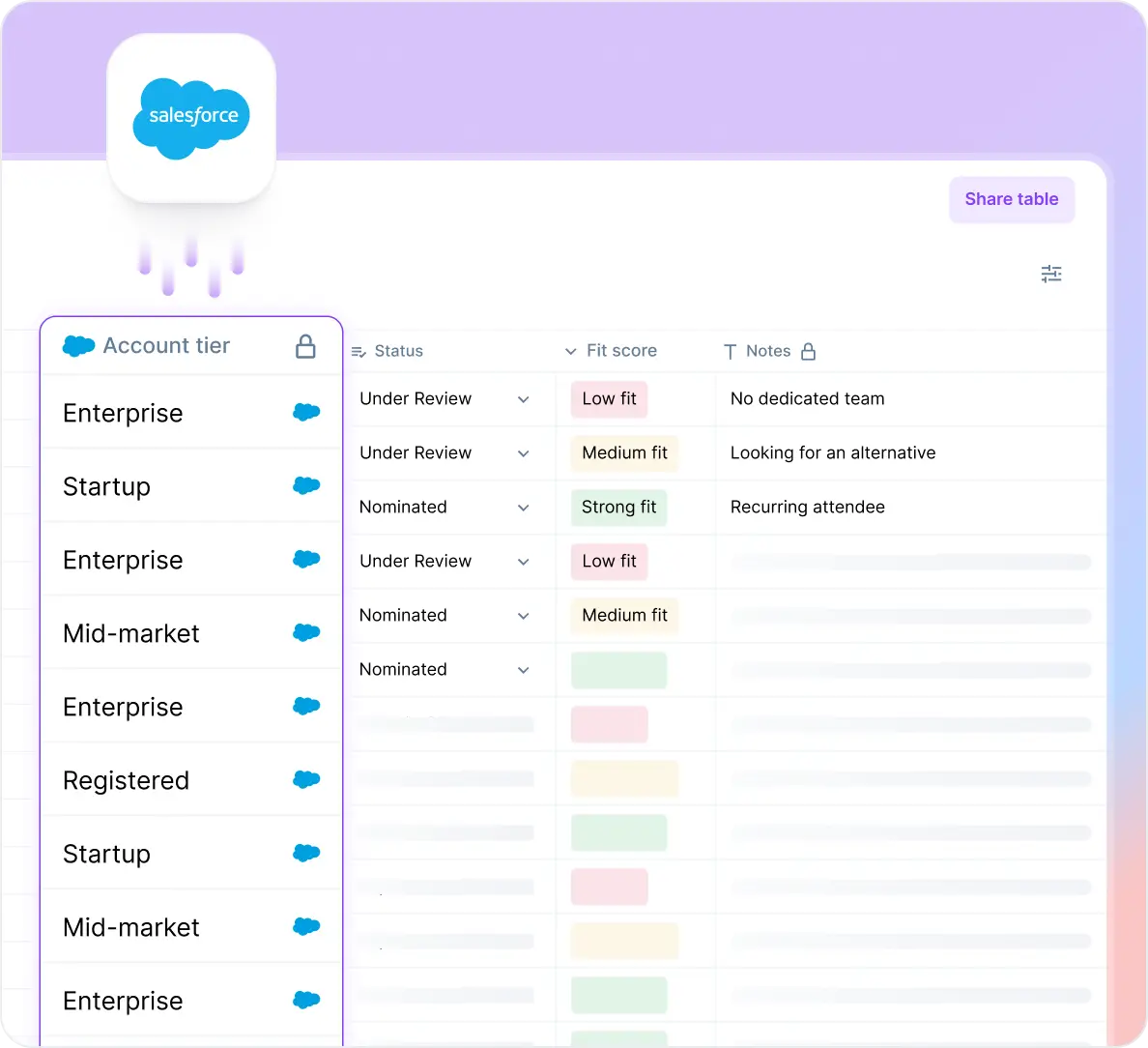
What Smart Tables changes
- CRM data is always synced in every row when you open the table: Account tier, deal stage, rep notes, and engagement history populate from Salesforce and update as the source updates. No export, no re-import, no "is this still accurate" before a decision.
- AEs nominate with context already in front of them: When an AE adds a name, they can see deal stage and account history before they submit
- Approvers see CRM context in the same view as the name: Your VP doesn’t have to alt-tab to Salesforce. You can build custom approval flows based on how your team decides
- Define your ideal guest and score each row against that criteria: Describe what a strong fit looks like and Smart Tables scores every row against it. A web research column fills in what the CRM might not have, such as recent job changes or funding rounds
- No extra licence needed for collaborators: An agency or sponsor verifies by email and sees only the columns explicitly opened to them, without a licence.
- Follow-up tracking for leads: Leads get assigned to reps in the same table where nominations started. An agent monitors Salesforce for each rep's activity, nudges them before the follow-up SLA closes, and escalates to the sales manager if it passes. Every status (contacted, meeting booked, no response) is visible in the table before anyone has to ask.
.webp)
What this means for your events program
When the data is live and self-serve in one table, the questions that currently route through the event marketer (did my nomination get approved, who nominated this person, did the rep follow up) answer themselves. They can focus on which event formats are converting, and whether the program mix needs to shift.
The quality of the room improves because everything from nominations to the final guest list is based on prior context. You’re able to narrow in on the 30 leads that are strong fits for your criteria from the pool of nominees. So, for example, you’d know that every invite is going to a Director-level persona at a company that employs 1000+ people and is dealing with a problem you can solve.
Unlike a spreadsheet, every decision taken in the smart table triggers an action - an approval leads to an invite, and if an invite tier doesn’t fill up, the system moves on to the next tier. You define an SLA and the sales reps are nudged to follow-up before the lead goes cold. There’s no confusion about which reps own which contacts, and what they’ve done since the event ended.
.webp)
The platform takes on the job of being the connective tissue, and the events team gains a level of visibility it never consistently had because they’re not just executing anymore. The friction between sales and marketing drops, and debriefs are no longer about fact finding.
Your baseline shifts from “did this happen” to what decisions need to be taken based on which regions and formats are working and which aren’t. Your events program starts to build on itself.
If you want to see this in action for your own guest list, talk to us.
{{demo-widget-1}}
Frequently asked questions
What's the difference between guest list management for B2B events and for weddings or consumer events?
Consumer and wedding guest list tools are built around RSVP counts, meal choices, and seating arrangements. B2B guest list management centers on a different set of problems: nominations that need to be merged from multiple sources, approvals that require CRM context to make a fast decision, and follow-up that has to be visible to a sales team, not just an event host.
Can I use Airtable for B2B event guest list management?
Yes, and many teams do, particularly as a step up from a plain spreadsheet. Airtable's native Salesforce sync, available on Business and Enterprise Scale plans, pulls CRM records in automatically on roughly an hourly refresh, but it only runs one way: nothing entered in Airtable writes back to Salesforce. Airtable also doesn't include a built-in, events-specific approval workflow or post-event follow-up tracking, so a team still has to build or bolt on that layer itself.
How do I connect Salesforce data to an event guest list spreadsheet?
Most teams handle this by exporting a Salesforce report into Google Sheets, importing a Salesforce report directly, or setting up a scheduled export, all variations on the same underlying task: getting CRM fields into the spreadsheet without manually retyping them. Each approach still produces a snapshot that goes stale the moment the underlying Salesforce record changes, the core limitation they share.
Is it safe to share CRM fields like deal stage or account tier in a guest list spreadsheet with external approvers or agencies?
It depends entirely on how access is controlled. A spreadsheet shared broadly exposes every column to everyone with the link, including CRM fields that shouldn't leave the company. Tools with column-level permissions let a team share only the columns an outside collaborator needs, such as name and company, while keeping deal stage, account tier, and other CRM fields restricted to internal approvers.
How do you handle a guest list change or cancellation after approval has already happened?
This is where the staleness problem shows up again after the fact: a name approved on Monday can be irrelevant by Thursday if the account churns, the contact changes roles, or the deal falls through. Static spreadsheets have no way to flag that the underlying data moved after the approval was recorded. A guest list connected to a live data source can surface the change instead of leaving an approved name sitting on a list that's already wrong.
Does this apply if we use HubSpot instead of Salesforce?
Yes. The three-stage workflow (nomination, approval, follow-up) is CRM-agnostic. Sync mechanics differ by tool: Airtable's native integration is built for Salesforce, one-way and hourly, while HubSpot connections tend to run through HubSpot's own Data Sync or Workflows products on different terms. The four evaluation questions apply regardless of CRM. Check whether the tool being evaluated has a native integration for the CRM in use, and whether it runs one way or two.


Subscribe to our blog now!

.png)
.png)
.png)
.png)


