Watch On Demand
Back To All Articles

What is AI-powered event management and when is it not enough?

An AI-powered event management platform is not the same as one that's AI-native. Let's examine the difference that makes for event teams.

[.ebook-q-card][.ebook-body-text]TL;DR: Most event platforms have added AI features on top of legacy infrastructure. They're AI-powered. AI-native is a different architecture: the platform learns your playbook and applies it automatically to every event. This piece covers how to tell the difference, what the setup looks like, and the two decisions that determine whether you get a structural change or just faster manual work.[.ebook-body-text][.ebook-q-card]

AI-native event management is a platform architecture where the system learns how an organization runs events: the standards, the integrations, the registration approval rules, the follow-up workflows. 

It carries that knowledge forward to every subsequent event automatically. The AI layer operates from a learned playbook.

Before this architecture existed, every event was a fresh start. The team that ran your last conference knew how you do things. That knowledge lived in their heads, in a shared document, or in the memory of whoever QA'd the setup. 

Scaling the program meant more handoffs, more inconsistency, more people doing the same setup work for the 35th event that they did for the first.

What was the problem before AI event management?

Event platforms have historically been built as a set of features: registration, email, integrations, check-in. Every feature is a configuration task that has to be repeated on every event.

These platforms can’t remember how you like things done. This is because they store conference data in one system and webinar data in another (because they are an amalgamation of different products under the hood). That leaves a human to carry the institutional knowledge of the program.

This is a structural problem for a team running upwards of 50 events a year. Even if you copy the last event and manually audit every tab, it would take a few hours per event. That’s more than 100 hours sunk into mechanical tasks that an event management platform could have handled.

[.ebook-q-card][.ebook-body-text]"We duplicate the event, then manually check each and every tab for every single event." Event Marketing Manager, enterprise cybersecurity company[.ebook-body-text][.ebook-q-card]

The good thing is that event programs have a playbook that doesn’t change from one event to the next. It covers the decisions a team has already made about how they run events, what the brand looks like, what integrations fire, how they communicate with attendees, and which registration approval rules apply. 

What changes is the specific details of each event. A platform architecture that distinguishes between what always stays the same and what changes each time - essentially learning your playbook and applying it to every future event by default is what AI event management should be about.

This makes it possible for your team to make decisions once that the platform then carries.

How does an AI-native event management platform work?

The core components

An AI-native event management platform has three components: a unified data layer, a playbook, and AI capabilities that need the other two. Each component depends on the one before it.
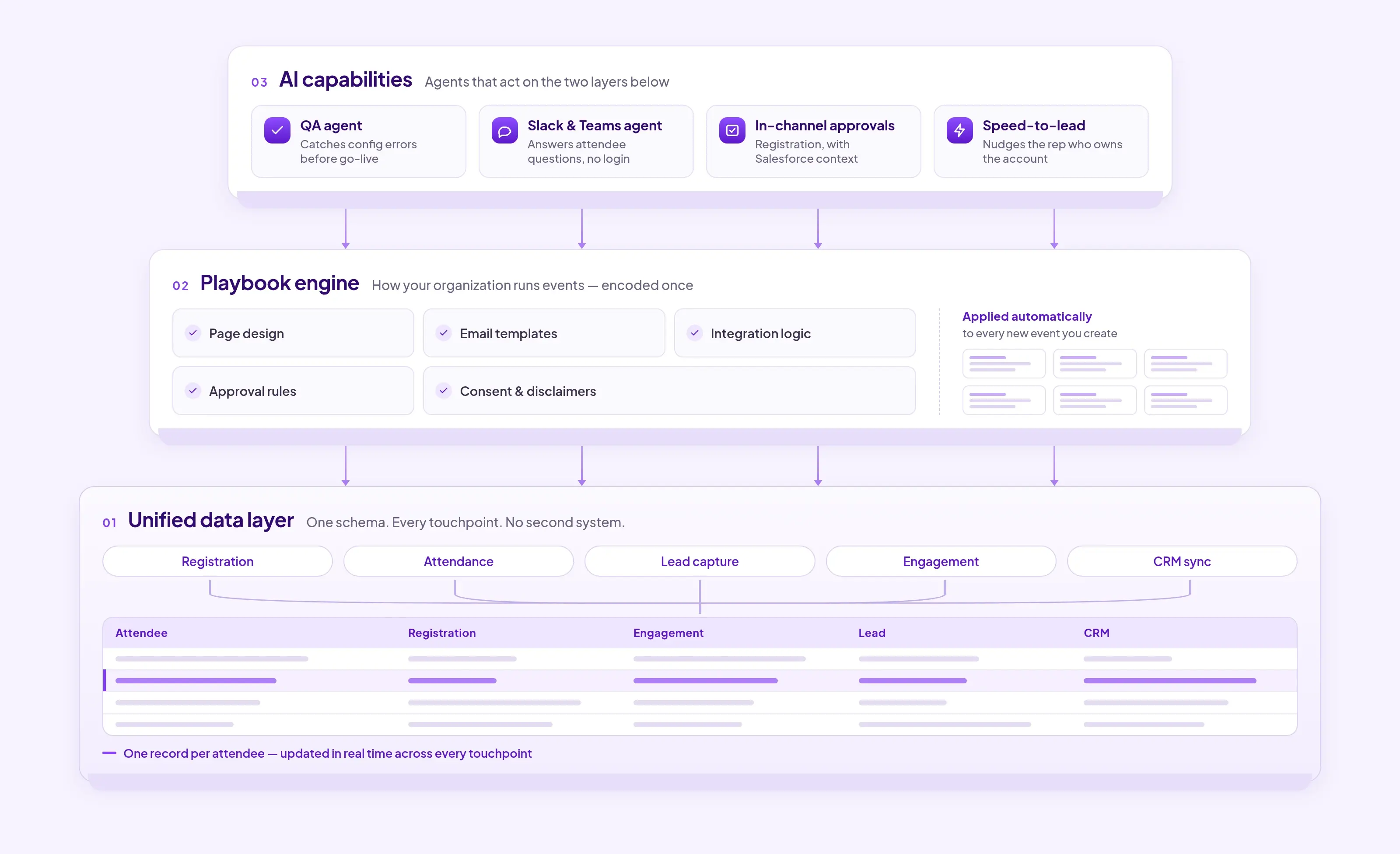
  • Unified data layer: All event data (registration, attendance, lead capture, engagement, CRM sync) exists in one schema and one layer. Event teams get one record per attendee, updated in real time across every touchpoint. This is the foundation without which AI capabilities operate on incomplete data and produce meaningless output
  • Playbook engine: The set of rules, standards, and configurations that define how your organization runs events: page design requirements, email templates, integration logic, registration approval rules, consent and disclaimer requirements.

In an AI-native platform, this playbook is encoded once and applied automatically to every new event. 

  • AI capabilities: The agents and automation that operate on top of the unified data and the playbook. In Zuddl: a QA agent that catches configuration errors before an event goes live,Slack and Teams agents that answer attendee questions for sales without requiring a platform login, registration approvals that happen in-channel with Salesforce context attached, and speed-to-lead alerts that nudge the rep who owns an account the moment it registers.

Identifying good AI event management: a practical example of how these components work together

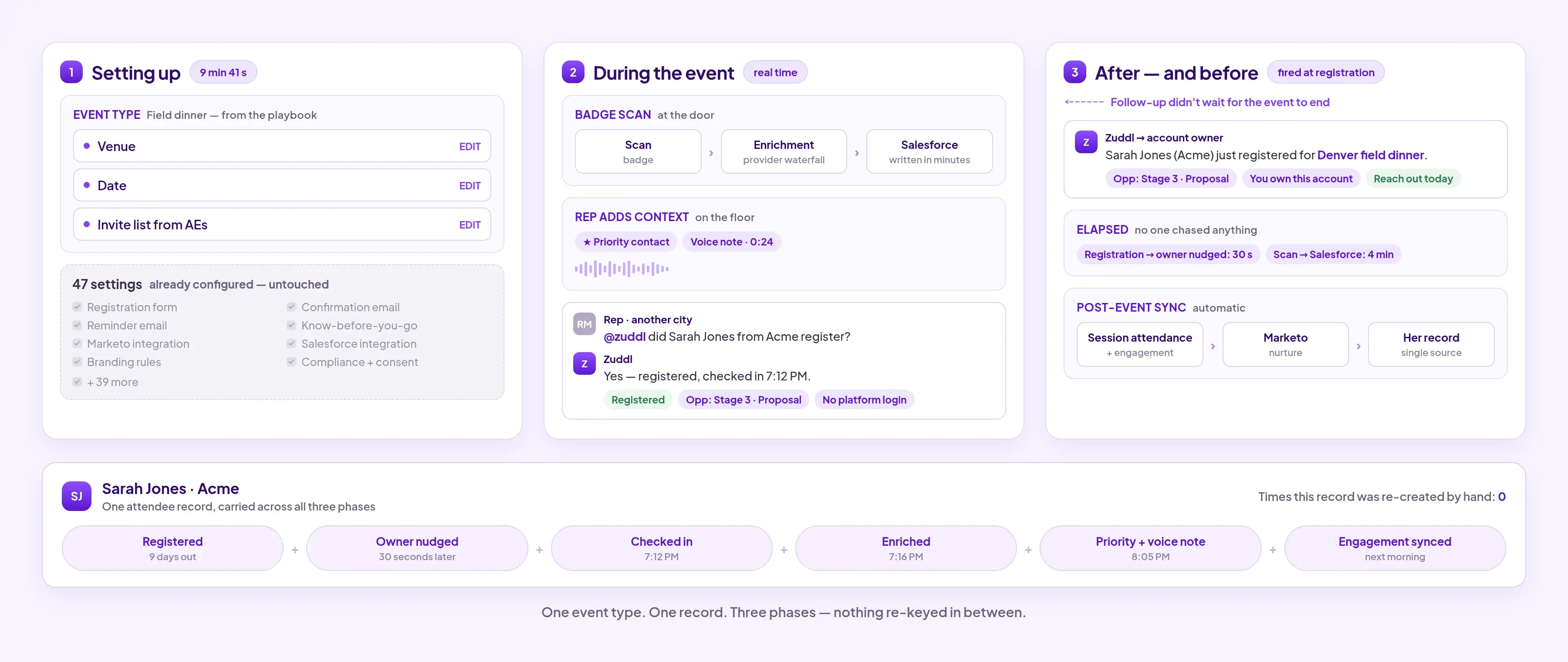
Let’s take an example of setting up a field dinner on an AI-native platform.

Setting up the event

A regional field marketer creates a field dinner in Zuddl. She selects the "field dinner" event type, which already has:

  • Registration form
  • Confirmation, reminder, and know-before-you-go emails
  • Marketo and Salesforce integration
  • Branding and compliance rules

The guided checklist shows her exactly what to update: the venue, the date, and the invite list her AEs have been building. She doesn't touch the 47 other things that are already correctly configured. Setup time: under 10 minutes.

During the event

  • The sales rep at the dinner scans a badge. The lead enriches through a waterfall of data providers and writes to Salesforce within minutes
  • The rep tags the lead as a priority contact and records a voice note.
  • A sales rep in another city asks in Slack: "@Zuddl did Sarah Jones from Acme register?" She gets a real-time answer with the Salesforce opportunity stage, without logging into the event platform.

After the event

Follow-up didn't wait for the event to end. When Sarah registered, the rep who owns the account was nudged in Slack with her deal context attached. Her session attendance and engagement data flows into Marketo and into her record.
What this means at the program level

When this is working, the Head of Events runs the program instead of being involved in the details of every event. The field marketer configuring a dinner in Denver is working from the same standards as the events team running the conference in New York.

[.ebook-q-card][.ebook-body-text]"The QA agent is super impressive and the guided event creation is huge." — David Nowlan-Shipp, Global Corporate & Field Events, BigCommerce[.ebook-body-text][.ebook-q-card]

The time saved is spent on decisions that can't be automated: which event types to add to the playbook, how to refine follow-up logic, whether the program mix is generating the right pipeline conversations.

What are the two most important decisions a human makes within an AI event management platform?

The value of an AI-native platform is proportional to the quality of the playbook encoded into it. Two decisions determine whether implementation produces a structural change or just ‘makes you faster’.
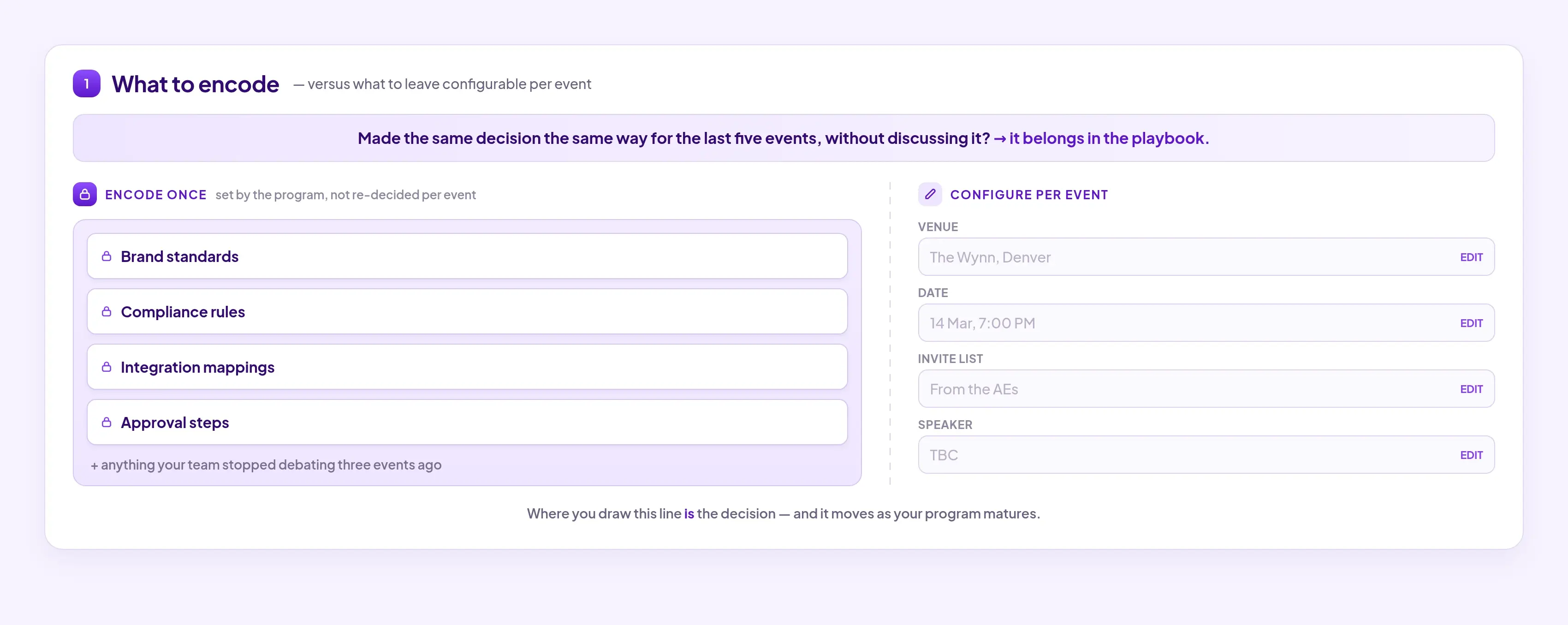
  1. What to encode in the playbook versus what to leave configurable per event: if your team made the same decision the same way for the last five events without discussing it, it belongs in the playbook. For eg. brand standards, compliance rules, integration mappings, approval steps.

What stays configurable is the venue, the date, the invite list, the specific speaker. You need to find the mix that works for your team and the way you run events.

  1. Don’t treat AI as a set of features when making a buying decision: AI should be an operator within the platform. Ask the vendor what happens when a sales rep needs attendee data mid-event. If it surfaces in Slack without any action from the rep, that's a behavior change. 
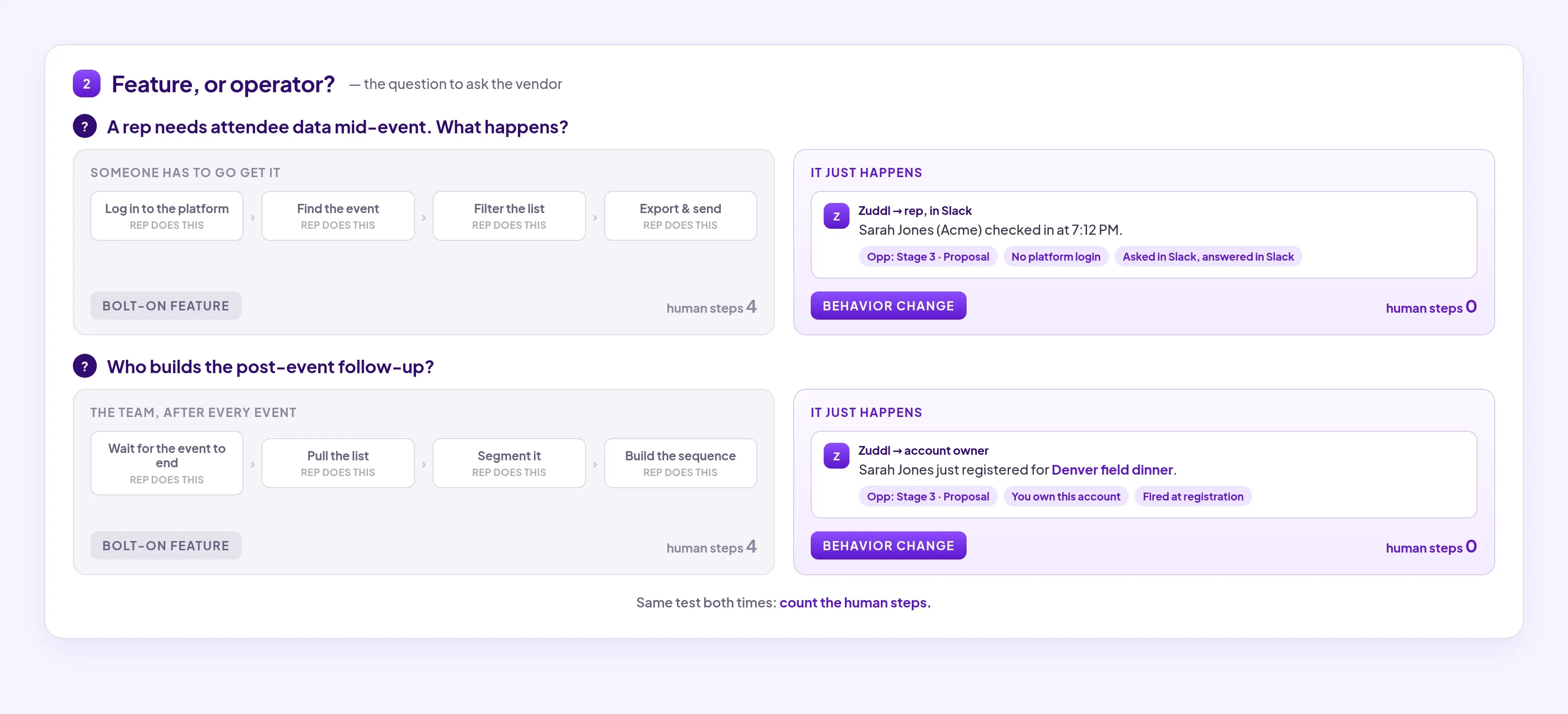
Apply the same test to post-event follow-up: if your team still builds the sequence after each event, AI is a bolt-on feature. If the rep who owns the account is nudged in Slack the moment they register, with the deal context attached, that’s AI operating the right way.

How do you set up AI event management if you're on a legacy platform?

The setup process has two phases: building the playbook, which happens once and shapes every future event, then connecting the AI capabilities to your tech stack. We’re assuming you already use a legacy platform.

Step 1: The configuration audit 

On a legacy platform, institutional knowledge lives in three places: the heads of your most experienced team members, a shared doc that may or may not be current, and the last event someone remembered to duplicate carefully. You want to get that knowledge documented first.

Look at your last 12 months of events. Group them by format: field dinners, webinars, sponsored conferences and the side events you run alongside them. Then split each format by region if your consent or communication requirements differ. For each group, identify what was configured the same way every time, and what should have been the same. 

For each event type, document:

  • Registration form fields that never change
  • Email sequence structure (number of touches, intervals, sender)
  • CRM integration mappings (which fields sync to Salesforce or HubSpot, and when)
  • Campaign naming convention and where the event sits in your Salesforce campaign hierarchy
  • How registration, attendance, and no-show should show up on the Salesforce campaign
  • Branding requirements
  • Registration approval rules and compliance checkpoints

Failure signal: If you can't identify consistent patterns across events of the same type, your program doesn't have a playbook yet. You can still use this step to create the playbook.

Step 2: Make scaling the program easy

Most legacy platforms let you duplicate a previous event and use it as a starting point. The problem is that duplication doesn’t carry over to your webinar tool. Someone has to reconfigure and set up the event separately.

Zuddl’s custom event types allow you to standardize an event across virtual, hybrid, in-person or field events. The branding, registration form, email sequence, integration mappings, and compliance rules are pre-defined as per your workflows. A team member creating a new field dinner selects the event type, updates the venue, date, and invite list, and launches a compliant event without needing to know how the platform is configured underneath.
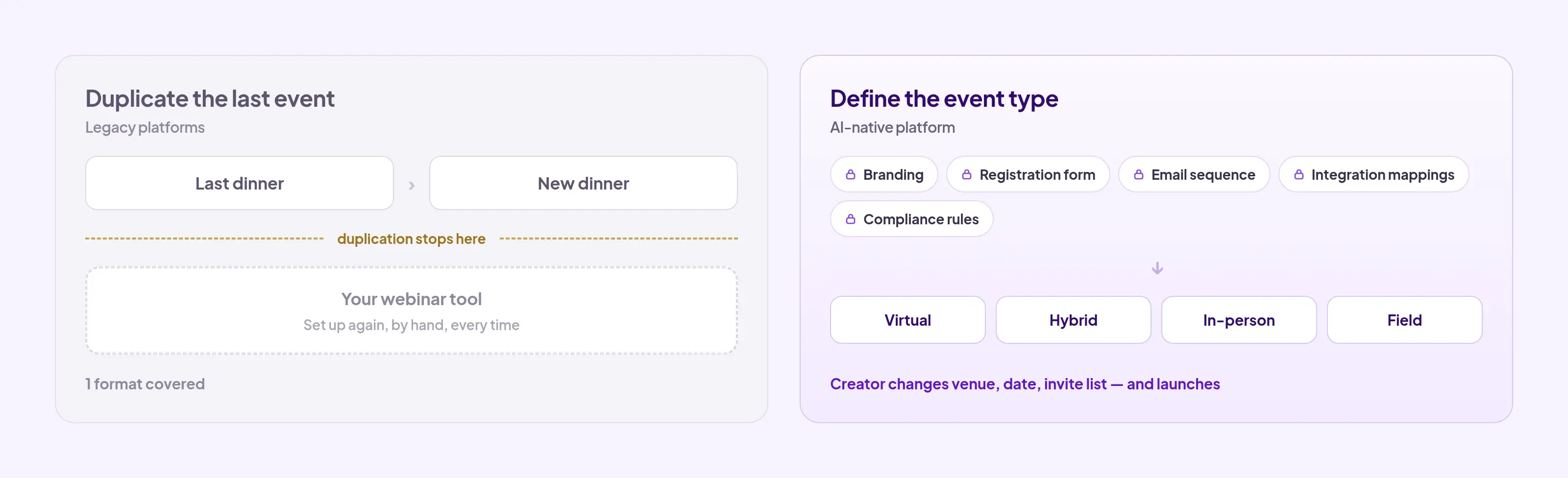
Build one event type completely before rolling out across the program. Test it on a real event. The first run will surface things you didn't document in Step 1 — edge cases, exceptions, fields you assumed would be obvious. Encode those before building the next event type.

Don't try to migrate existing events retroactively. Apply the new event type to the next event of each format going forward. 

Failure signal: If team members still need to check before launching after the event type is built, something that should be locked is still configurable. Go back to the event type and encode the missing rule.

Step 3: Connect real-time data to where sales works

On most legacy platforms, lead data reaches sales on a batch sync and onsite badge scans often don’t sync at all, arriving as a spreadsheet from the badge vendor days later. There’s a gap between badge scan and the Salesforce record updating, which means your leads go cold.

The setup here has two parts.

  • Real-time CRM sync: Configure your event platform to push lead data to Salesforce or HubSpot within minutes of capture, and confirm it respects your existing dedupe, matching, and assignment rules. In Zuddl, this happens natively.
  • Slack & Teams agents: Sales works in Slack or Teams, not in the event platform. Ideally they should be able to ask the platform in Slack about any attendee by name, email, or company and get a real-time answer with Salesforce opportunity context. 
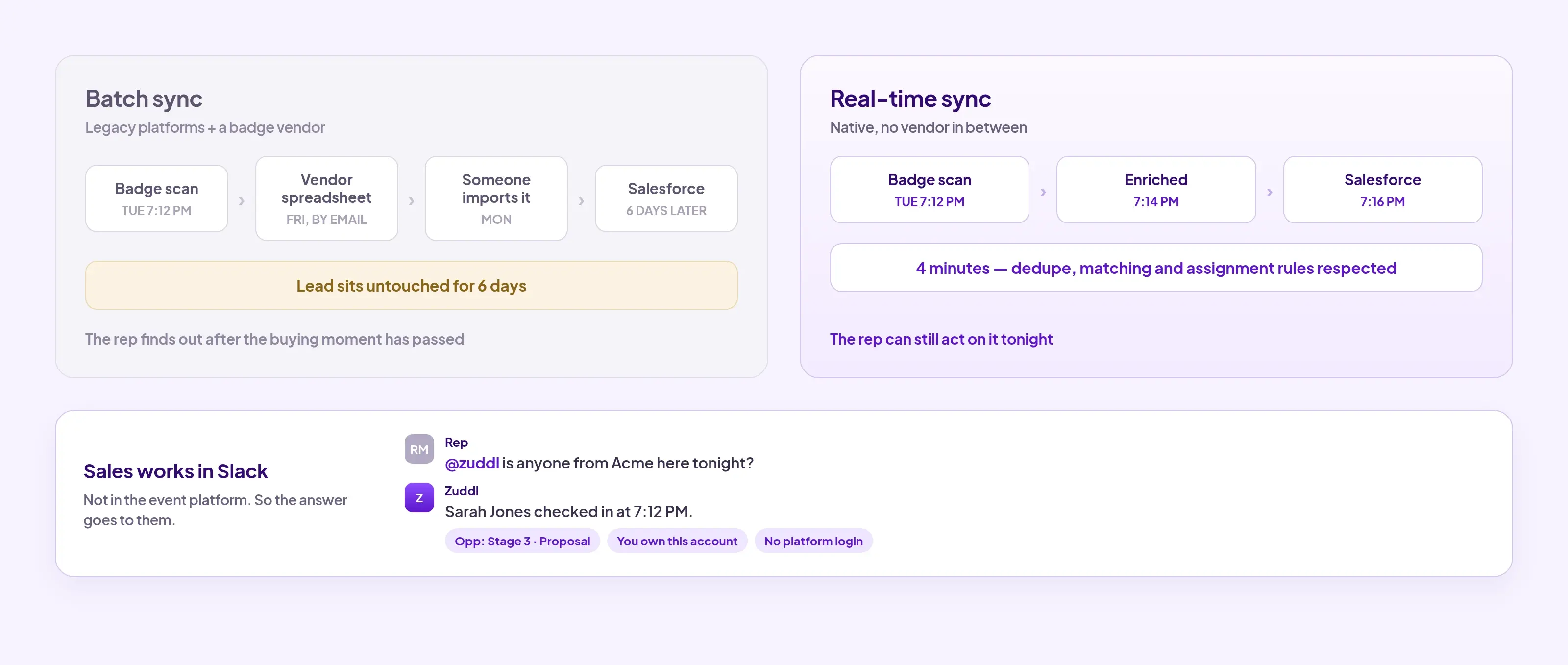
Zuddl already does this. You can get registration alerts in the channel with CRM data attached for reps to prioritize follow-up without switching tabs or asking the event team.

The difference between AI-powered and AI-native platforms at a glance

AI-Powered AI-Native
Event setup Every event starts from near-blank state Playbook applied automatically from event type
Data model Siloed by event format Unified across all event types and formats
QA process Manual audit before every launch QA agent flags errors before they reach attendees
Sales access to event data Manual export, hours or days after the event Real-time via Slack or Teams, no platform login needed
What AI actually does Makes individual tasks faster Changes what the team is able to do
Vendor consolidation Products acquired, data still separate Single schema across all event types

If your team is running hundreds of events a year and your current platform needs you to configure most things manually each time, your event program is paying a lot of hidden costs. If you’re curious about how an AI-native, unified platform could work for your program, we should talk.  

{{demo-widget-1}}

Frequently Asked Questions

What is AI-powered event management?

AI-powered event management refers to event platforms that have added AI features to their existing infrastructure: chatbots, email subject line generators, lead scoring fields powered by third-party APIs. These features make individual tasks faster but don't change how the underlying platform operates. Every event still starts from a near-blank state; the AI assists within that constraint rather than removing it.

How is AI used in event management?

AI is used in two fundamentally different ways. On legacy platforms, AI features (chatbots, email subject line generators, basic lead scoring) make individual tasks faster but do not change how the platform operates. On AI-native platforms, AI capabilities operate on a unified data layer and encoded playbook: QA agents catch configuration errors before launch, follow-up nudges reach sales reps in Slack.

What does AI-native mean in event management?

An AI-native platform is one where intelligence is built into the architecture, not added as a feature layer. This requires: a unified data layer where all event data exists in one schema across event types, a playbook engine where organizational standards are encoded once and applied automatically, and AI capabilities that operate on that unified data in real time. A platform that stores webinar data separately from field event data cannot operate as AI-native regardless of its AI feature count.

Will AI replace event planners?

No. AI event management automates configuration, QA, data sync, and post-event follow-up sequencing. It does not replace the judgment calls that define a good event: which speakers to invite, how to design the agenda, what makes the experience worth attending. Teams using AI-native platforms typically run more events with the same headcount; the recovered time goes toward program strategy, not fewer people doing the same operational work.

What is the best AI event platform?

The best AI event platform is one where AI is built into the architecture, not added as a feature layer. The practical test: does the platform operate from a learned playbook, or does every event start from a blank state? Platforms built on a single unified data layer can run AI capabilities across conferences, field events, webinars, and third-party lead capture consistently. Platforms assembled from acquisitions run separate codebases where AI features behave differently in each product.

Subscribe to our blog

Book A Demo
Deliver your best event ever with Zuddl

Subscribe to our blog now!

Get fresh ideas, actionable insights and expert guidance for B2B events delivered directly to your inbox!

What is AI-powered event management and when is it not enough?

[.ebook-q-card][.ebook-body-text]TL;DR: Most event platforms have added AI features on top of legacy infrastructure. They're AI-powered. AI-native is a different architecture: the platform learns your playbook and applies it automatically to every event. This piece covers how to tell the difference, what the setup looks like, and the two decisions that determine whether you get a structural change or just faster manual work.[.ebook-body-text][.ebook-q-card]

AI-native event management is a platform architecture where the system learns how an organization runs events: the standards, the integrations, the registration approval rules, the follow-up workflows. 

It carries that knowledge forward to every subsequent event automatically. The AI layer operates from a learned playbook.

Before this architecture existed, every event was a fresh start. The team that ran your last conference knew how you do things. That knowledge lived in their heads, in a shared document, or in the memory of whoever QA'd the setup. 

Scaling the program meant more handoffs, more inconsistency, more people doing the same setup work for the 35th event that they did for the first.

What was the problem before AI event management?

Event platforms have historically been built as a set of features: registration, email, integrations, check-in. Every feature is a configuration task that has to be repeated on every event.

These platforms can’t remember how you like things done. This is because they store conference data in one system and webinar data in another (because they are an amalgamation of different products under the hood). That leaves a human to carry the institutional knowledge of the program.

This is a structural problem for a team running upwards of 50 events a year. Even if you copy the last event and manually audit every tab, it would take a few hours per event. That’s more than 100 hours sunk into mechanical tasks that an event management platform could have handled.

[.ebook-q-card][.ebook-body-text]"We duplicate the event, then manually check each and every tab for every single event." Event Marketing Manager, enterprise cybersecurity company[.ebook-body-text][.ebook-q-card]

The good thing is that event programs have a playbook that doesn’t change from one event to the next. It covers the decisions a team has already made about how they run events, what the brand looks like, what integrations fire, how they communicate with attendees, and which registration approval rules apply. 

What changes is the specific details of each event. A platform architecture that distinguishes between what always stays the same and what changes each time - essentially learning your playbook and applying it to every future event by default is what AI event management should be about.

This makes it possible for your team to make decisions once that the platform then carries.

How does an AI-native event management platform work?

The core components

An AI-native event management platform has three components: a unified data layer, a playbook, and AI capabilities that need the other two. Each component depends on the one before it.

  • Unified data layer: All event data (registration, attendance, lead capture, engagement, CRM sync) exists in one schema and one layer. Event teams get one record per attendee, updated in real time across every touchpoint. This is the foundation without which AI capabilities operate on incomplete data and produce meaningless output
  • Playbook engine: The set of rules, standards, and configurations that define how your organization runs events: page design requirements, email templates, integration logic, registration approval rules, consent and disclaimer requirements.

In an AI-native platform, this playbook is encoded once and applied automatically to every new event. 

  • AI capabilities: The agents and automation that operate on top of the unified data and the playbook. In Zuddl: a QA agent that catches configuration errors before an event goes live,Slack and Teams agents that answer attendee questions for sales without requiring a platform login, registration approvals that happen in-channel with Salesforce context attached, and speed-to-lead alerts that nudge the rep who owns an account the moment it registers.

Identifying good AI event management: a practical example of how these components work together

Let’s take an example of setting up a field dinner on an AI-native platform.

Setting up the event

A regional field marketer creates a field dinner in Zuddl. She selects the "field dinner" event type, which already has:

  • Registration form
  • Confirmation, reminder, and know-before-you-go emails
  • Marketo and Salesforce integration
  • Branding and compliance rules

The guided checklist shows her exactly what to update: the venue, the date, and the invite list her AEs have been building. She doesn't touch the 47 other things that are already correctly configured. Setup time: under 10 minutes.

During the event

  • The sales rep at the dinner scans a badge. The lead enriches through a waterfall of data providers and writes to Salesforce within minutes
  • The rep tags the lead as a priority contact and records a voice note.
  • A sales rep in another city asks in Slack: "@Zuddl did Sarah Jones from Acme register?" She gets a real-time answer with the Salesforce opportunity stage, without logging into the event platform.

After the event

Follow-up didn't wait for the event to end. When Sarah registered, the rep who owns the account was nudged in Slack with her deal context attached. Her session attendance and engagement data flows into Marketo and into her record.

What this means at the program level

When this is working, the Head of Events runs the program instead of being involved in the details of every event. The field marketer configuring a dinner in Denver is working from the same standards as the events team running the conference in New York.

[.ebook-q-card][.ebook-body-text]"The QA agent is super impressive and the guided event creation is huge." — David Nowlan-Shipp, Global Corporate & Field Events, BigCommerce[.ebook-body-text][.ebook-q-card]

The time saved is spent on decisions that can't be automated: which event types to add to the playbook, how to refine follow-up logic, whether the program mix is generating the right pipeline conversations.

What are the two most important decisions a human makes within an AI event management platform?

The value of an AI-native platform is proportional to the quality of the playbook encoded into it. Two decisions determine whether implementation produces a structural change or just ‘makes you faster’.

  1. What to encode in the playbook versus what to leave configurable per event: if your team made the same decision the same way for the last five events without discussing it, it belongs in the playbook. For eg. brand standards, compliance rules, integration mappings, approval steps.

What stays configurable is the venue, the date, the invite list, the specific speaker. You need to find the mix that works for your team and the way you run events.

  1. Don’t treat AI as a set of features when making a buying decision: AI should be an operator within the platform. Ask the vendor what happens when a sales rep needs attendee data mid-event. If it surfaces in Slack without any action from the rep, that's a behavior change. 

Apply the same test to post-event follow-up: if your team still builds the sequence after each event, AI is a bolt-on feature. If the rep who owns the account is nudged in Slack the moment they register, with the deal context attached, that’s AI operating the right way.

How do you set up AI event management if you're on a legacy platform?

The setup process has two phases: building the playbook, which happens once and shapes every future event, then connecting the AI capabilities to your tech stack. We’re assuming you already use a legacy platform.

Step 1: The configuration audit 

On a legacy platform, institutional knowledge lives in three places: the heads of your most experienced team members, a shared doc that may or may not be current, and the last event someone remembered to duplicate carefully. You want to get that knowledge documented first.

Look at your last 12 months of events. Group them by format: field dinners, webinars, sponsored conferences and the side events you run alongside them. Then split each format by region if your consent or communication requirements differ. For each group, identify what was configured the same way every time, and what should have been the same. 

For each event type, document:

  • Registration form fields that never change
  • Email sequence structure (number of touches, intervals, sender)
  • CRM integration mappings (which fields sync to Salesforce or HubSpot, and when)
  • Campaign naming convention and where the event sits in your Salesforce campaign hierarchy
  • How registration, attendance, and no-show should show up on the Salesforce campaign
  • Branding requirements
  • Registration approval rules and compliance checkpoints

Failure signal: If you can't identify consistent patterns across events of the same type, your program doesn't have a playbook yet. You can still use this step to create the playbook.

Step 2: Make scaling the program easy

Most legacy platforms let you duplicate a previous event and use it as a starting point. The problem is that duplication doesn’t carry over to your webinar tool. Someone has to reconfigure and set up the event separately.

Zuddl’s custom event types allow you to standardize an event across virtual, hybrid, in-person or field events. The branding, registration form, email sequence, integration mappings, and compliance rules are pre-defined as per your workflows. A team member creating a new field dinner selects the event type, updates the venue, date, and invite list, and launches a compliant event without needing to know how the platform is configured underneath.

Build one event type completely before rolling out across the program. Test it on a real event. The first run will surface things you didn't document in Step 1 — edge cases, exceptions, fields you assumed would be obvious. Encode those before building the next event type.

Don't try to migrate existing events retroactively. Apply the new event type to the next event of each format going forward. 

Failure signal: If team members still need to check before launching after the event type is built, something that should be locked is still configurable. Go back to the event type and encode the missing rule.

Step 3: Connect real-time data to where sales works

On most legacy platforms, lead data reaches sales on a batch sync and onsite badge scans often don’t sync at all, arriving as a spreadsheet from the badge vendor days later. There’s a gap between badge scan and the Salesforce record updating, which means your leads go cold.

The setup here has two parts.

  • Real-time CRM sync: Configure your event platform to push lead data to Salesforce or HubSpot within minutes of capture, and confirm it respects your existing dedupe, matching, and assignment rules. In Zuddl, this happens natively.
  • Slack & Teams agents: Sales works in Slack or Teams, not in the event platform. Ideally they should be able to ask the platform in Slack about any attendee by name, email, or company and get a real-time answer with Salesforce opportunity context. 

Zuddl already does this. You can get registration alerts in the channel with CRM data attached for reps to prioritize follow-up without switching tabs or asking the event team.

The difference between AI-powered and AI-native platforms at a glance

AI-Powered AI-Native
Event setup Every event starts from near-blank state Playbook applied automatically from event type
Data model Siloed by event format Unified across all event types and formats
QA process Manual audit before every launch QA agent flags errors before they reach attendees
Sales access to event data Manual export, hours or days after the event Real-time via Slack or Teams, no platform login needed
What AI actually does Makes individual tasks faster Changes what the team is able to do
Vendor consolidation Products acquired, data still separate Single schema across all event types

If your team is running hundreds of events a year and your current platform needs you to configure most things manually each time, your event program is paying a lot of hidden costs. If you’re curious about how an AI-native, unified platform could work for your program, we should talk.  

{{demo-widget-1}}

Frequently Asked Questions

What is AI-powered event management?

AI-powered event management refers to event platforms that have added AI features to their existing infrastructure: chatbots, email subject line generators, lead scoring fields powered by third-party APIs. These features make individual tasks faster but don't change how the underlying platform operates. Every event still starts from a near-blank state; the AI assists within that constraint rather than removing it.

How is AI used in event management?

AI is used in two fundamentally different ways. On legacy platforms, AI features (chatbots, email subject line generators, basic lead scoring) make individual tasks faster but do not change how the platform operates. On AI-native platforms, AI capabilities operate on a unified data layer and encoded playbook: QA agents catch configuration errors before launch, follow-up nudges reach sales reps in Slack.

What does AI-native mean in event management?

An AI-native platform is one where intelligence is built into the architecture, not added as a feature layer. This requires: a unified data layer where all event data exists in one schema across event types, a playbook engine where organizational standards are encoded once and applied automatically, and AI capabilities that operate on that unified data in real time. A platform that stores webinar data separately from field event data cannot operate as AI-native regardless of its AI feature count.

Will AI replace event planners?

No. AI event management automates configuration, QA, data sync, and post-event follow-up sequencing. It does not replace the judgment calls that define a good event: which speakers to invite, how to design the agenda, what makes the experience worth attending. Teams using AI-native platforms typically run more events with the same headcount; the recovered time goes toward program strategy, not fewer people doing the same operational work.

What is the best AI event platform?

The best AI event platform is one where AI is built into the architecture, not added as a feature layer. The practical test: does the platform operate from a learned playbook, or does every event start from a blank state? Platforms built on a single unified data layer can run AI capabilities across conferences, field events, webinars, and third-party lead capture consistently. Platforms assembled from acquisitions run separate codebases where AI features behave differently in each product.

Subscribe to our blog

Book A Demo

Subscribe to our blog now!

Get fresh ideas, actionable insights and expert guidance for B2B events delivered directly to your inbox!

Our curated hub of inspiration

Take control of your virtual event production with Zuddl.
Own every step from registrations to approvals with Zuddl.
Own your event app from branding to CRM sync with Zuddl.
Book a Demo
Book A Demo
Book A Demo
Steph’s tip for event marketers: 
Bring a simple cost-savings table like this: 
Line Item
2024 Cost
2025 Cost(after negotiation)
Cost Savings
Venue package
$200k
$170k
$30k
Lead capture tech
$18k
$12k
$6k
Then say, “This $36K savings covers the increase I’m asking for.”

<script type="application/ld+json">
[
 {
   "@context": "https://schema.org",
   "@type": "BlogPosting",
   "headline": "AI-Powered Event Management: What Makes a Platform AI-Native",
   "description": "Most event platforms bolt AI onto legacy infrastructure. Learn what separates AI-powered from AI-native event management — and how to set it up.",
   "publisher": {
     "@type": "Organization",
     "name": "Zuddl",
     "url": "https://www.zuddl.com",
     "logo": {
       "@type": "ImageObject",
       "url": "https://www.zuddl.com/images/zuddl-logo.png"
     }
   },
   "mainEntityOfPage": {
     "@type": "WebPage",
     "@id": "https://www.zuddl.com/blog/ai-powered-event-management"
   }
 },
 {
   "@context": "https://schema.org",
   "@type": "FAQPage",
   "mainEntity": [
     {
       "@type": "Question",
       "name": "What is AI-powered event management?",
       "acceptedAnswer": {
         "@type": "Answer",
         "text": "AI-powered event management refers to event platforms that have added AI features to their existing infrastructure: chatbots, email subject line generators, lead scoring fields powered by third-party APIs. These features make individual tasks faster but don't change how the underlying platform operates. Every event still starts from a near-blank state; the AI assists within that constraint rather than removing it."
       }
     },
     {
       "@type": "Question",
       "name": "How is AI used in event management?",
       "acceptedAnswer": {
         "@type": "Answer",
         "text": "AI is used in two fundamentally different ways. On legacy platforms, AI features (chatbots, email subject line generators, basic lead scoring) make individual tasks faster but do not change how the platform operates. On AI-native platforms, AI capabilities operate on a unified data layer and encoded playbook: QA agents catch configuration errors before launch, follow-up nudges reach sales reps in Slack."
       }
     },
     {
       "@type": "Question",
       "name": "What does AI-native mean in event management?",
       "acceptedAnswer": {
         "@type": "Answer",
         "text": "An AI-native platform is one where intelligence is built into the architecture, not added as a feature layer. This requires: a unified data layer where all event data exists in one schema across event types, a playbook engine where organizational standards are encoded once and applied automatically, and AI capabilities that operate on that unified data in real time. A platform that stores webinar data separately from field event data cannot operate as AI-native regardless of its AI feature count."
       }
     },
     {
       "@type": "Question",
       "name": "Will AI replace event planners?",
       "acceptedAnswer": {
         "@type": "Answer",
         "text": "No. AI event management automates configuration, QA, data sync, and post-event follow-up sequencing. It does not replace the judgment calls that define a good event: which speakers to invite, how to design the agenda, what makes the experience worth attending. Teams using AI-native platforms typically run more events with the same headcount; the recovered time goes toward program strategy, not fewer people doing the same operational work."
       }
     },
     {
       "@type": "Question",
       "name": "What is the best AI event platform?",
       "acceptedAnswer": {
         "@type": "Answer",
         "text": "The best AI event platform is one where AI is built into the architecture, not added as a feature layer. The practical test: does the platform operate from a learned playbook, or does every event start from a blank state? Platforms built on a single unified data layer can run AI capabilities across conferences, field events, webinars, and third-party lead capture consistently. Platforms assembled from acquisitions run separate codebases where AI features behave differently in each product."
       }
     }
   ]
 },
 {
   "@context": "https://schema.org",
   "@type": "HowTo",
   "name": "How to Set Up AI Event Management at Your Organization",
   "description": "A two-phase process for teams migrating from a legacy event platform to an AI-native one: building the playbook once, then connecting AI capabilities to your tech stack.",
   "step": [
     {
       "@type": "HowToStep",
       "position": 1,
       "name": "The configuration audit",
       "text": "Review your last 12 months of events. Group them by format and region. For each event type, document registration form fields, email sequence structure, CRM integration mappings, campaign naming conventions, branding requirements, and registration approval rules. If you can't identify consistent patterns, use this step to create your playbook from scratch."
     },
     {
       "@type": "HowToStep",
       "position": 2,
       "name": "Make scaling the program easy",
       "text": "Use custom event types to standardize each event format across virtual, hybrid, in-person, and field events. Build one event type completely and test it on a real event before rolling out across the program. Apply the new event type to the next event of each format going forward — don't try to migrate existing events retroactively."
     },
     {
       "@type": "HowToStep",
       "position": 3,
       "name": "Connect real-time data to where sales works",
       "text": "Configure your event platform to push lead data to Salesforce or HubSpot within minutes of capture. Set up Slack or Teams agents so sales reps can query attendee data and registration status in real time without logging into the event platform."
     }
   ]
 }
]
</script>