August Product Pulse: Zuddl agent for Slack and Microsoft Teams
The Zuddl agent handles attendee lookups and registration approvals in Slack and Microsoft Teams. Plus badge calibration, presenter mode, bulk printing, and email tracking controls.
Get fresh ideas, actionable insights and expert guidance for your B2B events and webinars.

The Zuddl agent handles attendee lookups and registration approvals in Slack and Microsoft Teams. Plus badge calibration, presenter mode, bulk printing, and email tracking controls.
Checking registration status means opening your event platform, finding the attendee, reading the record, and typing the answer back into Slack or Teams. That's a dozen interruptions per event, and every one of them pulls the event marketer off the work they were doing.
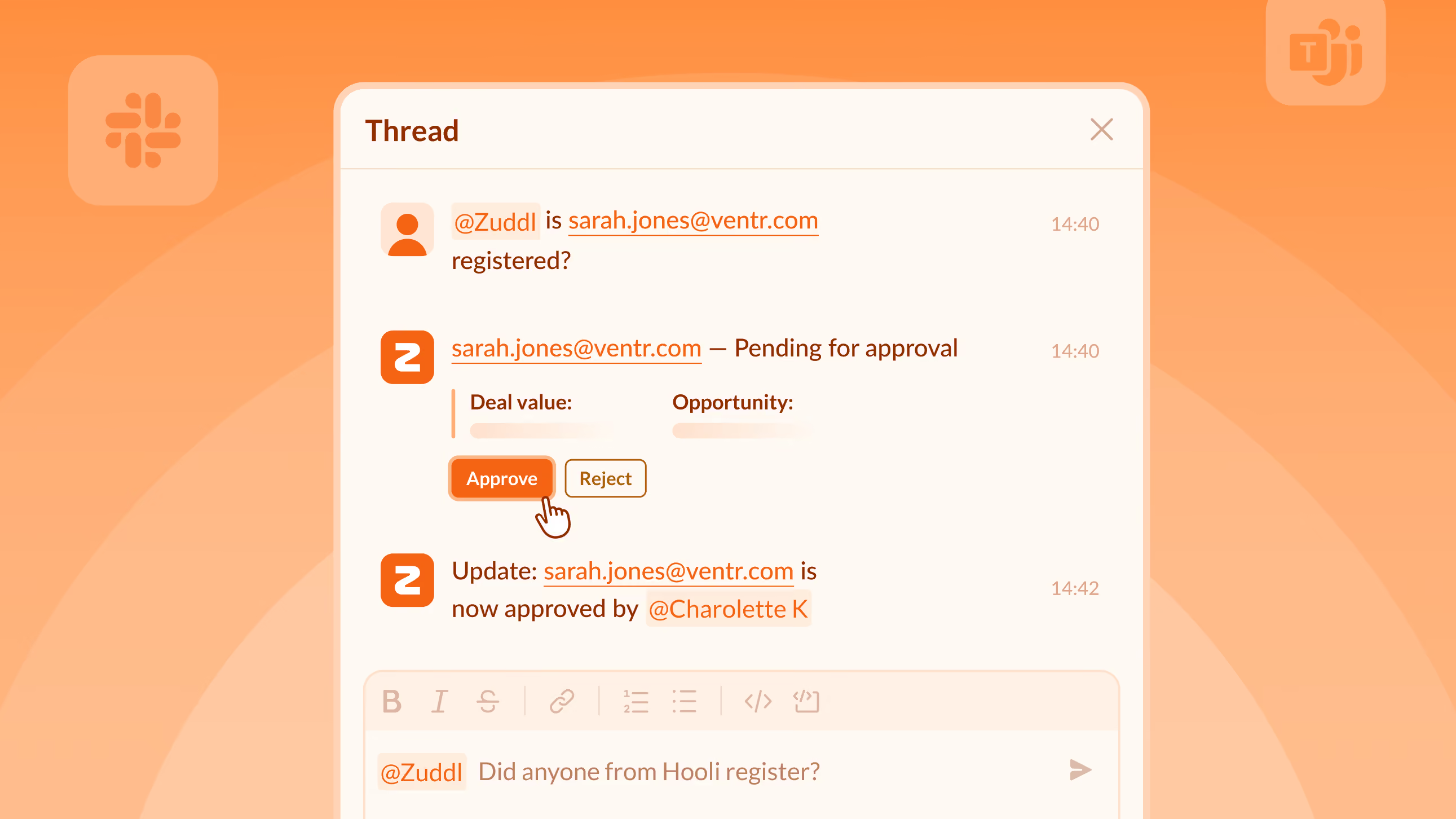
Tag @Zuddl in any event-linked Slack or Teams channel and ask by name, email, or company. The agent returns with a status update in under three seconds. Pending registrations show Approve and Reject buttons right in the thread and when a decision is taken, the status changes post back where the question was asked.
Soon you'll be able to spin up events and generate coupon codes directly from Slack/Teams.
Available for customer orgs on-request. Ping your CSM for more details.
Calibrate an event's badge once before scanning. The lead capture app detects which values map to enrichment fields, assigns them, and skips the rest. Every scan after produces clean, correctly mapped lead data.
Speakers and organizers can join a Studio session in Presenter Mode to share their screen with camera and mic disabled. Built for conference-room setups where room hardware handles A/V. Polls, chat, and moderation still work.
Onsite staff on iOS can select multiple attendees or the full event roster and print badges in one continuous run. Preview, exclude, and edit before printing - then pause, resume, or reprint from the progress strip.
Email open tracking is on by default, so you can see who opened your emails. To stop tracking, turn off the toggle under Settings - this removes the tracking pixel from all future sends.
.avif)
Post-webinar surveys can do much more than just give you an overall score. With the right questions, you can turn attendee feedback into decisions that improve your webinar program.
[.ebook-q-card][.ebook-body-text] TL;DR: A post-webinar survey only works if every question has a pre-defined action trigger and a clear owner. This piece covers 17 questions across six categories, each with a threshold that routes to a specific next step, plus Zuddl's first-party benchmarks on response rates, completion, and purchase intent. [.ebook-body-text][.ebook-q-card]
An events team running 40 webinars a year sends the same five questions in their post-webinar surveys. The open-text field fills up with answers nobody has time to read twice, let alone act on. Response rates are inconsistent, and even when they aren’t, nobody changes anything based on the answers.
In order for that to happen, the post webinar survey needs to be treated like a decision system: a question only belongs on it if a specific answer triggers a specific next action that’s owned by a specific person.
A post-webinar survey is a short set of questions sent to attendees immediately after a session ends, asking about the content, the presenter, the experience, and what they plan to do next.
It is different from a general customer satisfaction survey because it is time-bound to a single event, which means the questions should reference specifics the attendee just experienced.
It’s best when it’s used as a way to map attendee responses to decisions your team needs to take, instead of a way to produce an average of satisfaction scores.
But it’s still largely used as a feedback form: send it, glance at the average rating, file it away. This doesn’t work at the scale of a mature B2B events program. You’re sitting on a rich feedback loop that can be used to meaningfully improve your program…if you’re able to frame the survey questions right.
One way to do that is to scope a survey to a single webinar session instead of multiple sessions.
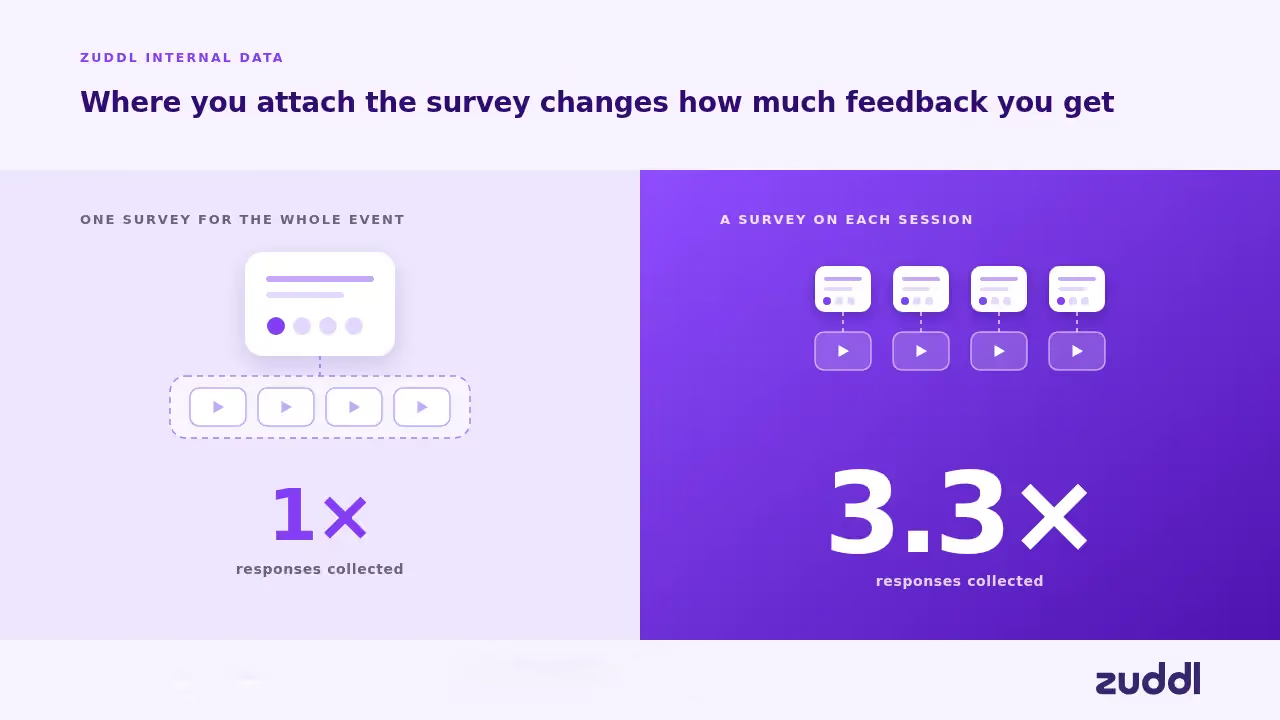
Zuddl's internal data across our customer base shows that a survey attached to one specific session collects roughly 3.3× more total responses than a single survey meant to cover an entire multi-session event.

This is because a post-webinar survey asks participants about the one thing they just watched, which is an easier question to answer honestly and quickly.
Three things have changed the stakes for the post-webinar survey:
The webinar software market is growing at a 12.68% CAGR, but the growth is not evenly distributed. Among organizations running recurring webinar programs, teams producing twelve or more sessions a year has nearly doubled in two years (per Zuddl’s internal data). This means that a post-webinar survey can produce a rich dataset of responses to analyze.
The open-text field used to be a place where good feedback went to die. Reading every free-response comment across dozens of webinars a quarter, by hand, is not a realistic ask of anyone's calendar.
Text-analysis tools built for survey data now classify open-ended responses into sentiment categories automatically, incorporating the context of both the question and the answer. That means open-text fields can be extremely useful in a post-webinar survey to surface patterns across responses.
Events leadership is increasingly asked to connect what happens in a webinar session to what happens in the pipeline, in the same terms RevOps already uses for it.
Mature B2B marketing teams already score accounts on engagement by tracking a buying group's collective activity across a deal's stakeholders rather than any single contact's enthusiasm on its own.
If there’s a purchase-intent question on a post-webinar survey whose high-scoring responses route into the same account-engagement view, that can become an additional buying signal for RevOps.

One thing matters more than question length, tone, or scale type: before the question goes out, does the team already know what it will do with each possible answer?
If a 3-out-of-10 rating and an 8-out-of-10 rating would produce the exact same response from the program (nothing), the question is not worth asking.
If an answer of "no" to a technical-issues question does not trigger anything beyond a shrug, cut it.
[.ebook-q-card][.ebook-body-text] A good question is one designed to trigger a series of decisions depending on the answer. [.ebook-body-text][.ebook-q-card]
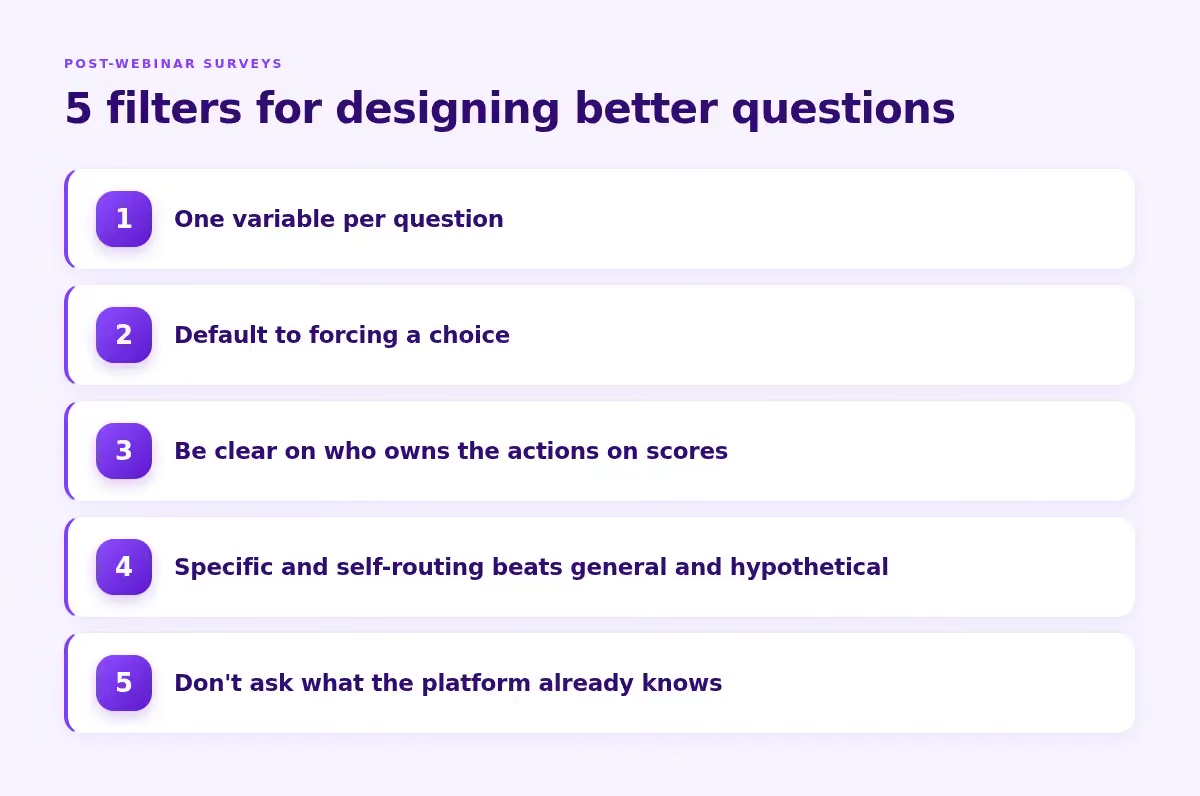
Here are 5 practical filters to follow when designing post-webinar survey questions:
For B2B specifically, research on 1,500 B2B customers found that nearly one in five who scored 9 or 10 on recommendation likelihood had actually failed to reach their desired business outcomes — meaning the score looked healthy while the relationship wasn't.
A question that asks for a specific next action instead of a general impression or a hypothetical prediction tends to do more of the routing work by itself.
These tables are built to be scanned in 10-minutes during a post-webinar review. For every question, there is a suggested action threshold or trigger, and what you should do next along with who owns the next steps.
First, an quick overview of the question categories and what they measure:
Now let’s look at the questions in detail.
For scored questions, the trigger is a threshold, such as 6 out of 10 or below. For open-text or multiple-choice questions, the trigger is a mention pattern instead.
Asking whether the respondent will actually forward the recording is a real commitment, and a "somewhat" or "no" answer says more than a 6/10 satisfaction score does. A single session's score also never shows a trend by itself, which is why the comparison question is important.
Why not how relevant was this to your priorities? That might lead to abstract answers - everyone can answer "somewhat relevant" without the answer meaning anything specific. Naming an actual current priority forces a focused answer.
Why clarity and pacing are two questions: One question asking about clarity and delivery combines two different problems into a single score, which breaks the one-variable-per-question rule. A presenter can be perfectly clear and still rush through the material.
A caveat on priority: for a program that already runs high volumes of webinars smoothly, this category is not a rich source of insight. You could choose to skip this and spend more energy on purchase intent or content relevance, where a mature program has more room to actually learn something new.
Why not a 1-10 "how likely are you to explore this further": "Talk to someone on your team" tells the rep exactly what to open with instead of a likelihood score.
For anyone who didn't ask for a conversation, the objection question routes further: "need to loop in others" gets a forwardable summary and a request for who to include. "Budget or timing" indicates a lead meant for the nurture track,
"Comparing other options" goes to an AE briefed on that specific comparison. "Already have a solution" gets logged for a future win-back attempt instead of an immediate call.
B2B buying groups now range from five to sixteen people across as many as four functions. The "who else" question allows you to see which of the participant’s colleagues might need to be influenced at their organization, which would be intel that’s super useful to mature RevOps teams.

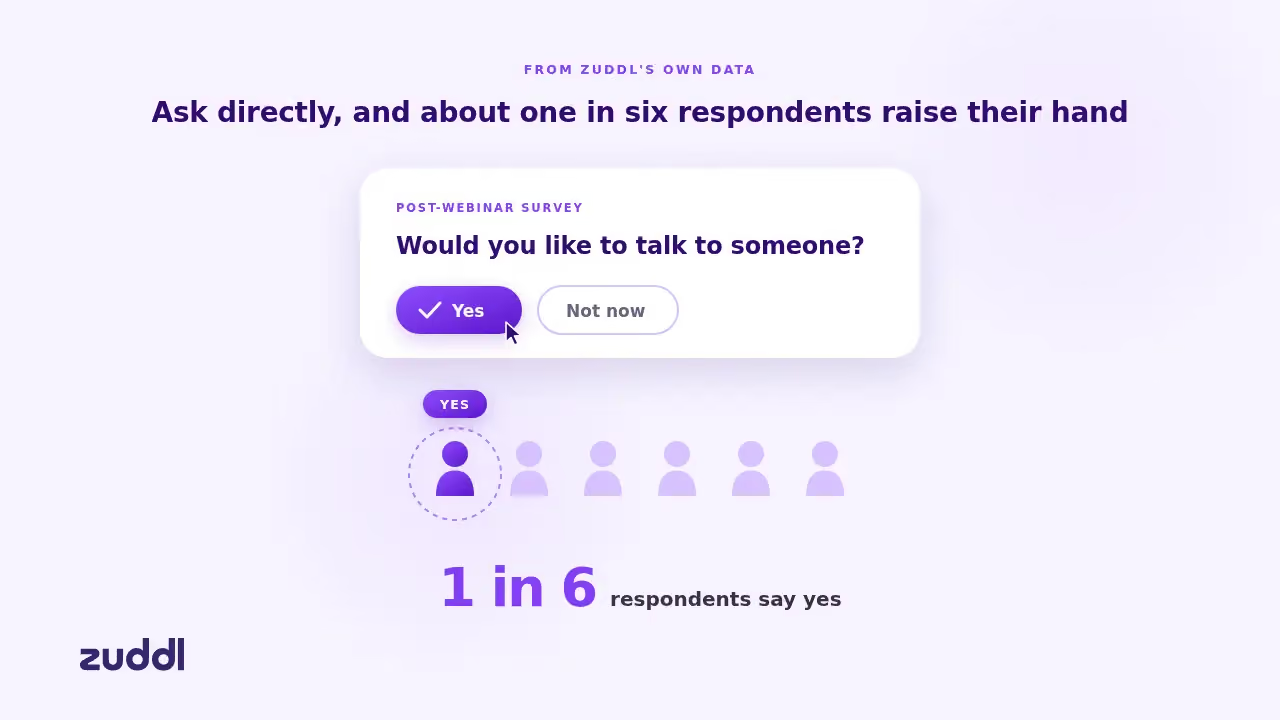
From Zuddl's own data, roughly one in six respondents say yes when a post-webinar survey asks them directly whether they'd like to talk to someone, yet very few programs currently ask this kind of question at all.
A positive response there is an MQL. They’re raising a hand and asking to speak with your team about a specific interest.
When you’re running a mature event program that also has field dinners, flagship conferences and third-party events, you need to be able to interpret post-webinar survey results at scale.

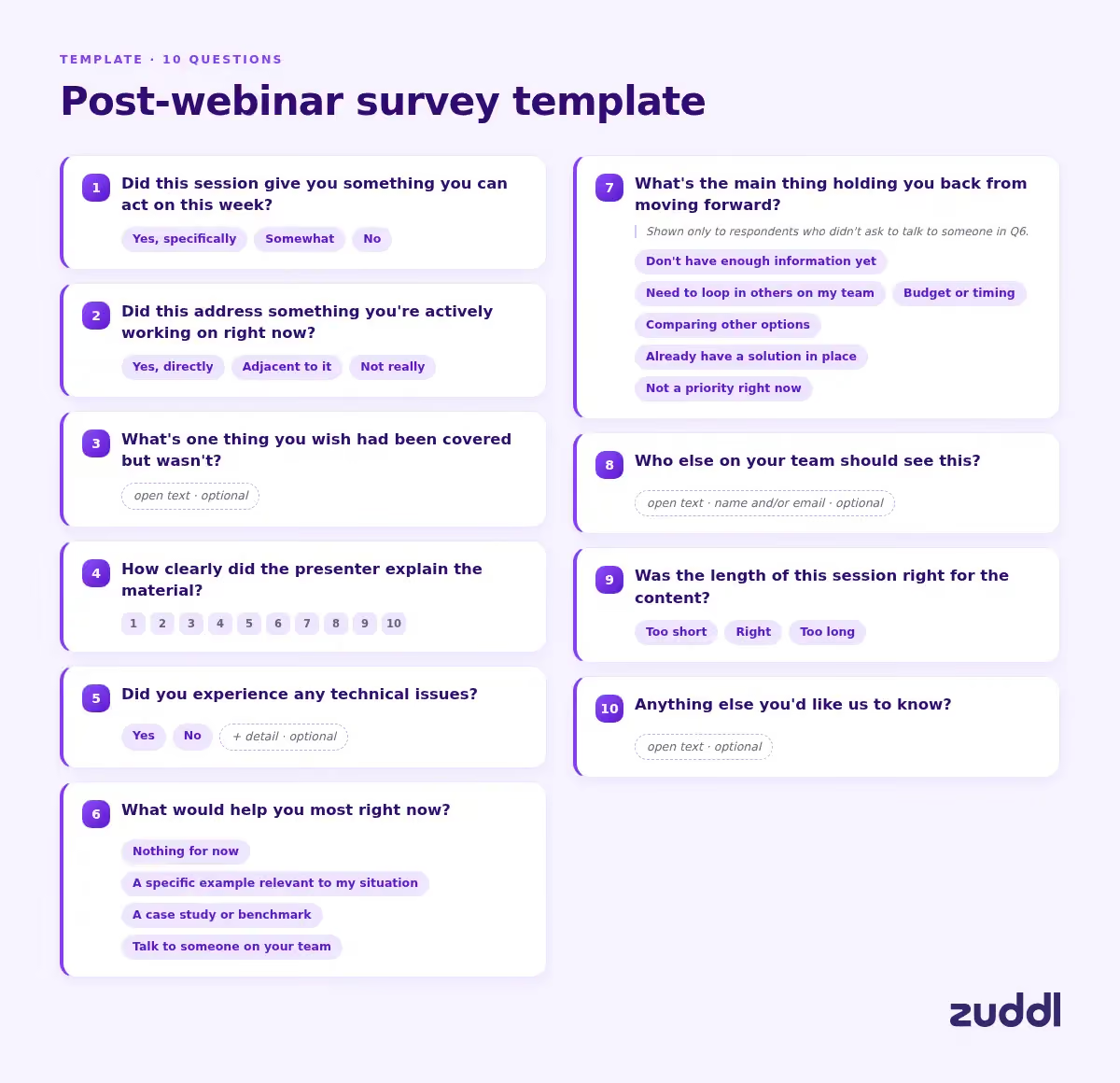
Here’s a stripped-down, ready-to-send 10 question set the six survey categories covered earlier in this piece:
If you want to adapt the set by webinar type, we’ve included a useful table below:
Research on memory and recall shows that the number of details people can retrieve drops significantly within 24 hours of an event, even when the quality of what they do remember holds up. Attendees forget specifics fast.
The best channel is the same screen attendees are already looking at, and the best moment for a post-webinar survey is during the last few minutes of the session. Here’s a handy table that lays out the best times to send the survey.
No-shows need a separate set of questions
The single most common mistake is collecting insight with no pre-wired action. You don’t want to end up with a dashboard full of average ratings that nobody changes anything based on.

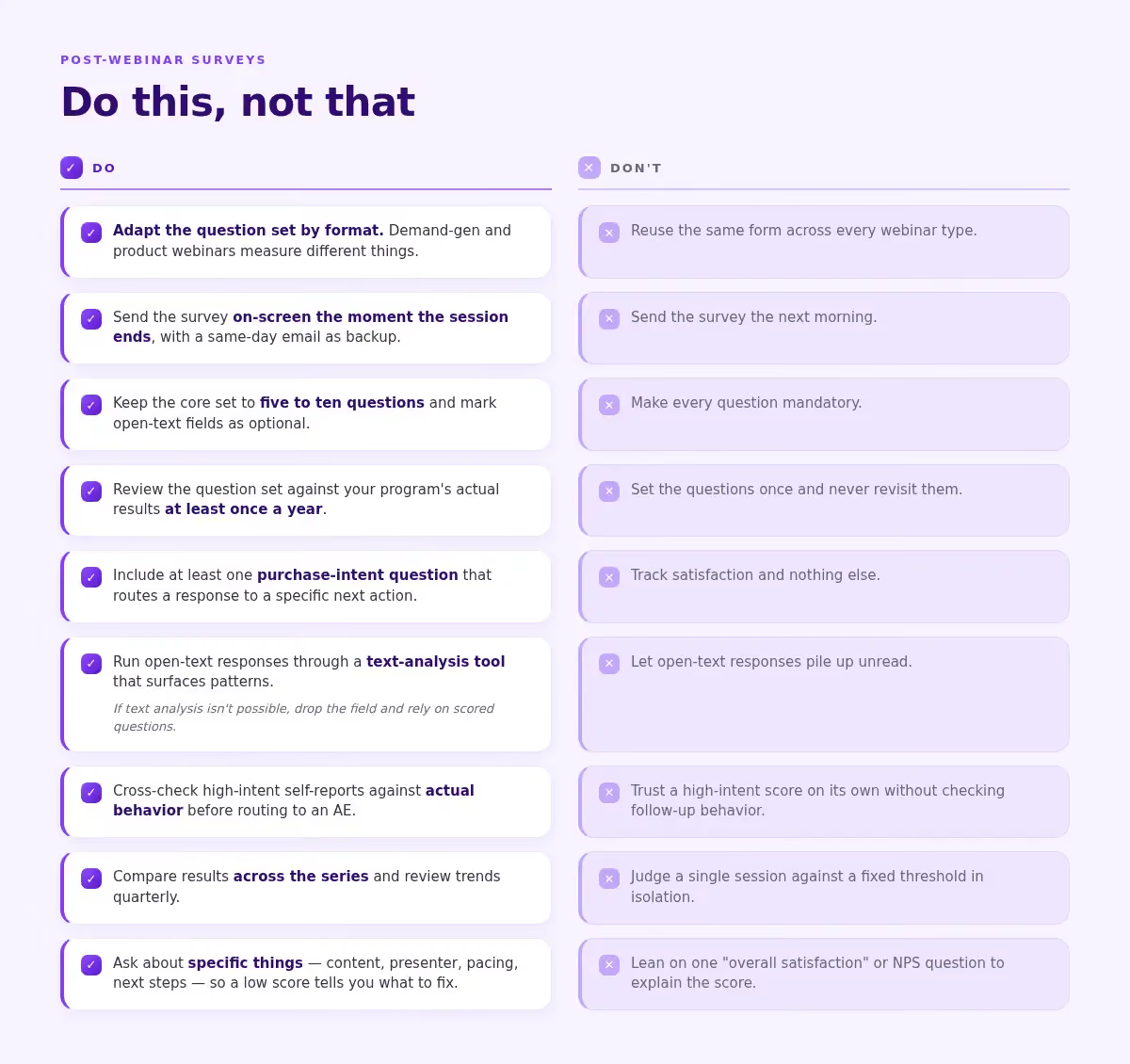
Do:
Don't:
There is no single reliable external benchmark that applies across industries and formats, and specific percentages circulating online are rarely backed by disclosed methodology. As per Zuddl's own aggregate data across B2B organizations running webinars between 2023 and 2026, the median post-webinar survey response rate, sits around 3.7%, with most programs somewhere between roughly 1.4% and 7.9%.
What is consistent is the pattern of surveys sent close to the moment a session ends outperforming surveys sent after the session, because the accuracy and willingness to respond both decay quickly once attendees leave.
Immediately, before the session window closes. An on-screen prompt at the end of the webinar, backed up by a same-day email for anyone who skips it, captures feedback while it is still accurate. A next-day send should be reserved for a separate, optional, longer survey, not the primary reaction capture.
Text-analysis tools designed for survey data can classify open-text responses into sentiment categories automatically, using both the question and the answer as context, which turns a pile of unread comments into a surfaced pattern across dozens or hundreds of responses without requiring anyone to read each one individually.
Yes, but not with the same form. No-shows need a short, separate survey asking why they registered without attending, whether a recording would help, and whether a different time would have worked. It exists to catch a scheduling or targeting problem, not to evaluate content they never saw.
For the immediate, on-screen version, keep it to roughly five to ten core questions. Zuddl's own aggregate data shows that once someone opens a post-webinar survey, roughly 83 to 89% of its questions get answered whether the survey has 2 questions or 15, with no meaningful drop as length increases within that range. External benchmarks confirm a similar non-linear pattern (Survicate, 2025). Don't obsess over trimming one more question. The real lever for completion is getting the survey opened at the right moment
Yes, but it should be one data point in addition to what the post-webinar survey says. Research on 1,500 B2B customers found only a 54% correlation between NPS and retention, and nearly one in five respondents who scored 9 or 10 failed to reach their desired business outcomes with the vendor's solution. A high recommendation score doesn't mean the session moved anyone closer to a decision. Pair it with at least one question that asks for a specific next action like "what would help you most right now" rather than treating the NPS number as a complete answer on its own.
Zuddl's July updates take three recurring workarounds off your plate - the manual Salesforce campaign, the video editor for speaker clips, and the CSM request before every event - plus five more improvements across lead capture, accessibility, and checkout.
You create an event in Zuddl. Then you open Salesforce, create a campaign, name it to match whatever format you agreed on three quarters ago, set the status to Planned, enter the dates, and link it back to the event. Skip this step and no registration data flows to your CRM. Do it for 30 events a quarter and it's the kind of task nobody owns but everybody notices when it slips.
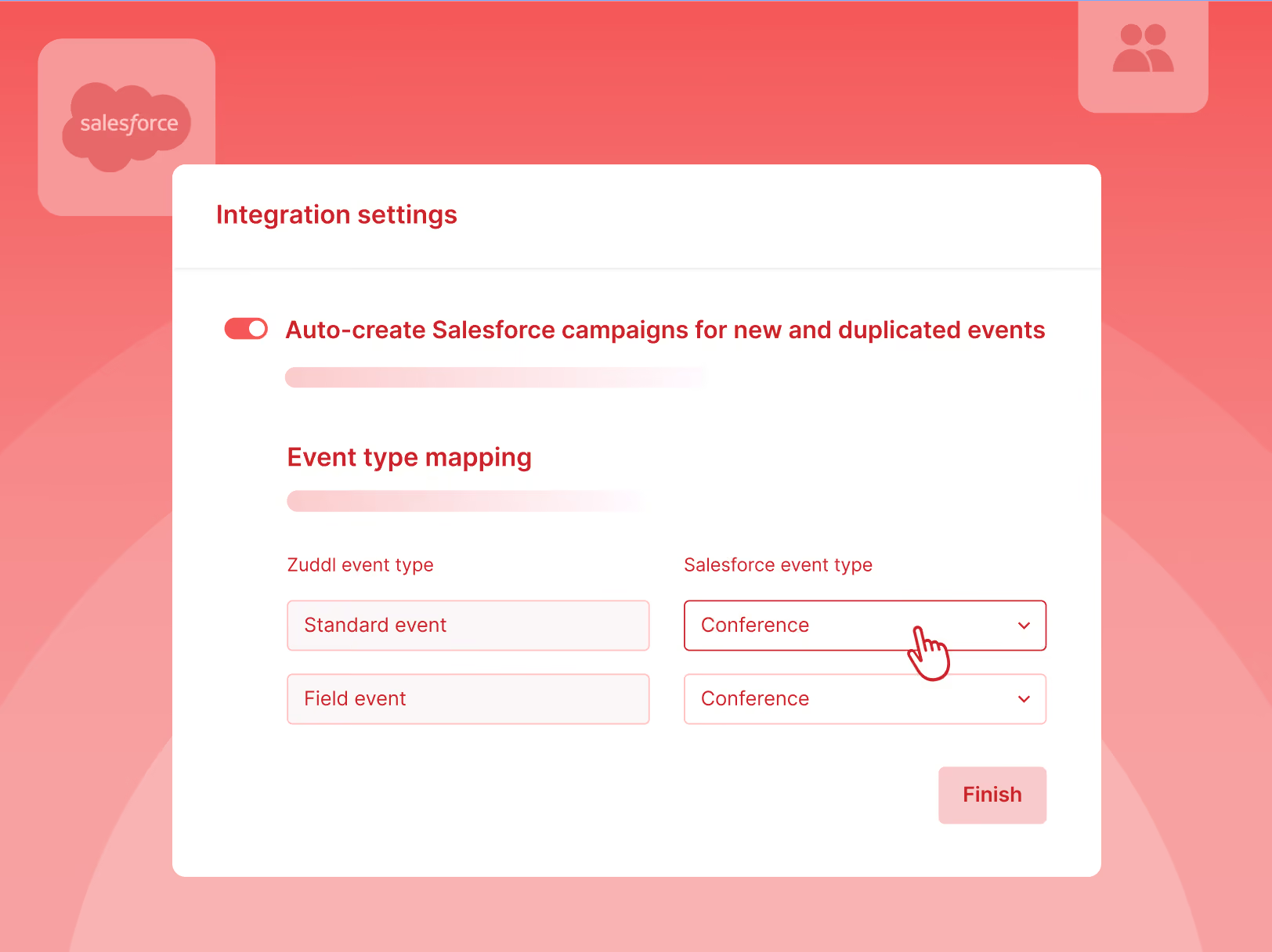
After one setup at the org level, every new or duplicated event gets its own correctly-named Salesforce campaign the moment you create it. Registration data flows to your CRM without anyone remembering to link things up. Manual campaign IDs still work whenever you need them.
You have an API kit from Maritz or Cvent. You've used it at every conference. But every event, you send those details to the CSM and wait for them to configure it, and hope it's done before your reps start scanning.
Now you submit it yourself from the Lead Capture App settings. Once connected, your badge provider becomes an enrichment source alongside Zuddl's own. You choose which gets priority and which is the fallback. If your primary source returns full data, your reps see that. If it comes back thin, the fallback fills the gaps.
Your keynote ended two hours ago. Marketing needs a 90-second clip of the CEO's closing remarks for LinkedIn by Friday. Your options: send the full-mix recording to a video editor and wait, or scrub through the timeline yourself and hope the export settings are right.
Your content team can now grab individual speaker clips straight from the Recording Library. Each speaker gets their own audio-video file, and screen shares are captured separately. Pull what you need and start repurposing into social clips, podcast segments, or highlight reels. No editor in the loop.
One-time enablement through your CSM. Applies to every webinar and virtual session from there.
Documentation: Events | Webinars
Reps at third-party booths scan badges with no context on who's a target account. Upload your attendee list before the show. Scanned badges auto-match during lead capture, surfacing enriched contact data at the point of scan. No match, the lead is captured as new.
Live sessions had captions. On-demand recordings didn't. The same CC toggle now covers both, with captions auto-translating into up to 6 target languages. Attendees switch languages or turn captions off directly from the player.
Attendees scan each other's QR codes in the Zuddl Events App to connect on the spot. Faster than spelling out a name or swapping business cards. One scan opens the other attendee's full profile. On by default.
Badge photos from lead scanning were stuck in the app with no way to get them out. Reps can now export them from the Lead Capture app, one at a time or in bulk. All scans are grouped by time for easy review.
Tax rates used to be looked up manually and applied per ticket, per jurisdiction, per event. Zuddl now integrates with Avalara to calculate the right tax automatically at checkout. Every invoice and transaction reflects the correct amount, with one-time setup at the org level.
Help article: How to set up automated taxes using Avalara
.avif)
Some event programs grow. Others compound. The difference widens with every event you run, and it starts with a decision most teams don't realize they need to make.
Imagine a marketing team that runs 75 events a year. Now think of them adding 12 more events to their program with no budget expansion and no new hires. Someone must have had to pay for that: late nights, weekends sacrificed, and a team that must be running on a mixture of adrenaline and exhaustion. They must be doing 16-hour days, right?
That would be the case normally. But let's say this team made one structural decision with their event platform that made scaling possible without any of the stress. What if, by taking this road, they've started on a path of compounding benefits that will keep paying off for years to come?
You'd call that unreal and a lot of fluff. But maybe it isn’t.
Scaling is additive: Put three more field events on the calendar, hire a coordinator, push the overflow to an agency. The program grows in size but the way it works doesn't change.
You can have more landing pages, but only you know what worked last time and what variants to cut. You know which session format drove re-registrations in Boston, which speaker pairing fell flat in London, which email subject line doubled open rates for the dinner series. That context is in your head, or split across your production lead, your ops counterpart, and the two field marketers who ran the regional programs. When any one of you goes on leave, that slice of the program's memory goes too.
Every event is configured manually from a template. The brand guidelines, the email sequences, the registration logic, the approval flows are duplicated per event, sometimes per tool. A second coordinator doesn't change this.
And you're the connective tissue. You're chasing the designer, waiting on marketing ops to build the campaign and schedule the send, waiting on the VP of sales to approve a guest list, looping in every vendor and customer contact one at a time. A second coordinator can chase more sign-offs, but the relationships and the history are yours. The platform can't coordinate on your behalf.

The reason for this is structural. When you're using separate tools for webinars, registration, lead capture, and your flagship conference, the tools have no way to share memory. The brand guidelines your design team configured in one doesn't carry to the next. What one tool's AI learns about registration patterns is invisible to the others. That's why you remain the connective tissue.
The good news is, marketing already knows how to do compound programs in other channels. Think of an org that’s been using and updating their CRM since day 1. They have years of account history, deal patterns, and buyer signals. So when AI arrived, they could point it at a decade of pipeline data and reap the benefits of pattern analysis and predictions without a lot of legwork.
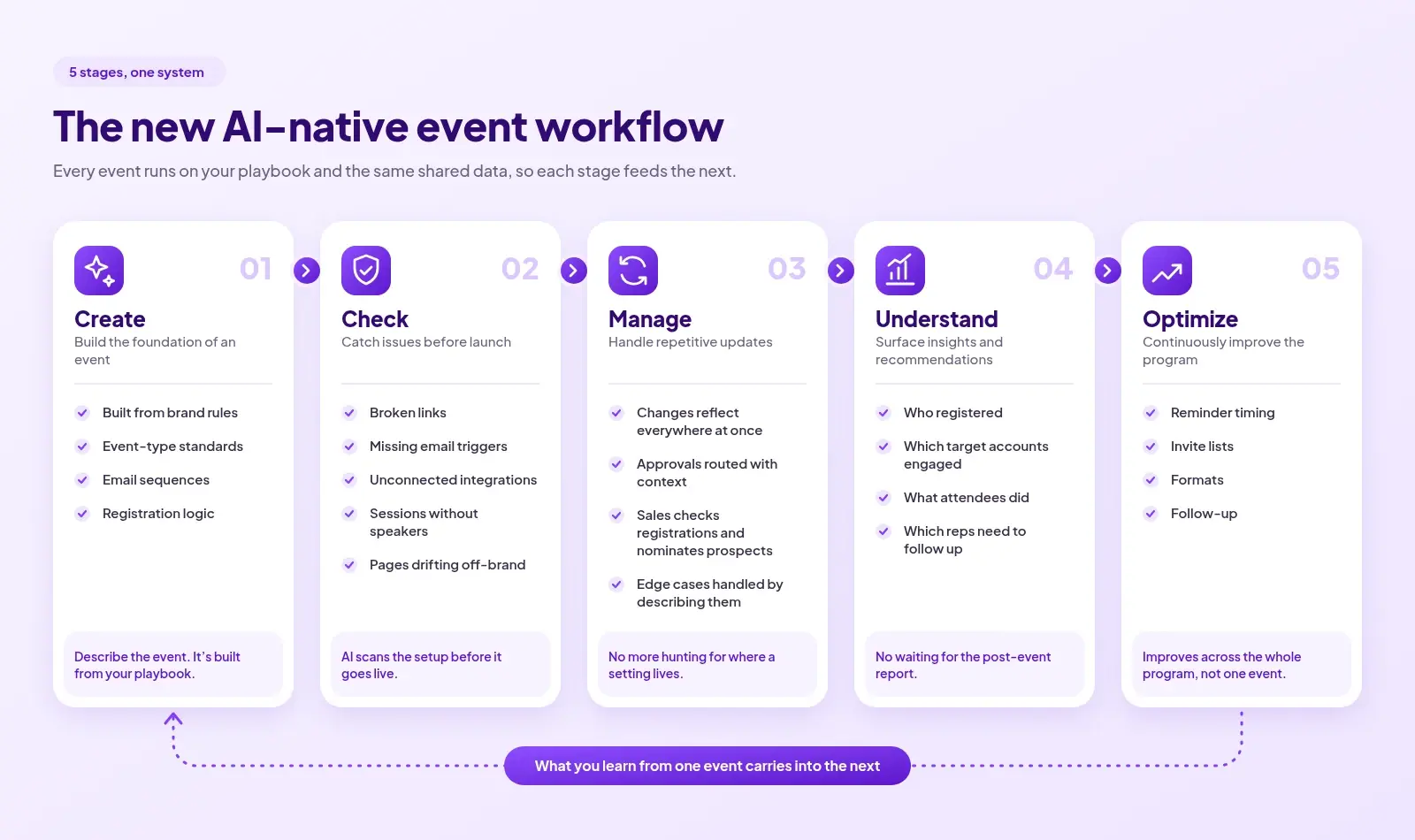
That's what a compounding event platform does. Define your guardrails and configurations once at the program level and they're inherited by every event. The platform learns your event playbook.
By event 87, the platform is drawing on years of data and decisions: which content format drove re-registration, which accounts sent three attendees and never received a follow-up, which cities produce pipeline within 30 days versus 90.

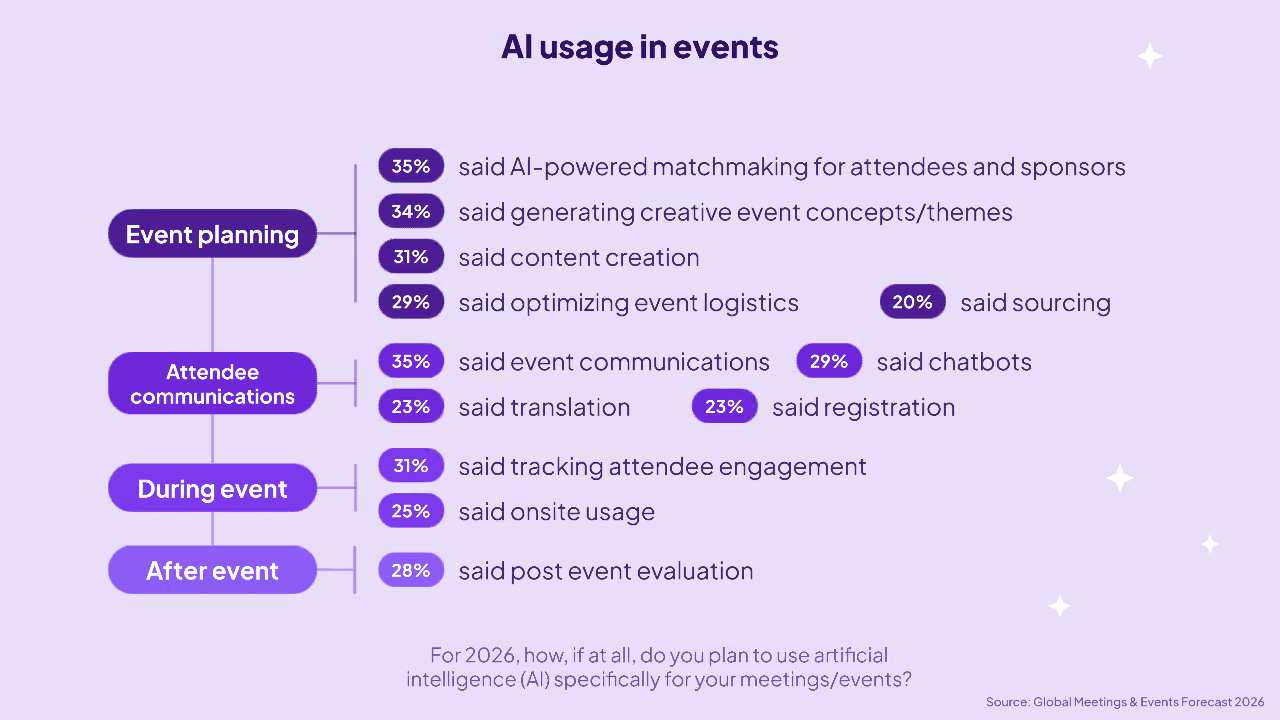
For events specifically, 50% of event teams are already using AI across planning and delivery. But most of these use cases are siloed: drafting session descriptions, writing follow-up emails and generating copy.
The shift from that to AI as a co-operator of events with things like creating an event from a prompt, a QA agent scanning the full setup before launch, a follow-up agent tracking per-rep outreach and escalating when the SLA slips, is only possible on a platform where AI has the full context of the program to reason from.
And when nominations, tiered approvals, and follow-up dashboards live inside the platform, where sales, marketing, and CS work the same rows with CRM context attached, the event marketer stops being the routing layer between departments. Sales can trigger a customer dinner without filing a ticket. The coordination moves from Slack threads and spreadsheets into a collaborative space the whole team can see and act on directly
AI has already had an effect on marketing headcounts. People are expected to be ‘10x marketers’ and events are no exception. Most are trying to meet that expectation on infrastructure built for a simpler version of the role. But that often means they don't have any runway to do anything except the next event, leading many event marketers to look for a change.
AI-nativity is starting to become table stakes in many roles. AI-specific roles are growing 8x faster than the wider market and marketing is increasingly becoming more of a systems function.
And it's not just workload. Leadership expectations have shifted. Boards are mandating AI-native vendors.
A unified, agentic platform makes the event marketing role a bit more future-proof. The platform carries the context, operates the events, and coordinates the execution. What's left for the event marketer is judgment: which accounts to target, which formats to run in which cities, which signals from last quarter should change this quarter's plan.

As agentic platforms become the norm, the connection between an event and a closed deal stops being something you reconstruct weeks later. Pipeline attribution becomes visible at the program level without a separate analytics build. Events become an even more integrated part of the revenue motion.
And every event in the program — the 40-person dinner, the regional roadshow, the monthly webinar — gets the same brand consistency, personalization, and operational polish as the annual conference. Execution quality stops being a function of which event got the largest budget.
The event marketer's role shifts from production to orchestrating the program and ensuring guardrails. The teams who move onto this infrastructure now are compounding their own skillset alongside their events strategy.
Pull up your last event and see what your platform remembers about it without being manually fed information. If the answer is 'not much', you might need to consider a platform that can take the context, execution and coordination burden off your plate.
Take a look at how Zuddl helps build and compound your company’s institutional knowledge of events.
{{demo-widget-1}}
.png)
If feature-layer AI is about speed, agentic AI is about unlocking a different way of working for event teams. What does that look like when the rubber meets the road?
Execs from Disney and Porsche. An Olympic skier teaching them the ropes on the slopes. You know every person in the room. You built the emotional arc of the event, and you weren't waiting on other teams to make it happen.
That's the version of the job most event marketers want to be doing, and it starts with getting out of the tooling mess that's been holding you back.
"I sent a report on the day of the event, something I've never done before," says an events lead that's been in the industry for years. She knows the wild west of four or five disconnected tools, where it takes weeks to reconcile who actually did what.

Moving out of that wild west needs structural change, and that's where the actual gains of AI in event marketing are.
AI is only as useful as the context it has. Think of your first day at work: you can act on what you know (which on day one is probably not much). As you absorb more information, like every event your company has run, every session that worked, every attendee who showed up more than once, you start taking better and more strategic calls.
An AI-first B2B event management platform builds and accumulates this institutional memory.
When webinars, field events, and conferences all run on one platform, every attendee interaction builds into a single record. The contact who attended your January webinar and walked into your March field dinner is not two exports to reconcile, she’s one continuous relationship the platform has been building since the first event. That is the context the AI acts on.

This also means you can define the different constraints (design, legal, marketing ops) once and every event inherits those guardrails. As an example, the first time you build a landing page, you lock in the brand - the logo placement, color palette, legal footer. Every page cloned after that starts from that locked state.
The same logic applies to how teams coordinate before the event. In most programs, nominations live in a spreadsheet that bounces between the event marketer, sales, and CS over Slack and email. Each person opens it, scans for their accounts, and makes decisions without seeing deal stage, engagement history, or whether the prospect has attended anything before.
When nominations happen inside the platform, CRM context is already in every row. The event marketer defines what a good guest looks like, and the platform scores each name against that description with live Salesforce data. A VP who used to toggle between three tabs to check each nominee now looks at a row, sees the context, and decides. Approved names sync to Marketo or the CRM in tiered waves without a manual re-upload or ops ticket.
For a breakdown of what event management software features to evaluate, check out this guide.
As useful as guardrails are, true autonomy is the AI acting on the event marketer’s behalf (with the human in control, of course). Choosing event management software means knowing what that looks like. Here are four moments that show you that an event platform is genuinely unlocking new ways of running events:
Before: After building an event, someone goes through the entire setup by hand. Speaker bio, event date, registration form, CRM campaign connection. One wrong setting sends a broken confirmation email to 500 registrants or pushes the wrong leads to the wrong Salesforce campaign. Someone has to check that manually.
After: The event marketer writes the QA checklist in plain English and the platform executes it before launch. It checks each item, and flags what is wrong. She doesn’t have to find the mistake in the speaker bio because the platform can surface it before anyone else sees it.
Before: A stack of business cards to type up on the flight home, and a rented badge scanner whose export you get days after the event in whatever format the organizer felt like sending. Even when leads make it to the CRM, the event marketer ends up writing follow-up emails for sales because reps either don't follow up or send something generic.
After: When the event ends, the platform DMs each assigned rep in Slack with a summary of their accounts - who attended, which sessions they sat in, what questions they asked, what resources they downloaded. Follow-up emails are pre-drafted based on what each person actually did. If a rep hasn't followed up within the SLA, the platform escalates to their manager.
One events team went from two-week post-event delays to near-instantaneous lead handoffs - CRM records updated while the event was still running.
Before: The person who owns the event fields a steady stream of Slack messages from sales reps. "Has this account registered? Is she on the waitlist?" Each one meant opening the platform, checking the record, and typing the answer back.
After: A rep asks in Slack whether a prospect has registered and gets an answer with full context. And when they need a dinner for a target account, they request it from Slack. The platform produces the event from the playbook that you set and routes it to events for review. The events team becomes editorial instead of operational.
Before: Extracting content after the event was almost a job in itself. There are session recordings to review. Quotable moments to identify and timestamp. Clips to pull or brief a video editor on, draft posts to write from notes.
After: When the session ends, the platform generates clips from the recording and drafts posts in the brand voice defined at setup. The event marketer leaves the venue with a content pipeline already seeded.
When the event platform incorporates AI as more than just a ‘time-saving feature’, the event marketer can stop paying the operational tax.
An events lead can focus on creating event influence and run a strategic program. A SaaS firm saw this work at their flagship conference. They scored each session by topic, then matched that to what each attendee engaged with.
A prospect who spent the day in security sessions got security-focused follow-up instead of generic recap. "By the time I sat down to dinner on Day 1 [of the conference], we already had our Salesforce data built and shared, cadences loaded, and everything was ready to go for our team to take action the very next day,'' said the SaaS firm's marketing and sales operations lead.

This is what AI in event marketing should help with - assembling the picture as it forms, and allowing events teams to take strategic calls. To see what this looks like in a platform, Zuddl's AI Agents are a great place to start.
{{demo-widget-1}}
.avif)
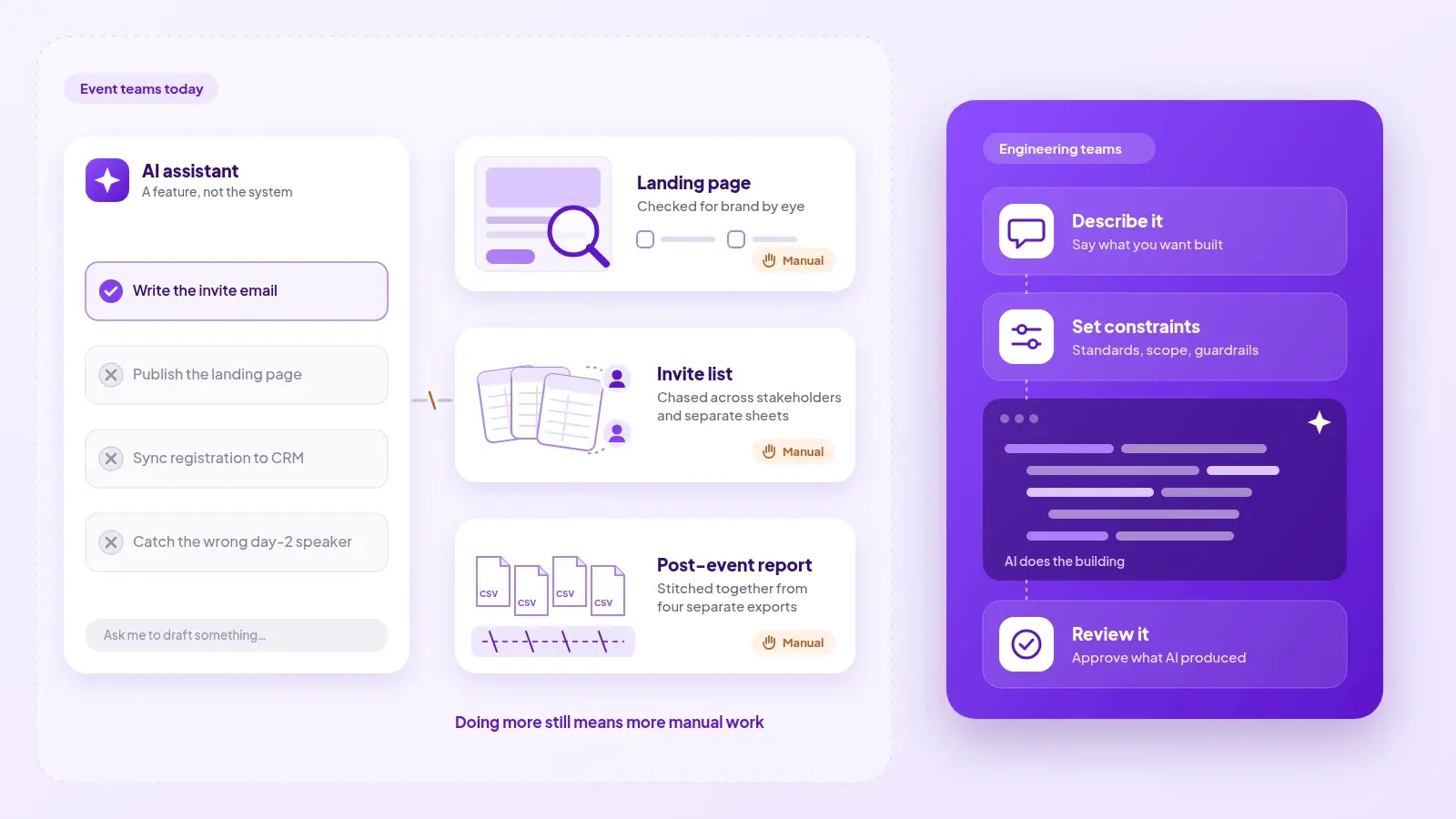
There are two ways to approach AI in events today. You should know which path your events platform is taking.
In 2026, you can't walk 10 seconds without bumping into something AI. It's there when you open Linkedin. You see it in billboard signs (especially in SF) and when your phone has an update. Every tool you use has it, including event marketing platforms.
You've probably been in demos that show you AI session summaries, or email copy that can be whipped up in seconds, or tools that turn session recordings into clips for social media. They're all great and they save time. More or less.
What they don't do is change the workflow underneath it all. The guest list is still a spreadsheet. The lead list will still take time to clean up and update. The context from the dinner conversation on Thursday night will still get lost by the time it makes it to the CRM.
But an AI-first platform can do much more than save a few minutes on individual tasks.
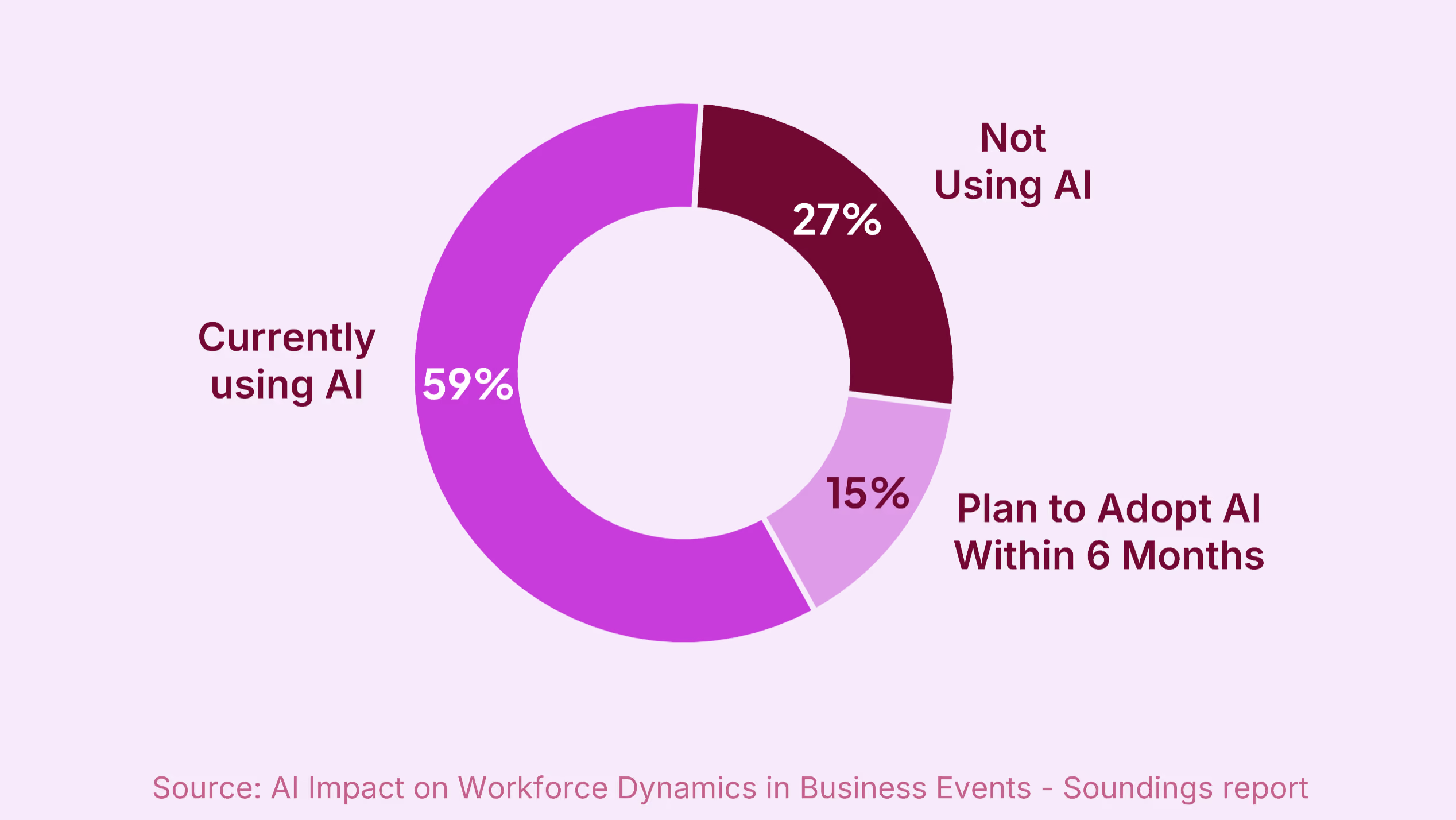
As per a 2025 Soundings survey, 59% of event professionals already use AI, with the majority of them using it for content creation. Most AI in event platforms today shows up in individual features and they are useful in many ways.

The problem is that this can't go beyond the feature layer. Most event platforms do not know what an attendee did at your last three events, or where they are in a buying conversation. When the platform has no memory of the person, the output can't go beyond a superficial level.
A senior field marketing manager at a B2B SaaS company wanted a single, connected view on leads with the help of AI: "Have they attended this specific category event before? Really helpful to see. It would be a lot less manual work on my end."
AI is only as powerful as the context you give it. And most event platforms have very little context to give.
Almost two-thirds of marketers use more tools than two years ago. The average enterprise event program has anywhere between 6-10 tools in their stack.
Today event teams might work with separate systems for registration, webinars, field events, CRM, marketing automation, lead capture, content, analytics. Each tool does one job and holds one part of the whole information pie.
When the data is split that way, there might as well be no AI in your event platform. The attendee who came to your webinar in January and your roadshow in March looks identical to the AI as someone who just registered for the first time. The model cannot distinguish them, and you end up manually tweaking flows and assets every time. An events team running 1000+ events a year recounted having to update the design for 50 pages individually when they changed their flagship event's branding.

When you have different codebases and databases that have no way to speak to each other, you get automation at most. And automation is not intelligence. This is the reason most event AI does not deliver at the scale it promises.
The pattern has been documented outside events too. When software teams started using AI coding assistants, individual developers wrote code significantly faster. But the time it actually took to ship finished software barely changed.
Faros studied over 10,000 developers and found that review queues got longer while company-level delivery metrics stayed flat. The bottleneck turned out to be everything else in the process.
AI in event marketing is in a similar state today. It might help you speed up one thing, but the pipe is still clogged with a spreadsheet waiting for approval, or a sales rep not following up on a good lead.
On the surface, a Zapier-like flow might feel great. For example, if an attendee checks in at the event, send a welcome SMS. If they visit the product demo booth, add them to the high-intent follow-up list. If the event ends and they were marked as "engaged," assign them to the nearest available rep in Salesforce.
Teams already wire these flows together, and they are great automations. However, they're not capable of autonomous decisions (within your guardrails). Each step fires because that's what the flow dictates. The logic can't change on its own regardless of who the attendee is or what else you know about them.
Agentic AI requires a foundation: a shared data layer across your brand and the events you hold. With that, the platform has enough context to act on. Combine that with some important guardrails, and the AI can now help you at the workflow level.
The guest list stops being a spreadsheet that bounces around in discussion threads. An event marketer can just describe what a good guest looks like in plain language, and the platform scores every name against that description, with live CRM data in every row. Approvals happen with deal stage and account context already visible.
.avif)
A VP who used to spend time switching between tabs to check the info each name now looks at a row, sees the context, and decides on nominations. The event marketer is no longer a Slack pinball.
Follow-up stops being the event marketer's job. When the event ends, the platform knows which reps were assigned leads and drafts the emails for them. It monitors whether they follow up, and if they haven't, it escalates.
Because the platform has context about your brand, you can generate on-brand assets almost immediately. Your team doesn't have to manually duplicate and edit assets.
Instead of building a post-event report by hand, the platform can show the event marketer drop-off trends, engagement by session, lead quality by event type with a conversational query. That's what an AI-first platform can do.
AI should not be a separate feature. When it's built into the platform's foundation, you can look past just speed of output and start taking judgment calls based on the data it shows you.
{{demo-widget-1}}
.avif)
Event influence is larger than data can show. The signals you get are rich and full of context. Why doesn't that translate to dashboards, and what does your event platform have to do with all of it?
A Head of Events and Field Marketing at a fast-growing data reliability company spent a year tracking every person her team met at their recurring data leader dinners, all the way through to a closed deal. When the first one converted, she had something most event marketers never get: an unbroken record connecting one dinner conversation to one signed contract. "I literally had a celebration when we finally closed something. I have the proof that this business model not only starts and generates the opportunities, but goes all the way through."
The relief of finally having proof is a feeling every event marketer knows. There’s no question that events work. They're the only way to get people in a room and build trust and relationships face to face. A HockeyStack analysis showed that while events only receive credit for 6.5% of closed deals, event-sourced deals generally have higher ACVs and shorter sales cycles.
The proof that events work shouldn’t take a year of manual tracking.
The people who show up to your event have a higher level of interest in what your brand does than if they'd signed up for a newsletter, let's say. The conversations you have with them and the context that provides is invaluable but hard to keep track of. You might have a hundred different business cards, some quick shorthand notes and a hastily built CSV at the end of an event.

You know you have less than 48 hours to follow up with these leads before they forget the conversation or the trail goes cold. But even if you're able to export the badge scan list, clean the list, match names to accounts in the CRM, and get the file uploaded, not all leads make it through, and not all of them have attached notes that say "this person mentioned they're evaluating three vendors right now."
[.ebook-q-card][.ebook-body-text] Context is like a rapidly decaying isotope: the quicker you act on it, the better. [.ebook-body-text][.ebook-q-card]
A name, title and event date don't help much without the details of what they said, but you do it anyway.
A senior experience marketing director said: "We've all uploaded a chunk of leads in the system knowing that those leads are not really good. But this is what the stakeholders wanted. They wanted to see the X number."
That is being forced to squash a rich human signal into a number for a dashboard.
The problem is that the systems between the event and the CRM were never built to handle context efficiently. A rep might log a note after a dinner conversation, but it remains in an activity feed - someone has to go looking for it. It's invisible to any workflow that routes, scores or acts on leads. And that's the best case. What stage the prospect is really at, what they actually care about, which of your three competitors they mentioned can remain in someone's head or a personal notebook until a debrief call a week later.
The right event platform narrows the event marketing attribution gap by providing your team with context in near real-time. It solves the ‘spreadsheet a week after the event’ problem.

An events team at a fast-growing fleet tech company moved from two-week post-event delays to real-time lead handoffs. Badge scans were synced to the CRM as they happened, so reps had the attendee's registration data and engagement history before the session ended.
The follow-up became a continuation of a conversation rather than a cold call from someone who happened to attend the same event.
For this to happen, event marketing platforms need to treat context delivery as a first-class problem: badge-in alerts to the rep before the event ends, a CRM sync that captures what happened in the room and not just who was there, and follow-up workflows that trigger on engagement signals. A detailed breakdown of how to connect event activity to pipeline is in From Planning to Pipeline: Measuring the True Impact of Your Flagship Event.
When the gap between the event floor and the sales rep closes like this, the signal that the event marketer has always known is there actually becomes visible in reporting dashboards.
With the right platform, you wouldn't need to manually track leads for a year. The data would show up in the same quarter, because the context from the dinner was captured live and fed forward.
Events have and will continue to work. The event platform's job is to handle context so well that event outcomes become not something you report, but engineer.
.avif)
Ask most event marketers what drew them to the field. Then ask them what they did last Tuesday. The answers raely match, and the reason might not be obvious.
"It wouldn't sync with Marketo. So we'd have to go in and manually change them on the Marketo side."
That's an event marketing manager at a data infrastructure company, describing what happens when someone who registered for the free happy hour changes their mind and upgrades to a paid conference pass.
Her team is not under-resourced. They run a multi-day user conference with sponsors, paid and free tiers, an exhibitor resource center and a call for papers. She has a registration platform she's worked in for five years, as well as a marketing automation platform, a web team, and a creative team.
Yet they're still having to find manual workarounds because no platform connects the seams.
The job became defined by the tool stack's constraints, and that's not what you signed up for.

The event marketer's core job is forward-looking: what experience should this audience have, what outcomes should this event drive, and figuring out how the event program connects to revenue.
Or at least it should be.
[.ebook-q-card][.ebook-body-text]What's happened is the event marketer was also forced to take on the planning and logistics layer of the event: things like vendor coordination, manual data reconciliation after every event, and manual lead routing and CRM exports.[.ebook-body-text][.ebook-q-card]
Most event platforms were built for a slice of what running an event requires. You can buy each piece separately, but then your flagship conference runs on one platform it's always been on and field events on whatever a field marketer could spin up in twenty minutes.
This causes a bridge vs engine room problem, and it's best explained via a ship.

The bridge is where navigation happens. The officers read conditions, and chart a course for the future. The engine room is for propulsion. Engineers keep systems running, monitor pressure and respond to the now.
Both are necessary and vital to the ship. But one layer is strategic and the other is operational.
The event marketer wants to be on the bridge, but platforms keep you trapped in the engine room.
It's not that platforms are blind to the strategic side of the job; it's just never been vital to their survival. The buying process measures capabilities in fragments. The rubric is registration, badge printing, or a mobile app.
There's rarely any scoring for the handoff seams - eg. what happens when a registrant upgrades their ticket and your marketing automation platform never finds out. Platforms optimize for parts of the process, and that's why most of what's sold under the guise of event tech doesn't feel like a cohesive stack.
The event marketer got good at the logistics side almost by necessity. You built workable systems and found workarounds. Nobody questions whether a person should be doing something when they're doing it well.
The same event marketing manager from the opening describes building registration pages: "I'm not a web person, but I can build a [registration] page in a day and it looks pretty good. I have all these technical skills."

That competence made the structural issue seem normal, both to you and to the organization. From the leadership's perspective, they already bought the platform as the fix. The hours you spend patching and coordinating despite the platform then become the job.
The starting point for event marketers is understanding what's actually keeping you below deck.
One of the things you could do is log what operational or strategic work is taking up your week. It seems simple, but understanding where you stand currently will help you see how to get to the next step.

The next step is separating platform debt from event complexity. Not all engine room work is the same:
For every manual workaround that's been running long enough to feel normal, ask whether it could be automated. Setup takes upfront time that most event marketers don't have, but one team found that configuring your tooling correctly can save 10-12 hours of manual work per event.

The last step is making the trade-off visible to the people around you. Your leadership sees the event but not the work behind it. One hour of data reconciliation is an hour not spent on experience design or pipeline strategy. Make that clear and connect it to things execs care about like lost pipeline, or resource waste. That is how you build the case for better tooling, more support, or both.
As one senior event professional put it: "We're still looked at as party planners. Live events are the number one driver of pipeline and trust for any company, and yet we're still not given the respect."
[.ebook-q-card][.ebook-body-text] This is a question of professional identity. [.ebook-body-text][.ebook-q-card]
The work of designing moments, from the attendee journey and the emotional arc of a day to the connection between what someone experiences and what they decide, is irreplaceable. It is not logistics. It is not being the connector between your tools.
For this to change, platforms need to build a shared context layer that can be updated in real-time. Whatever scans the badge at the booth and whatever runs the list for the field dinner should be writing to the same record for every lead.
That's how you can get out of the engine room and back to the bridge.
{{demo-widget-1}}
.avif)
Boil 'em, mash 'em, stick 'em in a stew. What should you do when all eyes are on you at the event and there's nowhere to put the hot potato?
There are two ways things go wrong in marketing.
The first way is quieter. An email campaign underperforms, or an ad sequence misses its targets. You spot them in dashboards and they might be reviewed in a meeting. There's time to adjust and try again.
The second way happens in front of your CMO, your sales team, your best prospects, and maybe even your CEO. That's events.
Picture this: it's 9:20 AM. Doors opened twenty minutes ago. Three senior executives from a target account are at the VIP desk, watching the check-in line not move. Half the walk-ups aren't resolving against the registration list. Your phone starts blowing up.

Catch! That’s your event hot potato now. It doesn’t matter if you didn't build the platform or choose the architecture direction. You own the outcome.
“It feels like a lot of the blame was [on us] and there hasn't been a lot on [the vendor] to help resolve or make sure this isn't going to happen again”, said a senior marketing director after a live stream went down during an event.
Nobody's first thought is "let's check the API". If a session link breaks and a speaker panics twelve minutes before go-live, the platform is far from their minds. Who else do they turn to but you?
The problem is, most of the causes for these issues are not in the event marketer's control.
The first generation of event management software was built for logistics challenges: process registrations, print badges, send emails, export a spreadsheet at the end. Platforms made themselves transactional and got good at these individual steps.
What they can't connect for you is the data that each step generates. Check-ins are clearing at half the rate they were a 20 minutes ago, but nothing alerts the events team. A corrupt session link that slipped past your manual QA process might only get caught when the attendee clicks on it. Four hundred badge scans from last week's booth are sitting in an app because nobody's exported them yet, and the leads are going cold. Someone has to dig for that information; your event platform probably doesn't have enough context to surface this for you.
.avif)
Most event tech didn't get built end to end. Companies running multiple event types have had to run one tool for conferences and a different one for webinars, and none of these share data. A brand kit configured in one doesn't carry into the next. You end up with a tacked-together workflow and a manual reconciliation round with every new event.
Those are the cracks you fall through. Because you and your team hold all the context for the event, you become the real-time warning system that continuously monitors for problems and coordinates manual handoffs, on top of everything else an event demands.
The irony of running an event program is that it is measured against how much pipeline it influences, but the parts that are crucial to the pipeline don't belong to the events function. The CRM belongs to marketing ops. Post-event follow up is under sales. The data routing that decides whether a hot lead gets called the same afternoon or five days later is an architecture decision that was made years ago, for a different era of event management.
These dependencies make it slower to get to the outcome. Since the running of an event is spread across multiple teams, you get functional silos that make it hard to share context with everyone.
[.ebook-q-card][.ebook-body-text] According to a Forrester study, only one in five enterprises has integrated their primary event platform with their wider marketing technology stack. [.ebook-body-text][.ebook-q-card]
These silos also lead to event tech being seen as a tactical asset focused on running the event rather than a way to strategically power the whole program.
This broken system has been normalized for far too long. For an event program to really work, the marketer needs to have visibility across the whole chain. Only then can they spot the gaps and fix them proactively instead of always putting out fires.
Let's go back to the 9:20 AM scene at the start, but now as you position yourself to catch the hot potato, you step aside and let it land on the box that's marked 'tooling'. Because now you know that the question isn't about people or preparation. It is information.
.avif)
A platform that's built for an event marketer should be able to surface problems before you go live. It should run QA on your event before you publish, route leads automatically the moment someone badges in, and escalate when a rep misses the follow-up window. It should allow you to run on-brand events fast without having to depend on multiple teams.
That can only work when these features can access the same record and know that a badge scan happened, that QA flagged a broken link, and that a rep's SLA clock is running. Visibility across the chain shouldn't take more effort from you. That's the event platform's responsibility.
That's the difference between catching the hot potato and turning it into fries.

The room is full. Everyone else is celebrating, but you're somewhere between exhaustion and dread. What is the human cost of running an event, and do you have to pay it?
People care about the effects and not what it took to get there. B2B event marketing is like an iceberg in that sense; everyone sees the packed room and the applause your keynote speaker walks off to, when there's a lot more going on under the surface.
No one talks about the part after the applause. Those weeks you spent prepping promos, coordinating with vendors, and the last-minute calls you had to make. It is unreasonable for one person to do all that, but you did.
You feel it after every large event, every multi-city program, every field dinner and quarterly webinar series. It shows up as a sense of being dead on your feet but still carrying on because you have to. That's unreasonable too.
Questions need to be asked, and the answer might lie in how event platforms have been built.
If you raised an eyebrow at that, allow me to explain. You're so used to being in the weeds that the fatigue and the constant firefighting feel natural, even expected. Everyone else seems to be giving it 110%, so if you're not burning yourself out, you feel weirdly guilty. But normal isn't the same as acceptable.
A seasoned strategic events marketer once ran a 2,500-person virtual event alone. Forty speakers, a platform that was oversubscribed and glitching, and she was simultaneously presenting and troubleshooting in the background.
"It was just the most bizarre feeling," she said afterward, "of being alone in a room with nobody else around me. And then hosting 2,500 people. Just being back here, fixing all this stuff. Nobody would have any idea."
If her event platform had just flagged potential errors proactively before the event started, she would've fixed them earlier and had a lot more peace of mind running the show.
The tooling problem is made worse by the nature of events. Unlike a product launch or a PR announcement, once an event has a date, it's fixed. Every CSV you build by hand and every workaround the tool forces has to be managed in that window — and when the platform isn't built to carry its weight, all of its problems become yours.

Event management platforms were built to handle a specific set of tasks: registration, badge scanning, email sends, basic reporting. That covers, generously, about ten to fifteen percent of what running an event actually requires.
The rest of the job — pre-launch QA, vendor coordination, run-of-show management, post-event data reconciliation, lead routing, CRM sync — was never part of the tool’s product roadmap. It became the event marketer's job by accumulation.
[.ebook-q-card][.ebook-body-text] The data backs this up: event professionals spend nearly 49% of their time on administrative tasks. These tasks should either be automated or handled at the platform level. [.ebook-body-text][.ebook-q-card]
Inertia is a powerful phenomenon. Because it has always worked this way, nobody questioned it. The midnight spreadsheet is part of the job, as is the 11 PM vendor call.
And because an event marketer is in the thick of execution trying to get everything across the finish line, it's hard to step back and take a look at the broader picture. If you've never worked with a platform that carries its share of the operational load, you just don't know the bar that exists.

In June 2025, the Meetings Industry Association surveyed event professionals and found that 53% had an increase in burnout, stress, and wellbeing-related issues in the past year because of high workloads and tight deadlines.
The workload is high partly because the platform never carried its share. The deadline pressure is acute partly because most event platforms are not designed to catch and fix problems early or on the fly.
Another unintended effect of carrying the event platform's responsibility is psychological. Human identity is intrinsically tied to what we're building. And if that project doesn't work out, a part of us feels like we failed.
Collapsing "something went wrong at the event" into "I failed" is so natural that it feels weird to call out. After all, isn't the event marketer responsible for everything to do with the event? But attributing it this way is wrong; it's like asking an artist to perform without a functioning sound system in the rain on a festival stage.

The question needs to move from "how do I get better at managing this?" to "what should the platform have been handling that I've been doing instead?"
The midnight CSV reconciliation, the post-event data export done manually at 2 AM, the pre-launch checklist run by one person against a run-of-show document because the platform doesn't do it — these things were a necessity because of a product design choice made years ago by people who built for the median use case.
It’s also frustrating because you have no control over the process. You can delegate a vendor call, but attribution only works if the campaign is linked with the CRM, which means waiting on MOps. All of this might be fine occasionally, but doing it a hundered or more times a year piles up.
Once you start asking what event platforms should be doing for you, the meaning of the workload changes. The post-event crash stops being a personal failing and you see it as the result of a sustained process. Maybe a better designed system would help you avoid the crash by handing you a choice.
None of this is the way it is because people running event platforms wanted you to struggle. For the longest time, events were seen as more of a branding channel with very direct needs: a tool for registration, and another for webinars. Platforms built to that ask one feature at a time, and the gaps between the tools widened. That was fine when teams ran a handul of events a year.
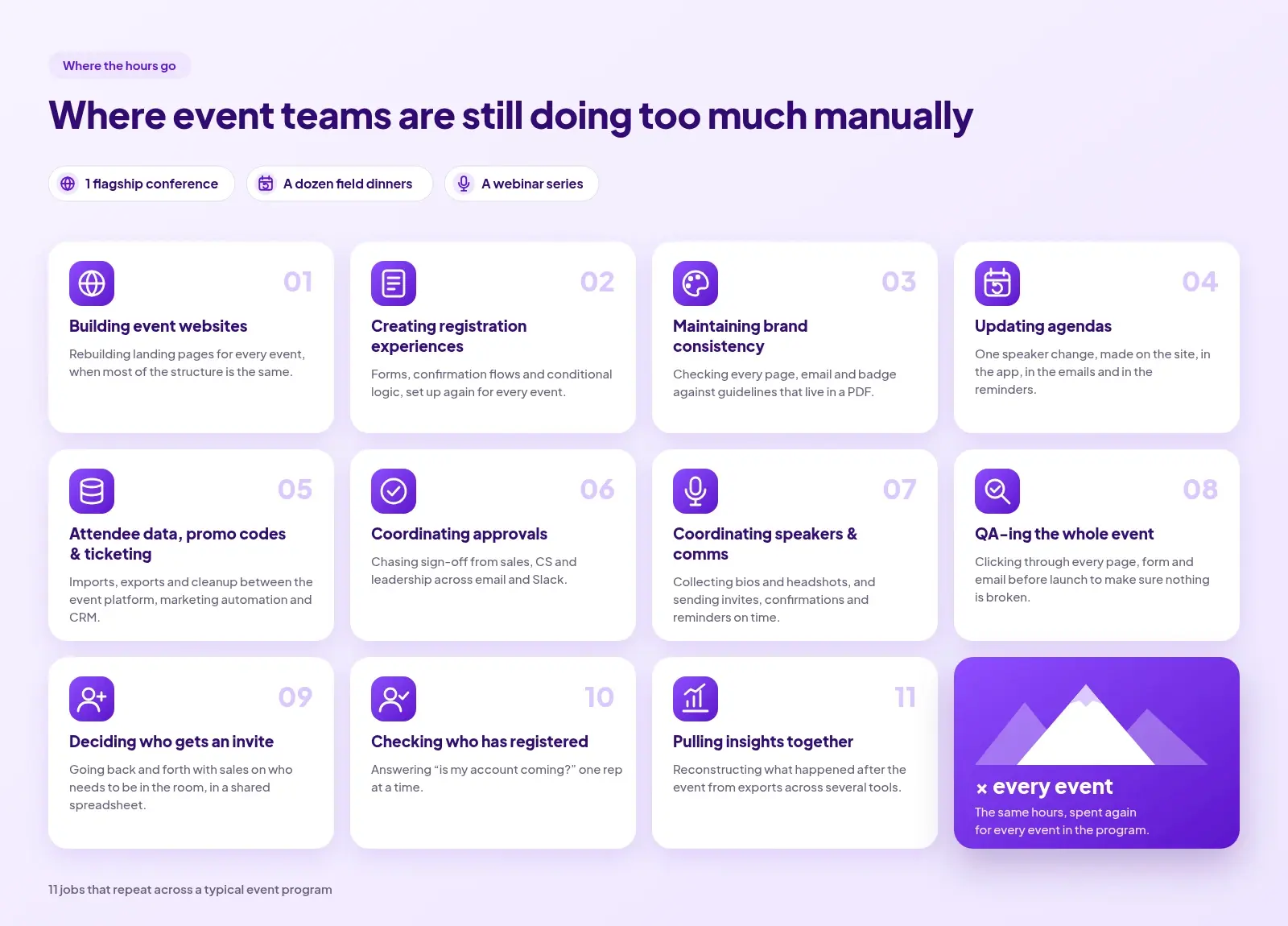
Today, events have become a primary GTM channel with revenue goals instead of being a nice-to-have. You're going from twenty events a year to 100+ with the same headcount. At that scale, holding all of the context, execution, and coordination together with manual workarounds limits how much your events program can grow. Adding more tools doesn't solve this because each tool only sees a slice of the problem.
This is what an event platform built on a shared database is designed to solve, where every part of the system has the same event context as you. Offload that context and the manual execution to the system, and you're free to focus on the strategic direction of your program.
The event marketer shouldn't end up doing both their job and the platform's. For too long, the event platforms have forced teams to work down at their level. It's time the bar was raised.
A free claude plugin with 10 claude skills that event marketers can install and use right away for venue research, sponsor research, budget planning and more.
If you run B2B marketing events — customer dinners, prospect happy hours, field events at tradeshows, executive retreats, user conferences, webinars, fireside chats — most of the work isn't the event itself. It's the eight weeks of sourcing, shortlisting, chasing, scheduling, designing, briefing, and reconciling that surround it.
The event-marketing plugin packages that work into ten Claude Code skills you can call from a single conversation. Each skill is opinionated, built around the actual artifacts an event marketer produces (a venue shortlist, a workback, a budget, a stack of LinkedIn promo cards, a post-event brief), and designed to live alongside a per-event folder so the same pinned thread can run the whole program.
The plugin ships ten skills, grouped by where they sit in the event lifecycle.
venue-research — The entry point for sourcing any customer- or prospect-facing event under ~150 people: dinners, happy hours, workshops, mini-conferences, ancillary tradeshow events. Returns 5–8 well-fitted venues with rationale. Handles intake for every event format and delegates to experience-research when the ask is an experience (Sphere tour, F1 suite, helicopter ride, golf with a pro) rather than a fixed-location venue.
experience-research (internal) — Sources VIP experiences from hospitality programs, suite brokers, motorsports corporate hospitality, museum buyouts, celebrity-led experiences, and luxury weekend retreats. Invoked automatically by venue-research or directly via /experience-research.
speaker-research — Build a ranked, deduplicated, competitor-filtered shortlist of 10–20 target speakers for a specific event — webinars, fireside chats, customer panels, podcast guests, virtual summits, conference sessions. Output is opinionated enough to start outreach to your top 3–5 picks the same day.
sponsor-research — Build a ranked shortlist of 15–40 target sponsor companies for a user conference, virtual summit, webinar series, or roadshow, each paired with the specific human inside that company most likely to own the sponsorship decision.
workback-schedule — A reverse-timeline ("T-minus") schedule for a single event with target date, projected date, and on/off-track signal for every prep task. Designed to be invoked repeatedly in a pinned thread: "we pushed X by a week", "mark Y done", "catch up on the thread", "what's left before the event".
budget — A line-item budget that lives in the same per-event folder as the workback. Drop in evidence — PDF invoices, image invoices, screenshots of email receipts, even screenshots of a bank/credit-card transaction list — and the skill extracts vendor and total, auto-categorizes each into the right line item, and updates Projected / Actual / Variance. Generates a read-only HTML view styled like a finance tracker.
linkedin-event-promos — Bulk-renders LinkedIn promotion graphics from a user-supplied HTML template and a CSV of speakers or sponsors. One PNG per row, across the ramp (save-the-date, 1 month out, 2 weeks out, 1 week out, day-of). Built for the moment you have 15 speakers and 8 sponsors to announce and don't want to open Figma 23 times.
agenda-generator — Builds and deploys a here.now-hosted conference agenda site: filterable session grid, natural-language "Great fit / Good fit" recommender, personalized agenda builder, shareable link. Also supports a marketer-driven flow where Claude curates a standalone personalized agenda for a specific VIP attendee.
attendee-chatbot — Spins up a brand-themed, embeddable chat widget for a single event, powered by a Claude Managed Agent the skill provisions. Answers attendee questions from PDFs you supply (agenda, FAQ, venue map, code of conduct, sponsor list, travel/visa info). Ships as a single-file JS bundle plus an embed snippet.
post-event-brief — Combines registrants-vs-attendees data with optional Salesforce enrichment (top accounts touched, hot leads, pipeline influenced, new contacts created) into a stakeholder-ready markdown brief plus an interactive HTML view. Lives in the same per-event folder as the workback and budget.
Skills auto-trigger from natural language — you don't need to remember the skill names. The design intent is that one pinned Claude Code thread per event can run workback-schedule, budget, and post-event-brief against the same per-event folder across the full planning window.
Some real prompts you can try right away after you install the skills:
This is a Claude Code plugin, so it installs through Claude Code's plugin system (not the Anthropic API or claude.ai).
Here's the plugin URL.
Open Claude Desktop App > Customize > Plugin > Create Plugin > Add Marketplace > Paste in the plugin URL and sync
Here’s quick help video to install it:
Zuddl's May updates take the manual work out of publishing recordings and gating replays - plus give organizers BCC for up to five recipients, multi-line form fields, configurable survey scales, UTM visibility on attendee tables, and integration duplication.
Until now, getting an on-demand webinar live meant a separate workflow - configuring the on-demand page, manually publishing the recording, rebuilding the registration funnel if the content was gated. Three steps that had no reason to be separate.
That's gone. In continuation to the On-Demand experience, here are a few updates.
Auto-publish recordings, be it a live webinar or a simulive session. Recordings go live on the on-demand page the moment they are processed. No follow-up action, no manual publishing step. Organizers who want to review before publishing can turn off auto-publish in settings - a clear "Publish On-Demand Page" CTA surfaces when the session ends. The control is still there, it's just no longer the default bottleneck.
Gated on-demand without rebuilding the funnel. Gated webinars are now equipped with a dedicated on-demand setup section. Organizers can either reuse the existing registration page or create a custom on-demand page. For attendees, the experience stays simple - same link, register or log in, watch.
What this changes:
Event communications rarely have one stakeholder - account managers, CSMs, regional leads, and partners often need visibility on the emails being sent. Organizers can now BCC up to five emails, removing the need for manual forwards or screenshot threads after the send.
Some registration questions don't fit on one line - mailing addresses, dietary requirements, accessibility notes. The Registration Flow Builder now supports a text area field type that accepts multi-line input with a taller field height and line-break support.
Not every survey fits a 1–5 scale - NPS needs 0-10, quick pulse checks work better at 1-3. Organizers can now configure rating scales per rating type question - minimum stays at 1, maximum can be set anywhere from 3 to 10. Attendee-facing surveys render the configured scale dynamically across both web and mobile.
Attribution data was always captured - it just wasn't easy to see at the row level. The attendees and approvals tables now show UTM parameters (utm_source, utm_medium, utm_campaign, etc) as columns. Attribution lives in the same view organizers already use to triage registrations, approve attendees, and pull lists.
For teams running field events, ancillary sessions, or partner-hosted events at tradeshows, event setups are duplicated repeatedly. Integrations now duplicate alongside the event itself - no reconfiguring from scratch each time.
.avif)
Compare the top trade show lead capture apps across scan versatility, lead qualification depth, and CRM sync speed. Each tool is assessed on what it does well for B2B event teams and where it has gaps that could slow your post-show follow-up.
Your booth rep scans a badge at 2:47 PM on day one. The scan fails because the event organizer uses a badge format your rented scanner does not support. Your rep grabs a business card instead, drops it into a fishbowl, and moves on. By the time someone types that card into a spreadsheet four days later, the prospect has already taken a call from a competitor who captured the same lead digitally and followed up within hours.
A trade show lead capture app manages more than contact collection. It coordinates how multiple booth staff qualify prospects in real time, how conversation context travels from a noisy exhibition floor into your CRM, and how enrichment fills the gaps that a badge scan leaves behind.
This article evaluates 9 trade show lead capture apps across scan versatility, lead qualification depth, and CRM sync speed. Each tool is assessed on what it does well for B2B event teams and where it has gaps that could slow your post-show follow-up.
Zuddl's Universal Lead Capture app works at both Zuddl-powered events and third-party events, supporting badge scanning, business card photo capture, manual entry, and API integration with event organizer badge systems. It is built for B2B event teams managing multi-city trade show calendars where booth staff need a single app that adapts to whatever badge format the organizer provides.
What it does well
Where it has gaps
Pricing: Custom pricing; not listed publicly. Request a demo
Ratings: 4.8/5 on G2 · Not available on Capterra
Best for: B2B field marketing teams running trade shows across multiple cities who need one lead capture app that works regardless of event organizer, badge system, or venue WiFi, with real-time CRM sync and AI enrichment that eliminates the post-show data cleanup sprint.
Blinq is a lead capture platform that pairs universal contact scanning with an AI Notetaker that generates conversation summaries after each interaction. It fits individual reps and small booth teams who value AI-generated context over manual note-taking during fast-paced trade show conversations. It's built to enrich leads with event context and increase speed to lead.
What it does well
Where it has gaps
Pricing: Free plan available. Blinq Business starts at $4.99 per card per month (annual billing). Enterprise offers custom pricing.
Ratings: 4.9/5 on G2 · 4.9/5 on Capterra
Best for: Small booth teams or individual reps who need AI-generated conversation summaries after each scan, want broad CRM compatibility across 5,000+ platforms, and prioritize enriched context over raw contact data in their follow-up workflow.
Captello is a lead capture platform built around scan flexibility, offering AI badge scanning, NFC, barcode, QR code, business card transcription, and manual kiosk mode. It fits booth teams who attend high volumes of trade shows and need a single platform that works across different badge types without per-event hardware rentals.
What it does well
Where it has gaps
Pricing: Custom pricing; not listed publicly.
Ratings: 4.8/5 on G2 · 4.9/5 on Capterra
Best for: Booth teams attending 15+ trade shows per year who encounter different badge systems at every event and want unlimited device access with a multi-source enrichment layer that fills gaps when badge data is incomplete.
iCapture is a trade show lead capture app that aligns with top badge providers and offers a managed setup model where the iCapture team configures the system before each event. It fits B2B marketing teams who want a hands-off setup process and consistent capture across all their shows.
What it does well
Where it has gaps
Pricing: Starting from $998/event or $4,998/year for unlimited events.
Ratings: 4.7/5 on G2 · 4.7/5 on Capterra
Best for: B2B marketing teams who prefer a managed service model where vendor staff handle event-by-event configuration, and whose CRM integration requirements demand in-house-built connectors rather than generic API bridges.
Popl combines digital business card functionality with event lead capture in a single app, offering a universal badge scanner that works without purchasing event badge API kits. It fits sales reps and small teams who use the same app for everyday networking and trade show lead collection.
What it does well
Where it has gaps
Pricing: Custom pricing; usage-based per badge scan.
Ratings: 4.6/5 on G2 · 4.7/5 on Capterra
Best for: Sales reps who attend trade shows and networking events regularly and want a single app for digital business cards, badge scanning, and CRM-synced lead capture without switching between separate tools for each function.
Swapcard is an event management platform with built-in lead capture for exhibitors, combining badge and QR code scanning with AI-driven matchmaking between attendees and exhibitors. It fits event organizers running their own trade shows who want lead capture embedded in the event platform rather than purchased separately.
What it does well
Where it has gaps
Pricing: Custom pricing; not listed publicly.
Ratings: 4.6/5 on G2 · 4.3/5 on Capterra
Best for: Event organizers who run their own trade shows and want exhibitor lead capture built into the event platform, with AI-powered attendee matchmaking that pre-qualifies leads before exhibitors scan a single badge.
Whova is an event management platform that includes lead retrieval functionality for exhibitors, letting booth staff scan attendee QR codes and manage leads with custom qualifiers. It fits organizers already using Whova for event management who want to offer exhibitors an integrated lead capture option.
What it does well
Where it has gaps
Pricing: Custom pricing; not listed publicly.
Ratings: 4.8/5 on G2 · 4.8/5 on Capterra
Best for: Event organizers already running their conferences on Whova who want to provide exhibitors with basic lead retrieval through QR scanning, where the exhibitor's primary need is simple capture and CRM export rather than multi-format scanning or enrichment.
myfairtool is a trade show lead capture app with published per-user pricing and a feature set that covers scanning, offline capture, qualification, and CRM sync. It fits small exhibitor teams who want transparent costs and do not need enterprise-scale partner portals or AI enrichment.
What it does well
Where it has gaps
Pricing: $29/month per user (Starter), $79/month per user (Professional), $149/month per user (Enterprise), or $299/event.
Ratings: Not available on G2 · 5.0/5 on Capterra
Best for: Small exhibitor teams attending 3 to 8 trade shows per year who want transparent per-user pricing, full offline capability, and voice notes for qualification without committing to enterprise contracts or custom pricing negotiations.
QuickTapSurvey is an offline survey and data collection app used for trade show lead capture through structured forms on iPad, iPhone, and Android. It fits teams who need to collect specific survey data at the booth rather than scan badges, with reliable offline form submission.
What it does well
Where it has gaps
Pricing: Individual at $19/month. Pro at $49/month. Premium at $99/month. Enterprise pricing available for 25+ devices.
Ratings: Not available on G2 · 4.6/5 on Capterra
Best for: Teams collecting structured survey data or detailed qualification responses at their booth who need reliable offline form submission across multiple devices, and whose capture workflow does not depend on badge scanning.
Badge and business card scanning versatility. Evaluate whether the app supports QR codes, barcodes, NFC, business card photos, manual entry, and API integration with event organizer systems. Teams locked into a single scan type rent expensive hardware or lose leads when the badge format changes between shows.
Offline capture and sync reliability. Test whether the app stores leads locally when WiFi drops and syncs automatically when connectivity returns. Convention center WiFi fails during peak traffic, and an app that depends on a live connection will lose leads at the moments your booth is busiest.
Real-time lead qualification and contextual notes. Check for custom qualifier fields, lead scoring, tags, and audio or voice note capabilities that booth reps can use during the conversation. Without on-the-spot qualification, all leads arrive in the CRM looking identical, and sales wastes time calling prospects who were browsing.
Instant CRM integration and data sync. Confirm the app offers real-time or near-real-time sync to your CRM with field mapping and failure retry logic. Delays of even 24 hours give competitors who synced in real time a head start on outreach.
Lead data enrichment accuracy. Assess whether the app fills missing fields like email, phone, job title, and company details automatically from verified data sources. Badge scans often capture only a name and company, leaving sales with incomplete records that require manual research.
Multi-user team coordination. Verify the app supports multiple booth staff capturing leads simultaneously on their own devices with centralized visibility and duplicate prevention. Without coordination, two reps scan the same prospect and both send follow-up emails.
Cross-event lead tracking and analytics. Look for unified dashboards that track leads across multiple events with pipeline attribution and ROI metrics. Without cross-event visibility, marketing cannot prove which trade shows generate revenue and which generate only badge scans.
Partner and exhibitor self-service capabilities. Evaluate whether the app provides isolated portal access for co-exhibiting partners or sponsors to capture their own leads with data separation. Manual lead sharing between partners and your team creates delays, errors, and compliance risks.
What should a lead capture app integrate with? At minimum, it should sync with your CRM (Salesforce, HubSpot, or equivalent) and marketing automation platform (Marketo, Pardot, or similar). Zuddl offers bi-directional real-time sync with Salesforce, HubSpot, and Marketo, including retry logic for failed syncs. Popl and Blinq also support real-time CRM sync to multiple platforms. Integration with calendar tools and data enrichment providers adds further value for post-show follow-up.
What is the difference between lead capture and lead retrieval? Lead retrieval typically refers to scanning badges provided by an event organizer to access pre-registered attendee data. Lead capture is broader. It includes badge scanning, business card photo capture, manual entry, qualification tagging, and data enrichment. Apps like Zuddl and Captello support both functions, while tools limited to QR scanning cover retrieval only.
How do lead capture apps compare to traditional business card collection? Business cards require manual data entry after the event, lose conversation context, and create delays between meeting a prospect and syncing their record to a CRM. Lead capture apps digitize the contact instantly, attach qualifier tags and notes during the conversation, and sync to CRM in real time. The difference is measured in days of follow-up speed.
Can lead capture apps work offline at trade shows? Several do. Zuddl's Universal Lead Capture stores leads offline and syncs automatically when the device reconnects. Popl, Blinq, myfairtool, and QuickTapSurvey also offer offline capture with automatic sync. Convention center WiFi is unreliable during peak hours, so offline capability is a requirement rather than a feature for serious trade show teams.
Zuddl's April updates give organizers native file collection in registration flows, badge-free check-in at third-party events, and attendee self-cancellation - plus sharper integrations across Slack, HubSpot, and Salesforce.
Enable Third-party Event Badge Scanner in your check-in settings, and the Zuddl onsite app can scan any physical badge - from any event. OCR reads the attendee's name and available details. The app matches that against your field event registrations in real time.
Match found - check-in completes in one tap. No match - the scanned data pre-fills the registration form. Staff review, submit, and the attendee is processed as a walk-in on the spot.
What this changes:
Current release: Online mode only. Kiosk mode and offline support are in progress.
Organizers can now add a file upload field to any registration flow. Choose the allowed file types - JPG, PNG, or PDF - set a size limit between 1 MB and 10 MB, and the field is live. Attendees upload during registration. Files appear immediately in People > Attendees, approval queues, and pending registration tables - from the moment the form is submitted.
For teams running approval flows, this matters more than it might seem. Files arrive with the registration, not after a follow-up thread.
What this changes:
Available for all event types, live now. Note: Files are not included in CSV exports or sent via integrations.
Cancellations often happen in response to a calendar invite or an email to the organizer. Capacity stays reserved. Reporting stays stale.
Organizers can now enable self-cancellation with a single toggle. Attendees cancel from a link in their confirmation email, calendar invite, or from the modify registration page. They select a reason, confirm, and access is revoked immediately. Cancelled registrations appear in People > Attendees under a dedicated status filter.
What this changes:
Note: Available only for non-ticketed flows.
Each event can now send Slack notifications to its own dedicated channel - or inherit the org-level one. Notifications can be disabled per event, and types (Registered, Attended, Pending for Approval) toggled individually. When the org-level channel changes, events using it update automatically. Events with a custom channel are unaffected.
The Enter Studio screen now runs connectivity and audio/video checks before the session starts. Issues surface immediately with troubleshooting guidance. If the organizer proceeds with an unresolved issue, a warning indicator stays visible on the affected control throughout the session.
HubSpot can now activate automatically for every new or duplicated event. New events inherit the global configuration. Duplicated events carry over the source event's field mappings. No per-event setup required.
When AI is enabled, the platform auto-maps CSV headers to the expected fields before review. Confident matches are applied. Uncertain fields are flagged as Needs Review. Unrecognized headers are marked Skipped. The review step stays - the manual mapping before it doesn't.
Campaigns in the Salesforce integration can now be searched and selected by name. No switching tabs to look up IDs - though search by ID still works for teams that prefer it.

Evaluates 14 tools across check-in speed and queue management, badge design flexibility, and hardware reliability. Each entry covers what the tool does well, where it has gaps, and the specific team or event type it fits best.
Your keynote starts in 20 minutes. Three hundred attendees are still in the lobby because the check-in tablets lost their Wi-Fi connection, and the backup process is a printed spreadsheet and a Sharpie. The registration team is fielding questions they cannot answer. The ops lead is on the phone with IT. Your CEO is already inside, waiting for a full room.
Event check-in software manages more than the moment someone walks through the door. It coordinates the handoff between registration data and onsite operations, badge printing hardware and branding requirements, session-level access control, walk-in workflows, and the real-time attendance data that sales and marketing need for follow-up sequencing.
This list evaluates 14 tools across check-in speed and queue management, badge design flexibility, and hardware reliability. Each entry covers what the tool does well, where it has gaps, and the specific team or event type it fits best. Teams running multi-track conferences can evaluate session-level access controls, while field marketing teams can assess offline resilience for venues with unreliable connectivity.
Zuddl provides QR code scanning with on-demand badge printing, processing each attendee in under 60 seconds from scan to printed badge. The platform fits B2B marketing teams running conferences, field events, and multi-session programs at scales from 100 to 25,000+ attendees.
What it does well
Where it has gaps
Pricing: Starts at $10,000/year
Ratings: 4.8/5 on G2 · 4.5/5 on Capterra
Best for: B2B marketing teams running branded conferences and field events who want one vendor handling check-in software, badge design, hardware fulfillment, and CRM sync instead of stitching together separate tools and suppliers.
Cvent's OnArrival system offers multi-station check-in where staff can log in across multiple iPads simultaneously, scanning badges and processing attendees in parallel. The platform serves large enterprise event programs running frequent, high-attendance conferences that justify dedicated onsite support.
What it does well
Where it has gaps
Pricing: Custom pricing; not listed publicly.
Ratings: 4.3/5 on G2 · 4.5/5 on Capterra
Best for: Enterprise organizations with dedicated event operations teams and budgets for full-service onsite support, running large-scale conferences where having Cvent's staff and pre-configured hardware on the ground outweighs the setup complexity.
Expo Pass delivers on-site badge printing and check-in through iPad kiosks, with attendees scanning unique QR codes to check themselves in and print badges instantly. The platform targets B2B event teams that want hardware included in their software package rather than sourced separately.
What it does well
Where it has gaps
Pricing: Custom pricing; not listed publicly.
Ratings: Not available on G2 · 4.8/5 on Capterra
Best for: B2B event teams that want a hardware-included badge printing solution without coordinating separate printer vendors, particularly for events where setup simplicity matters more than advanced badge design flexibility.
Bizzabo combines traditional QR code check-in with Klik SmartBadge wearable technology for contactless session-level tracking. The platform serves enterprise event teams managing multi-day conferences where attendee journey data matters as much as entry speed.
What it does well
Where it has gaps
Pricing: Custom pricing; not listed publicly.
Ratings: 4.3/5 on G2 · 4.4/5 on Capterra
Best for: Enterprise conference teams that need contactless session-level attendance tracking through wearable badges and are willing to invest in setup complexity for deeper attendee journey analytics across multi-day events.
EventX provides a mobile check-in app on iOS and Android with a drag-and-drop badge designer that prints custom badges in under 2 seconds. The platform fits smaller B2B event teams that need professional check-in and badge printing without enterprise-tier pricing.
What it does well
Where it has gaps
Pricing: Free plan available (100 attendees per event). Essentials at $99/month (billed annually, 500 attendees). Premium at $199/month (billed annually, 1,000 attendees). Enterprise pricing requires contacting sales.
Ratings: 4.9/5 on G2 · Not available on Capterra
Best for: B2B teams running small to mid-size events (under 1,000 attendees) who need fast badge printing, offline reliability, and published pricing they can evaluate without a sales call.
vFairs offers multiple check-in methods including QR code scanning, AI-powered facial recognition, and name search, giving onsite teams flexibility based on attendee preferences and event security requirements. The platform serves B2B teams running hybrid events where in-person and virtual experiences need to connect.
What it does well
Where it has gaps
Pricing: Custom pricing; not listed publicly.
Ratings: 4.7/5 on G2 · 4.8/5 on Capterra
Best for: B2B event teams running hybrid programs that want facial recognition and flexible device-based check-in, with enough technical resources to manage the initial setup complexity.
Whova provides self-service kiosk check-in with QR code scanning and email lookup, combined with a broader event engagement platform that includes networking features and attendee interaction tools. The platform fits association and conference teams that value attendee engagement alongside check-in efficiency.
What it does well
Where it has gaps
Pricing: Custom pricing; not listed publicly. Registration fees are 3.0% + $0.99 per ticket.
Ratings: 4.8/5 on G2 · 4.8/5 on Capterra
Best for: Association conference teams running multi-day events where attendee networking and engagement tools are as important as the check-in process itself, and where badge design requirements are straightforward.
Swoogo's Go Onsite app handles event, session, and package check-in with QR code scanning and name search, built as a native extension of its registration platform. The tool suits B2B marketing teams already using Swoogo for registration who want check-in without adding another vendor.
What it does well
Where it has gaps
Pricing: Custom pricing; not listed publicly. Per-user pricing model with no per-event or per-registrant fees. Go Onsite Pro is an optional paid add-on.
Ratings: 4.7/5 on Capterra
Best for: Marketing teams already running event registration through Swoogo who need native check-in with offline resilience and walk-in handling, without introducing a separate check-in vendor into their workflow.
EventMobi offers QR code-based check-in with physical kiosk support and session-level attendance tracking, including CE credit verification capabilities. The platform targets conference organizers who need to document session attendance for professional certification requirements.
What it does well
Where it has gaps
Pricing: Per-event or per-year pricing based on attendee count and selected modules. Pre-printed badges start at $3.99 per badge. No ticket fees for registration.
Ratings: 4.6/5 on G2 · 4.7/5 on Capterra
Best for: Conference organizers in professional education or healthcare who need to verify session attendance for CE credits and want modular, transparent pricing that scales with event count rather than a fixed annual commitment.
Samaaro enables QR code and digital wallet check-in with automated badge printing at kiosks, positioning itself around compliance-ready attendance logging with CRM integration. The platform targets B2B marketing teams in regulated industries where audit trails matter.
What it does well
Where it has gaps
Pricing: Custom pricing; not listed publicly.
Ratings: Not available on G2 · 4.9/5 on Capterra
Best for: B2B event teams in regulated industries that need compliance-grade attendance logging with CRM integration and offline reliability, provided they are comfortable evaluating a platform with a smaller review footprint.
Eventzilla provides self-service kiosk check-in with a drag-and-drop badge editor, mobile apps for iOS and Android, and integration with Zebra and Epson printers. The platform fits budget-conscious B2B teams that want per-ticket pricing without monthly subscriptions.
What it does well
Where it has gaps
Pricing: Free for free events. Basic plan at $1.50 per ticket for paid events. Eventzilla Payments: 2.9% + $0.99 per transaction.
Ratings: 4.4/5 on G2 · 4.4/5 on Capterra
Best for: B2B teams running occasional paid events who need solid check-in and badge printing without committing to annual platform subscriptions, and whose events do not require complex session-level access control.
RSVPify offers QR code scanning and guest name search for check-in, with real-time syncing across unlimited devices so multiple staff members can manage entry simultaneously. The platform serves teams managing invitation-driven corporate events where RSVP tracking connects directly to check-in workflows.
What it does well
Where it has gaps
Pricing: Free plan for events up to 100 guests. Professional features require subscription (contact for details). Ticketing fees: 1.95% + $0.90 per ticket.
Ratings: 4.7/5 on G2 · 4.8/5 on Capterra
Best for: Teams running invitation-only corporate events, executive dinners, or board meetings where RSVP management flows directly into multi-device check-in, and where badge printing is not a primary requirement.
Eventbrite's Organizer app provides mobile QR code scanning for check-in, with real-time data syncing across devices at multiple entry points. The platform fits B2B teams running high-volume ticketed events where door sales and walk-in payment processing matter more than badge customization.
What it does well
Where it has gaps
Pricing: Free to publish events. Ticketing fees: 3.7% + $1.79 service fee per ticket, plus 2.9% payment processing fee per order.
Ratings: 4.4/5 on G2 · 4.6/5 on Capterra
Best for: B2B teams running single-track ticketed events or meetups where fast mobile check-in and walk-in payment processing are the priority, and where professional badge printing is not part of the onsite experience.
Webex Events provides in-person event check-in and badge printing as part of the broader Webex Suite, with multi-track agenda support and flexible ticketing options. The platform targets organizations already operating within the Cisco/Webex ecosystem that need event capabilities bundled with their existing collaboration tools.
What it does well
Where it has gaps
Pricing: Custom pricing; not available for separate purchase. Included in select Webex Suite Enterprise Agreements.
Ratings: 4.8/5 on G2 · 4.9/5 on Capterra
Best for: Organizations with existing Webex Suite Enterprise Agreements that want to add event check-in without procuring a separate platform, primarily for hybrid events where virtual and in-person workflows need to connect through one vendor.
Check-in speed and queue management. Evaluate whether the system supports multiple simultaneous check-in modes: self-serve kiosks, staff-assisted scanning, and mobile QR. A single check-in method creates a bottleneck when 300 attendees arrive in the same 15-minute window.
Badge design flexibility and brand control. Look for visual editors that let marketing teams update layouts, logos, and attendee fields without submitting design tickets. Generic badges that ignore your event branding signal a lack of attention that attendees notice immediately.
Hardware reliability and equipment management. Determine whether the vendor provides printers, tablets, and routers or whether your team sources everything independently. Multi-vendor hardware coordination fails when one supplier ships the wrong printer model the day before your event.
Real-time data synchronization. Confirm that check-in data flows to your CRM and marketing automation platform without manual exports. Delayed attendance data means your sales team follows up with prospects days after competitors who captured the same signal in real time.
Offline and connectivity resilience. Test whether the system continues scanning and printing badges when Wi-Fi drops. Venue internet is unreliable at convention centers, hotels, and field locations. A tool with no offline mode becomes a liability at the exact moment you need it most.
Session and access control integration. Check whether the platform enforces session-specific entry rules based on ticket type or attendee role. Without automated access control, VIP sessions fill with general attendees, and capacity limits exist only on paper.
Walk-in and last-minute registration handling. Verify that walk-in attendees can register, pay, and receive printed badges through the same system pre-registered guests use. Separate walk-in processes create data silos and produce visibly different badges that mark late arrivals.
What should event check-in software integrate with?
At minimum, it should connect to your CRM (Salesforce, HubSpot, or Marketo), your marketing automation platform, and your registration system. Zuddl offers bi-directional CRM sync that pushes attendance data in real time. Cvent and Bizzabo also provide CRM integrations. Without these connections, attendance data sits in the check-in tool and never reaches the teams who need it for pipeline follow-up.
What is the difference between event check-in software and event management software?
Event management software covers the full lifecycle: registration, marketing, agenda building, and post-event analytics. Event check-in software focuses specifically on onsite arrival: scanning, badge printing, and attendance tracking. Many platforms, including Zuddl, combine both. Standalone check-in tools lack registration and CRM features. The distinction matters because a check-in tool that cannot sync with your registration data creates manual reconciliation work.
How do you choose event check-in software for large events?
Prioritize three things: concurrent check-in capacity across multiple stations, offline functionality for unreliable venue Wi-Fi, and hardware support. Zuddl provides full equipment fulfillment including printers, iPads, and routers from a single vendor. For events above 1,000 attendees, also evaluate real-time data sync speed and session-level access control. Test the system under load before committing.
Can event check-in software handle badge printing and check-in together?
Most dedicated tools combine both workflows. Zuddl prints branded badges within seconds of check-in using a visual badge editor with custom fonts and merge tags. Expo Pass uses direct thermal printing with pre-branded badge shells. EventX prints in under 2 seconds. The key variable is whether badge design requires a separate tool or is built into the check-in platform.
Top 10 virtual event platforms for large-scale B2B programs in 2026, compared on production studio depth, CRM sync, branding control, and the analytics that connect events to pipeline.
Your marketing team ran 14 virtual events last quarter using three different tools. Each had its own registration page, its own email workflow, its own analytics dashboard. The quarterly review meeting turned into a debate about which numbers to trust. Nobody could answer the simplest question: which program drove the most pipeline.
A truly capable virtual event platform should handle registration, branded landing pages, in-session production, attendee engagement, speaker coordination, and CRM sync that connects it all to revenue. When those functions are spread across separate tools, the data fragments. Attribution gaps widen. And every new event requires rebuilding integrations that should have carried over from the last one.
Platforms built for large-scale attendee experiences consolidate production, engagement, and data into a single system. Below, we evaluate 10 options across those capabilities, with emphasis on where they differ for B2B teams running recurring programs.
Zuddl is a unified event and webinar platform built for B2B marketing teams managing conferences, field events, and virtual programs from a single system. Its core strength in the virtual event category is combining broadcast-quality production with real-time, bi-directional CRM integration.
What it does well
• The built-in production studio supports pre-defined scene flows, branded overlays, lower thirds, and live speaker transitions without requiring external production tools or app downloads for organizers or attendees.
• Bi-directional integration with Salesforce, HubSpot, and Marketo syncs registration statuses, engagement data, and attendee behavior to CRM in real time, with field mapping for statuses like invited, registered, attended, and no-show.
• Embeddable, SDK-based registration widgets preserve UTM tracking and GA4 attribution, keeping attendee journeys on your owned web properties instead of redirecting to third-party landing pages.
• An AI-powered content hub auto-generates highlight reels, social clips, and blog drafts from session recordings within an hour of event completion, without manual editing.
• One-click event cloning duplicates entire virtual event setups, including integrations, branded assets, registration forms, and communication workflows, reducing repeated setup time for recurring programs.
Where it has gaps
• The breadth of configuration options creates a learning curve for first-time users, though all plans include 30-day onboarding and first-event support to accelerate setup.
Pricing: From $10,000/year
Best for: B2B marketing teams running multi-format event programs (virtual, hybrid, in-person) that need production control, real-time CRM sync, and consolidated analytics across all event types without stitching together separate tools.
Take control of your virtual event production, CRM integration, and attendee engagement with Zuddl. See how it works.
Goldcast is a virtual event platform built for B2B demand generation teams. Its primary strength is pairing branded production quality with granular attendee engagement data that flows into CRM and marketing automation platforms.
What it does well
• Branded virtual stages, live video Q&A, and interactive overlays create a polished attendee experience that G2 reviewers consistently describe as visually differentiated from standard webinar tools.
• Post-event content repurposing through its Content Lab feature generates clips, blog posts, and social assets from recordings.
• CRM integrations with Salesforce, HubSpot, and Marketo push engagement-level data (poll responses, CTA clicks, session duration) for lead scoring.
• Supports multi-session virtual summits and multi-day conferences with session tracks, sponsor hubs, and networking spaces.
Where it has gaps
• Goldcast was acquired by Cvent in December 2025. Product direction and integration roadmap post-acquisition remain to be confirmed, which may affect long-term planning for new buyers.
• The platform is primarily virtual-first. Teams running in-person or complex hybrid programs requiring onsite logistics (badge printing, check-in, lead capture hardware) need additional tools.
• Some G2 reviewers report that Marketo integration can be inconsistent with custom variable mapping and rate-limit handling.
Pricing: Custom pricing, requires sales conversation
G2: 4.7/5 | Capterra: 4.6/5
Best for: B2B demand gen teams focused on producing branded virtual events with strong content repurposing workflows and CRM-connected engagement data, primarily for webinar-series and virtual summit formats.
Bizzabo positions itself as an event experience operating system for enterprise B2B teams. Its virtual event capabilities sit within a broader platform that also covers in-person conferences and hybrid formats.
What it does well
• Unified event data across virtual, hybrid, and in-person formats provides consolidated reporting for teams managing complex portfolios.
• Real-time analytics dashboards and post-event engagement reports are among the more detailed in this category, per G2 reviewer feedback.
• Networking and attendee matchmaking tools support structured connection-building during virtual conferences.
• The platform supports scalable registration with multi-track session management for large virtual conferences.
Where it has gaps
• Landing pages rely on iframe-based architecture, which can block script tracking for GA4 and Bizible, creating attribution gaps for marketing ops teams.
• Customization options for event branding are more limited than platforms with full CSS/HTML access. Custom fonts and advanced design changes are constrained.
• Promo code and ticketing workflows have been flagged by reviewers for unexpected behavior, including auto-selecting incorrect ticket types when discount codes are applied.
Pricing: From $17,999/yr
G2: 4.3/5 | Capterra: 4.4/5
Best for: Enterprise B2B organizations managing a portfolio of event formats (virtual, hybrid, in-person) that need unified data and reporting across the entire program, with attendee networking as a priority.
ON24 is an enterprise webinar and virtual engagement platform with deep roots in structured, analytics-heavy programs. It is one of the more established options for marketing teams running formal webinar series at scale.
What it does well
• Engagement analytics are among the most granular in this category, tracking poll responses, resource downloads, Q&A activity, and attention time at the individual attendee level.
• On-demand content hubs allow gated access to recorded sessions, supporting long-tail lead generation beyond the live event date.
• Compliance and certification workflows support continuing education use cases common in financial services and life sciences.
Where it has gaps
• ON24 is in the process of being acquired by Cvent. Post-acquisition product direction, pricing, and integration strategy may shift, which is a consideration for teams evaluating long-term commitments.
• The platform is primarily webinar-focused. Teams needing broader event management (in-person logistics, hybrid production, field event support) will require additional tools.
• CRM sync can experience delays, and some reviewers note that real-time data availability does not match what newer platforms offer.
Pricing: Custom pricing, requires sales conversation
G2: 4.3/5 | Capterra: 4.3/5
Best for: Enterprise demand generation teams running high-volume, analytics-heavy webinar programs, particularly in regulated industries where compliance tracking and continuing education workflows are required.
Webex Events (formerly Socio) is Cisco's virtual and hybrid event platform, combining enterprise-grade security with event management capabilities. It is a common choice for organizations with existing Cisco infrastructure.
What it does well
• Enterprise security posture backed by Cisco's compliance certifications (SOC 2, ISO 27001, FedRAMP) satisfies IT and procurement requirements at large organizations.
• Multi-track session management, networking features, and gamification tools support complex virtual conferences.
• The mobile event app integrates with the virtual platform for a consistent attendee experience across devices.
Where it has gaps
• Marketing-specific workflows, including advanced CRM integrations and marketing automation connections outside the Cisco ecosystem, are more limited compared to platforms built specifically for B2B demand generation.
• Branding flexibility and advanced design customization options fall short for teams that prioritize pixel-level control over the attendee-facing experience.
Pricing: Custom pricing, requires sales conversation
G2: 4.6/5 | Capterra: 4.8/5
Best for: Security-conscious enterprise organizations already operating within the Cisco ecosystem that need a compliant virtual event platform with strong mobile app support for large-scale conferences.
vFairs is a virtual event platform known for immersive 3D environments that simulate in-person expo halls, trade shows, and career fairs. It serves both B2B and association markets across virtual and hybrid formats.
What it does well
• 3D virtual lobbies, auditoriums, and exhibit halls create a visual experience that differentiates from flat, browser-based event platforms. Reviewers on G2 consistently cite the immersive design as a standout feature.
• Exhibitor and sponsor booth management tools allow self-serve content uploads, lead capture, and attendee engagement tracking within individual booths.
• Support quality is among the highest-rated in this category, with dedicated event managers assigned to guide setup and live-day execution.
Where it has gaps
• The 3D environment comes with a steeper learning curve for both organizers and attendees. Initial setup requires more configuration than template-based platforms.
• CRM integrations and enterprise marketing automation connections are less developed than platforms purpose-built for B2B pipeline workflows.
• Pricing transparency is limited. Some reviewers note that custom design elements and specific features carry additional costs beyond the base package.
Pricing: Custom pricing, requires sales conversation
G2: 4.7/5 | Capterra: 4.8/5
Best for: Organizations hosting virtual expos, trade shows, or career fairs that benefit from immersive 3D environments and structured exhibitor-attendee interaction, particularly in association and education markets.
Airmeet is a virtual events and webinar platform with a strong emphasis on attendee networking. Its virtual table and lounge features replicate informal conference interactions that most virtual platforms struggle to deliver.
What it does well
• Virtual networking tables allow attendees to move between group conversations freely, replicating the spontaneous interaction of in-person events. G2 reviewers frequently cite this as a primary differentiator.
• Branding customization spans the full attendee journey, from registration pages and email invites to virtual stages and networking lounges.
• The platform supports webinars, virtual conferences, and hybrid events within a single product, with engagement features like polls, Q&A, emoji reactions, and leaderboard gamification.
Where it has gaps
• Mobile experience for organizers and hosts could be improved, based on consistent G2 reviewer feedback.
• Enterprise CRM integrations, particularly with Salesforce for bi-directional sync and granular field mapping, are less mature than platforms that position CRM connectivity as a core differentiator.
Pricing: From $2,000 (webinars only)
G2: 4.6/5 | Capterra: 4.4/5
Best for: B2B event teams running virtual conferences where attendee networking and community engagement are as important as content delivery, particularly for recurring community-building programs.
RingCentral Events (built on the former Hopin platform) is a virtual event solution within the broader RingCentral communications suite. It supports webinars, virtual conferences, and community events.
What it does well
• Built-in community hub features allow ongoing attendee engagement between events, supporting series-based programs and recurring audience interaction.
• The platform handles large audience capacities and supports multi-session formats with expo areas, networking spaces, and breakout rooms.
• For organizations already using RingCentral for communications, the unified billing and account management simplifies procurement.
Where it has gaps
• The platform's direction post-Hopin acquisition is still stabilizing. Some G2 reviewers note that the transition has introduced UI inconsistencies and feature changes.
• Real-time analytics and marketing-specific conversion features are less developed than dedicated B2B virtual event platforms.
• Backend configuration can feel complex for smaller teams or straightforward events.
Pricing: From $1,200 (webinars only)
G2: 4.5/5 | Capterra: 4.5/5
Best for: Organizations with existing RingCentral communications infrastructure looking for a virtual event platform that supports community-driven engagement and recurring event series.
Zoom Events extends the familiar Zoom Meetings experience into a structured virtual event platform with registration, ticketing, event hubs, and multi-session management. Its primary advantage is the near-zero learning curve for attendees.
What it does well
• Attendee familiarity with the Zoom interface reduces onboarding friction and no-show rates for teams whose audiences already use Zoom regularly.
• Event hubs centralize session management, registration pages, and on-demand content for multi-session virtual conferences.
• Stable, well-tested streaming infrastructure supports large attendee counts with consistent audio and video quality.
Where it has gaps
• Branding and customization options are notably limited. The virtual experience still closely resembles a Zoom meeting, which can reduce perceived brand differentiation for external-facing B2B events.
• Native engagement tools beyond chat and Q&A are minimal. Teams requiring live polls, gamification, or in-session CTAs typically need supplementary tools.
• Marketing automation integrations and CRM attribution capabilities are shallow compared to platforms built specifically for B2B demand generation workflows.
Pricing: Zoom Events add-on pricing requires a sales conversation
G2: 4.4/5 | Capterra: 4.7/5
Best for: B2B teams that prioritize attendee convenience and low-friction access over advanced branding or CRM integration, particularly for internal events, training sessions, or straightforward webinar broadcasts at scale.
Hubilo (now VirtualPRO) is a virtual event platform designed for event marketers running programs where sponsor and exhibitor engagement is central to the event model. It supports webinars, virtual conferences, and hybrid events.
What it does well
• Sponsor and exhibitor tools include branded virtual booths, lead capture, resource distribution, and analytics dashboards, making it one of the stronger options for sponsorship-funded event programs.
• Interactive features like live chat, Q&A, polls, and emoji reactions support real-time audience engagement across session types.
• Integrations with CRM and marketing automation tools including HubSpot, Salesforce, Mailchimp, and Typeform push event data into existing workflows.
Where it has gaps
• Virtual event capabilities are gated behind the enterprise pricing tier. Lower-tier plans focus on webinar-only functionality, limiting flexibility for teams that need virtual conference features without enterprise budgets.
• Customization depth for branding, registration pages, and attendee-facing elements is less extensive than platforms that offer full CSS/HTML access.
Pricing: From $15,000/yr
G2: 4.6/5 | Capterra: 4.6/5
Best for: Event marketers running sponsorship-funded virtual programs that require dedicated exhibitor management tools, branded sponsor booths, and self-serve analytics for sponsors.
These are the dimensions where virtual event platforms differ most for B2B teams. Weigh them based on which failure mode would hurt your program first.
Registration and landing page control
The platform should support branded, conversion-optimized registration pages without external web dev or iframe limitations. Losing UTM tracking at registration breaks attribution from the start.
Production studio depth
Pre-built scene flows, branded overlays, speaker transitions, and backstage controls separate professional virtual events from screen-share presentations. Without these, production quality drops.
In-session engagement tools
Look for native polls, Q&A, live CTAs, downloadable resources, and emoji reactions. If attendees are passive viewers, engagement data for sales follow-up does not exist.
Attendee networking capabilities
Structured networking (1:1 matching, virtual tables, breakout rooms) separates event platforms from broadcast tools. Without it, virtual audiences disengage faster.
CRM integration depth
Bi-directional sync with Salesforce, HubSpot, or Marketo should push granular engagement data, not just registration records. Delayed sync creates follow-up latency.
Content repurposing workflow
Automatic generation of on-demand recordings, clips, and derivative content assets matters. Manual post-production delays reduce the content lifecycle of every session.
Branding and design flexibility
Full CSS/HTML access, custom fonts, and embeddable widgets keep the event experience consistent with your web presence. Locked templates limit brand differentiation.
Analytics and revenue attribution
Session-level engagement data, pipeline dashboards, and exportable reports determine whether the event team can prove ROI to leadership. Basic attendance counts are insufficient.
Scalability across formats
If you run webinars today and plan conferences or hybrid events later, evaluate whether the platform supports those formats natively or requires a separate tool purchase.
{{demo-widget-dark}}
What is a good virtual event platform for B2B marketing teams?
Zuddl, Goldcast, Bizzabo, and ON24 are commonly evaluated by B2B marketing teams. The right choice depends on whether the priority is production quality, CRM integration depth, content repurposing, or multi-format event support. Teams running conferences alongside webinars benefit from a unified platform.
What should a virtual event platform integrate with?
At minimum, CRM (Salesforce, HubSpot), marketing automation (Marketo, Eloqua, Pardot), and communication tools (Slack). Bi-directional data sync with real-time engagement signals is what separates pipeline-impacting integrations from basic data exports.
What is the difference between a virtual event platform and a webinar tool?
Webinar tools focus on one-to-many broadcast sessions. Virtual event platforms add multi-session agendas, networking environments, sponsor areas, attendee segmentation, and deeper CRM attribution. If events need to produce pipeline data, a webinar tool alone is typically insufficient.
How do you evaluate virtual event platforms for large-scale attendee experiences?
Start with CRM integration depth and production quality. Then evaluate registration flexibility, engagement tools, and post-event analytics. Test with a live pilot before committing. The failure modes that matter most are data sync delays and branding limitations.
Top 8 mobile event apps in 2026, compared on the aspects that shape B2B conference outcomes: branding control, CRM integration, engagement tools, and post-event reporting. Pick the one that fits how your team actually runs events.
The keynote is running 5 minutes late, a breakout session has just moved to a different room, and 800 attendees are checking printed schedules finalized 2 days ago. The event coordinator is fielding texts from three sales reps who need to know which prospects checked in.
A mobile event app at a B2B conference does more than display a schedule. It feeds session attendance into CRM records, routes push notifications to the right audience segments, gives sponsors visibility metrics, and captures networking data that sales teams depend on for post-event outreach.
The gap between an agenda viewer and an operational layer is where most mobile event apps diverge. To help B2B conference teams identify which platform closes that gap, the following tools are evaluated on branding depth, in-app engagement, CRM sync, onsite integration, and post-event reporting.
Zuddl is a unified event platform purpose-built for B2B conferences, field events, and webinars. Its attendee mobile app connects directly to the platform's registration, check-in, lead capture, and CRM integration layers.
What it does well
Where it has gaps
Pricing: From $10,000/year
Ratings: G2: 4.8/5 | Capterra: 4.5/5
Best for: B2B marketing teams and conference organizers who need full design control over the mobile app, real-time CRM data flow, and session-level personalization, managed from the same platform that handles registration, on-site check-in, and post-event analytics.
Whova is a conference-focused event management platform whose mobile app has been its defining product since launch. It serves associations, universities, and mid-market B2B organizations running events with 500 to 10,000 attendees.
What it does well
Where it has gaps
Pricing: Custom pricing based on event size
Ratings: G2: 4.8/5 | Capterra: 4.8/5
Best for: Associations and mid-market B2B teams hosting annual conferences where attendee networking and community engagement are the primary success metrics, and deep brand customization is secondary to adoption speed.
Cvent Attendee Hub is the mobile app layer within Cvent's enterprise event management platform. It is built for large-scale conferences where the app must integrate with Cvent's registration, venue, and analytics infrastructure.
What it does well
Where it has gaps
Pricing: Custom pricing, requires sales conversation
Ratings: G2: 4.4/5 | Capterra: 4.5/5
Best for: Enterprise organizations with an existing Cvent contract managing 10+ annual conferences where the mobile app needs to pull from a centralized registration and session database across the portfolio.
Bizzabo positions itself as an event experience platform for B2B marketing teams. Its mobile app is part of a broader suite covering registration, marketing, and on-site engagement for branded conferences.
What it does well
Where it has gaps
Pricing: Custom pricing, requires sales conversation
Ratings: G2: 4.3/5 | Capterra: 4.4/5
Best for: B2B marketing teams running branded user conferences where wearable-based engagement tracking and unified content management between the website and app are priorities.
Swapcard is an AI-powered event platform built around attendee networking and exhibitor lead generation. Its mobile app is among the strongest options for trade shows and large B2B conferences where matchmaking drives ROI.
What it does well
Where it has gaps
Pricing: Custom, user-based pricing
Ratings: G2: 4.6/5 | Capterra: 4.5/5
Best for: Trade show organizers and conference teams where exhibitor ROI depends on AI-matched meetings and qualified lead capture through the mobile app.
EventMobi is a mobile event app platform built for mid-market conferences, association events, and corporate meetings. It emphasizes ease of setup and visual customization for branded attendee experiences.
What it does well
Where it has gaps
Pricing: From $3,500/event
Ratings: G2: 4.6/5 | Capterra: 4.7/5
Best for: Association conference planners and mid-market B2B teams who need a branded, easy-to-configure mobile app with engagement tools and prefer per-event or annual pricing over custom enterprise quotes.
Webex Events (formerly Socio) is Cisco's event platform offering mobile apps for in-person, hybrid, and virtual conferences. It fits enterprise organizations already embedded in the Cisco collaboration ecosystem.
What it does well
Where it has gaps
Pricing: Custom pricing, requires sales conversation
Ratings: G2: 4.6/5 | Capterra: 4.4/5
Best for: Large enterprises already using Cisco Webex for internal collaboration who want their conference app on the same infrastructure without introducing a separate vendor.
Stova (formed from the merger of Aventri, MeetingPlay, and Eventcore) offers event management software with a mobile attendee app for conferences, trade shows, and corporate events at enterprise scale.
What it does well
Where it has gaps
Pricing: Custom pricing, requires sales conversation
Ratings: G2: 4.2/5 | Capterra: 4.3/5
Best for: Global enterprises managing a portfolio of regional conferences that need venue sourcing, registration, and an attendee app consolidated under one vendor with multi-region support.
These are the dimensions where mobile event app platforms differ most for B2B teams. Weigh them based on which failure mode would hurt your program first.
App branding depth
Check whether you can customize fonts, icons, layouts, and section ordering. If the app looks generic, attendees associate that with the event, not the platform.
Agenda personalization
Confirm attendees can build personal schedules filtered by track, role, or interest. Static agendas lose value at multi-track conferences.
Push notification targeting
Verify notifications can be segmented by ticket type, session access, or attendee group. Untargeted alerts drive opt-outs.
Networking and matchmaking
Evaluate whether the app surfaces relevant connections based on profile data. Passive attendee directories produce low engagement.
In-app engagement tools
Look for live polls, Q&A, and gamification that capture interaction data, not just participation counts.
Onsite integration
Confirm the app connects to check-in, badge scanning, and session tracking. A disconnected app creates duplicate data entry.
CRM and marketing sync
Verify real-time, bi-directional sync with your CRM. Delayed sync means sales teams miss follow-up windows.
Post-event analytics
Check whether session attendance, engagement scores, and networking activity export cleanly to your reporting tools.
{{demo-widget-dark-app}}
Q: What is the best mobile event app for B2B conferences?
It depends on event scale and integration needs. Zuddl fits teams that need deep app branding and real-time CRM sync. Whova is strong for organizations prioritizing attendee networking. Cvent suits enterprises with existing Cvent infrastructure.
Q: What should a mobile event app integrate with?
At minimum, a B2B conference app should sync with Salesforce, HubSpot, or Marketo for attendee data and engagement scoring. Slack integration for real-time alerts and calendar sync for session reminders add operational value.
Q: How is a mobile event app different from an event management platform?
An event management platform handles planning, registration, and logistics. A mobile event app is the attendee-facing layer for schedules, networking, and engagement. Some platforms, like Zuddl and Cvent, combine both.
Q: How do you evaluate a mobile event app for a B2B conference?
Start with branding control and CRM integration, since those affect both attendee experience and post-event sales follow-up. Then assess networking tools, push notification targeting, and analytics depth.
Top 8 event registration platforms for B2B teams in 2026, compared on registration flow logic, CRM integration depth, ticketing flexibility, and branding control. Choose the right platform for your event scale and tech stack.
Your event ended Friday. By Monday, the sales team wants the attendee list, and it is sitting in a CSV that does not match your Salesforce fields. Registration data that should have triggered follow-up sequences is instead waiting on someone to clean it, map it, and upload it manually.
For B2B event teams, registration is where ticketing logic, attendee segmentation, approval workflows, branded communications, and CRM sync all originate. A mishandled registration setup does not just slow down sign-ups.
It determines whether leads reach sales with context or without it, whether VIPs get routed correctly or dropped into a general queue, and whether post-event attribution connects to pipeline or dies in a spreadsheet.
The difference between those outcomes usually comes down to what the registration tool was built to handle. This article evaluates 8 event registration platforms across the dimensions that separate tools built for B2B marketing teams from those built for general ticketing: registration flow logic, CRM sync depth, branding control, approval workflows, and post-event attribution.
Zuddl is a unified event management platform built for B2B marketing teams that run conferences, field events, and webinars from a single system. Its registration module is designed around operational speed and full branding control.
What it does well
Where it has gaps
Pricing: From $10,000/year
Ratings: G2: 4.8/5 | Capterra: 4.5/5
Best for: B2B marketing teams replacing a fragmented stack of 5-6 registration, webinar, and field event tools with one unified system that restores execution ownership to the event team without web dev or agency dependencies.
Take control of your registration flows, ticketing, and approval workflows with Zuddl. See how it works.
Cvent is an enterprise event management platform with one of the broadest feature sets in the category. Its registration capabilities serve large-scale conferences, trade shows, and corporate summits with complex logistical requirements.
What it does well
Where it has gaps
Pricing: Custom pricing, requires sales conversation
Ratings: G2: 4.3/5 | Capterra: 4.5/5
Best for: Enterprise event teams managing flagship conferences where venue sourcing, multi-session registration, hotel blocks, and compliance requirements must live in one procurement-approved platform.
Bizzabo positions itself as an Event Experience OS for B2B conferences and enterprise event programs. It combines registration, marketing, and analytics with optional Klik SmartBadge wearables for real-time engagement tracking.
What it does well
Where it has gaps
Pricing: From $17,999/year
Ratings: G2: 4.3/5 | Capterra: 4.4/5
Best for: Conference teams that need registration, branded mobile app, and SmartBadge check-in without internal dev resources for setup or integration.
Swoogo is a mid-market event management platform focused on registration and event website building. It is known for an intuitive drag-and-drop interface and a pricing model that includes unlimited registrations.
What it does well
Where it has gaps
Pricing: From approximately $11,800/year
Ratings: G2: 4.9/5 | Capterra: 4.7/5
Best for: Mid-market event teams running 20+ events per year that need fast, self-service registration site builds with unlimited event volume, without enterprise complexity or per-registration fees.
Accelevents is a mid-market event management platform with registration, ticketing, and onsite check-in as primary features. It serves B2B conferences, trade shows, and field marketing events with native Salesforce and HubSpot integrations.
What it does well
Where it has gaps
Pricing: From $7,000
Ratings: G2: 4.7/5 | Capterra: 4.7/5
Best for: Mid-market B2B event teams that need branded registration with conditional logic, native CRM sync, and integrated onsite check-in and badge printing at a lower price point than enterprise platforms like Cvent or Bizzabo.
RainFocus is an enterprise event management platform built for organizations running large-scale annual conferences and multi-event programs. Its registration module integrates directly with exhibitor management, content scheduling, and budget tracking.
What it does well
Where it has gaps
Pricing: Custom pricing, requires sales conversation
Ratings: G2: 4.6/5 | Capterra: 4/5
Best for: Large enterprises managing 50+ annual events across multiple formats that need centralized budget tracking, exhibitor management, and AI-based attendee personalization tied to the registration workflow.
Stova is a full lifecycle event management platform formed from the merger of Aventri, MeetingPlay, and Eventcore. It covers in-person, virtual, and hybrid events with registration, onsite, and analytics modules.
What it does well
Where it has gaps
Pricing: Custom pricing, requires sales conversation
Ratings: G2: 4.2/5 | Capterra: 4.3/5
Best for: Corporate event teams mid-migration from legacy Aventri or MeetingPlay contracts that need continuity across in-person, virtual, and hybrid formats with HubSpot or Marketo integration.
Swapcard is an event management platform with AI-powered attendee matchmaking at its core. It is widely used for B2B trade shows, expos, and congresses where networking outcomes are a primary registration goal.
What it does well
Where it has gaps
Pricing: Custom, user-based pricing
Ratings: G2: 4.6/5 | Capterra: 4.2/5
Best for: Trade show and expo organizers where pre-event networking and AI-driven meeting scheduling are the primary value of the registration process, not multi-track session management.
These are the dimensions where event registration software platforms differ most for B2B teams. Weigh them based on which failure mode would hurt your program first.
Registration flow builder and conditional logic
Look for visual, no-code branching that routes different attendee types through distinct forms and ticket paths. Without it, complex events force separate registration pages or manual workarounds.
Branding and white-label control
Every registration touchpoint (forms, emails, landing pages, badges) should match your corporate identity. Platforms limited to template colors force brand compromise at the first attendee interaction.
Ticketing flexibility
Multiple ticket tiers, bundle discounts, promo codes with caps, and session-level add-ons are table stakes for paid B2B conferences. Missing any one creates manual pricing workarounds.
Approval and access control workflows
Invite-only and VIP events need bulk pre-approval lists, manual review options, and domain restrictions. Without native approval flows, gatekeeping registration becomes a spreadsheet exercise.
CRM and marketing automation sync
Bi-directional, real-time sync with Salesforce, HubSpot, or Marketo is critical. One-way or batch-only sync delays follow-up and breaks attribution models.
Embeddable widgets and tracking architecture
SDK-based or native embed options preserve UTM parameters and analytics scripts. Iframe-based registration pages break GA4 and Bizible tracking, creating data blind spots.
Onsite check-in and badge printing
Native check-in and badge printing connected to the same registration data eliminates the dual-system problem. If onsite requires a separate tool, data discrepancies multiply.
Post-event analytics and attribution
Registration data must connect to session attendance, engagement scores, and CRM opportunity records. Without closed-loop attribution, proving event ROI depends on manual spreadsheet joins.
{{demo-widget-dark-reg}}
What is the best event registration software for B2B marketing teams?
It depends on event format and scale. Teams running multi-format programs from one system may find Zuddl well suited. Cvent fits complex enterprise logistics. Bizzabo, Swoogo, and Accelevents serve mid-market conference teams with different strengths in CRM integration and pricing.
What should event registration software integrate with?
At minimum: a CRM (Salesforce or HubSpot), marketing automation (Marketo or Eloqua), Slack for real-time alerts, and analytics tools (GA4 or Bizible). Bi-directional sync matters more than the number of integrations listed.
What is the difference between event registration software and event management software?
Registration software handles attendee signup, ticketing, and payment. Event management software covers the full lifecycle: registration, onsite logistics, session management, analytics, and CRM sync. Most B2B teams need the broader category.
How do you evaluate event registration software for a B2B marketing team?
Start with what breaks first: CRM sync failures, branding restrictions, or missing approval workflows. Then test conditional registration flows, check embed architecture (SDK vs. iframe), and verify real-time data handoff to your existing stack.

If you still haven’t found what you’re looking for, then please use the topics on top to browse through all content.