Zuddl Product Pulse
Every release ships a manual step out of your workflow.



Bundle discounts gated by coupon code
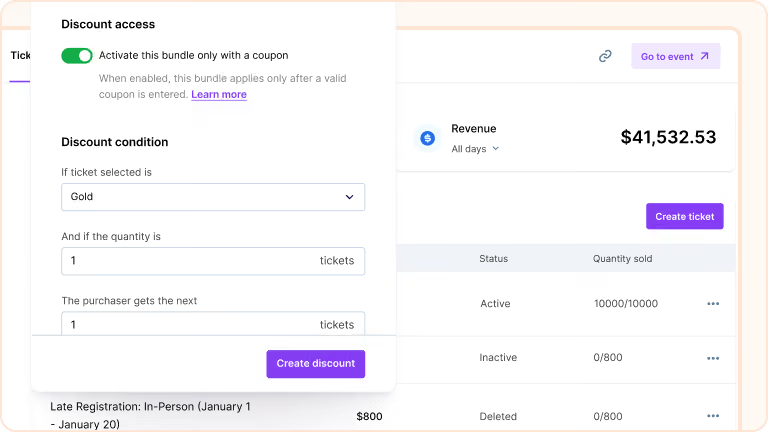
Tie a bundle discount to a coupon so it activates only when the code is entered. Create a B1G1 offer on Gold tickets, link it to a coupon, cap it at 100 free tickets, and the bundle stays invisible until the right person uses the code.

Session-level calendar invites
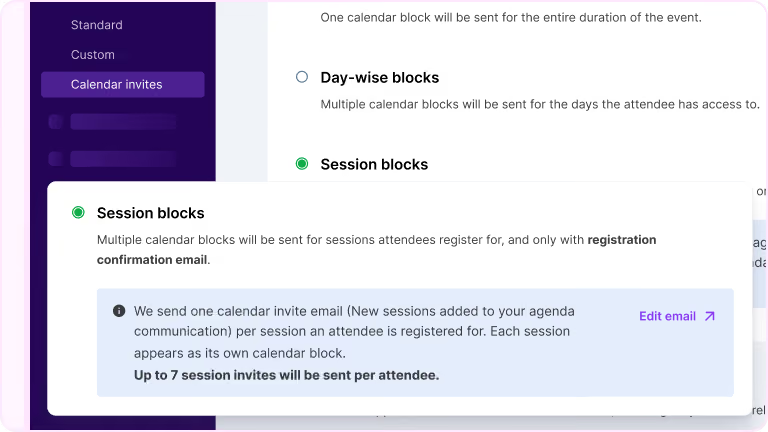
Session-level calendar invites are sent after registration confirmation and stay in sync if session details change. Organizers customize the title, description, timing, and location for each.
BCC on event emails for internal stakeholders
BCC support for event emails lets organizers include internal recipients on any attendee communication. Recipients get an exact copy and stay hidden from attendees, configured at the email level.

Bulk registration approval via CSV
Download pending requests as a CSV, process approval decisions in a spreadsheet, and re-upload for processing. All requests, Pending, Approved, and Rejected, export in a single file.

Custom payment gateways at the org level
Connect external providers like Bluesnap, Klarna, Adyen, Braintree, Razorpay, or Shift4 at the org level. Once configured, they behave like native payment options inside events.

Brand your widgets with a prompt
Describe the look you want in a sentence. Sidekick writes production-ready CSS and applies it across every event widget at once. Registration, agenda, speakers, sessions, all styled together.

Custom validation rules on registration forms
Email validation runs through ZeroBounce, Kickbox, or NeverBounce, and disposable or risky domains are blocked on submission. API-based logic enforces business-specific rules with custom error messages. Set the rules once at the org level and they apply to every form.

Third-party apps embedded in the webinar panel
Custom Apps lets you embed third-party iframes into the webinar engagement panel. Attendees interact with surveys, calculators, or external tools without leaving the session.

Merge tags in calendar invites
Customize event name and location in calendar blocks using merge tags: {{event_name}}, {{event_start_date}}, {{event_venue}}, {{event_url}}, and more. Virtual events include the event link with a secure magic token.

Field slugs that lock after publish
Set a field's ID (slug) before the registration flow is published. Once published, the ID locks to keep integrations and mappings stable. Field IDs must be unique across the event, and mandatory fields keep their fixed IDs.
